
Vandaag of morgen in huis

Kwaliteit gegarandeerd

Welkomstaanbiedingen ontgrendelen: GRATIS bezorging | Tot 80% korting | Gratis 30 dagen JoyPlus-proefperiode
Download de app
A US QWERTY keyboard can be useful for programming, gaming, working with international software or using an American laptop layout. However, the range can be more complicated than it first appears. A keyboard may be marketed as “gaming” even though it uses membrane keys. Photos may also show an American layout while the product title refers to a different variant.
As a Joybuy Product Recommendation Officer, I filter the most important product specifications so you can rely less on marketing copy. Below, you’ll find out which pitfalls to avoid and which models suit different use cases.
QWERTY refers to the key sequence, but several variants exist. Look specifically for US English, US International or ANSI US. A Belgian AZERTY model or another ISO layout has a different key shape and punctuation placement.
Also check the keyboard language in Windows or macOS. A physical US QWERTY keyboard only behaves predictably when the software setting matches the legends printed on the keys.
Some models use membrane keys with a mechanical feel. This does not mean you get mechanical switches, hot-swappable components or the same responsiveness as with a genuine mechanical keyboard. Check the specifications for “mechanical”, “membrane” or “scissor”.
A mechanical model can be suitable for intensive typing and gaming, but it is often noisier and generally costs more. A quiet membrane or scissor keyboard is a better choice for a shared workspace.
A 60% keyboard saves a great deal of space, but usually lacks the function row, arrow keys and numeric keypad. With a TKL keyboard, the main feature removed is the numeric keypad, while the arrow and function keys remain. A 75% keyboard often provides a compromise, with arrow keys and a compact function row.
If you enter lots of figures, you may prefer a full-size keyboard or one with a numeric keypad. Measure your desk before ordering; the dimensions and cable exit can affect the amount of space available for your mouse.
Look for the following information:
A keyboard for PC and Mac may work physically with both systems, but multimedia and function keys may behave differently.
A mechanical switch can be linear, tactile or clicky. Linear switches generally offer a consistent keystroke, while clicky switches produce a distinct clicking sound. The exact experience depends on the switch type, keycaps and case.
For the office, home working or a shared space, a quiet keyboard with scissor or membrane keys is often more practical. Product descriptions sometimes use terms such as “almost silent”. Treat this as a description from the brand rather than a universal guarantee for every person or environment.
A wired keyboard connected via USB has no battery and is ready to use as long as your device has a suitable port. A wireless keyboard works via Bluetooth, a USB receiver or both. Check:
An RGB keyboard may offer per-key lighting or just fixed colour modes. “RGB” therefore does not automatically mean that every key can be programmed individually.
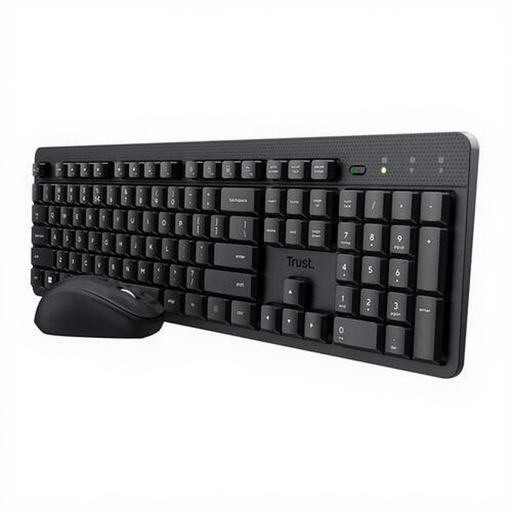
Why it suits this profile: This wireless set has a US QWERTY layout, quiet low-profile keys and a mouse. That makes it suitable for simple home workspaces and students who don’t want to choose separate accessories.
The specifications explicitly state US QWERTY, membrane keys and a single USB receiver. You therefore won’t expect mechanical switches or RGB features that aren’t included.
Wireless RF connection, numeric keypad, multimedia functions and compatibility with Windows, macOS, Linux and Chrome OS.
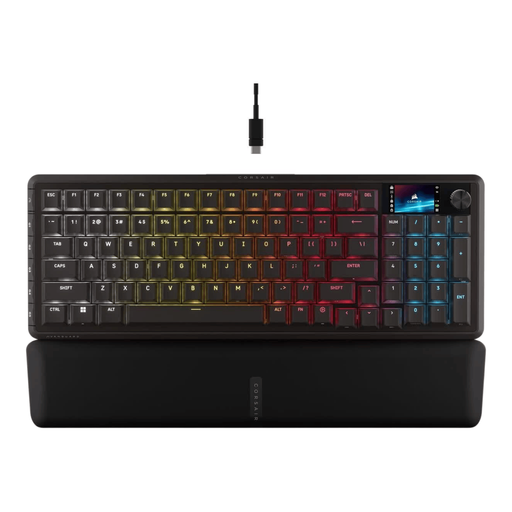
Why it suits this profile: The 96% layout keeps the numeric keypad while offering features for gaming and multitasking, including multiple connection options, per-key RGB and programmable controls.
The product details list US ANSI QWERTY, 2.4GHz, Bluetooth and USB-C separately. Hot-swappable support and the presence of the numeric keypad are also clearly stated.
96% format, 3-pin and 5-pin hot-swap, USB, Bluetooth and RF connectivity, programmable RGB lighting and a rotary dial.
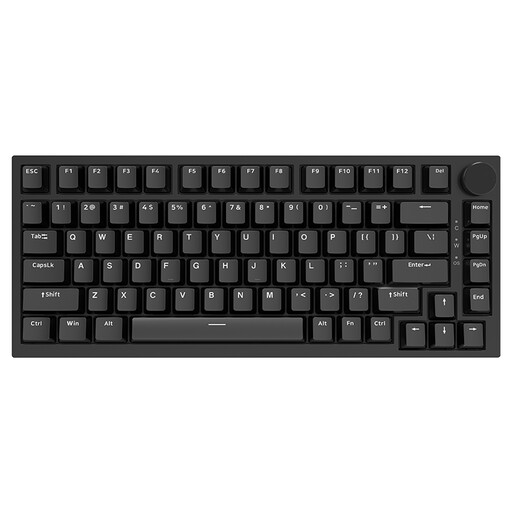
Why it suits this profile: This compact 75% model is designed for users who want to combine mechanical keys and extra mouse space with arrow keys, function keys and a volume dial.
The specifications state a 75% layout, wired Type-C connection, hot-swappable 3-pin and 5-pin PCB and PBT keycaps. The product information specifies red linear switches.
82 keys, gasket construction, volume dial, PBT keycaps and RGB lighting with multiple modes.
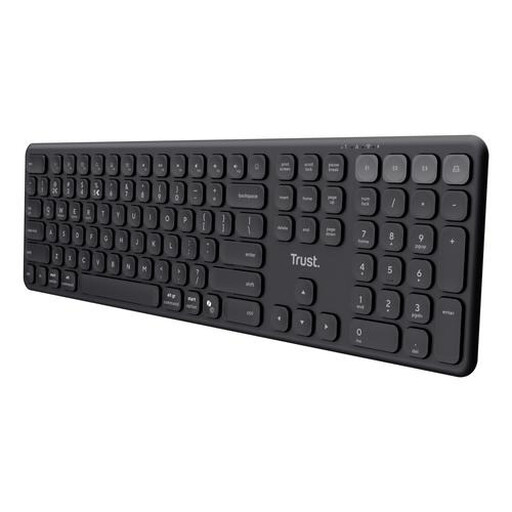
Why it suits this profile: The full-size layout with numeric keypad and support for four devices is ideal for flexible workers switching between a laptop, tablet and smartphone.
This is not a disguised gaming model: the product information specifies scissor keys, no lighting and no mechanical switches. This makes expectations clear.
USB receiver plus three Bluetooth channels, rechargeable battery, full-size design and compatibility with Windows, macOS, iOS and Android.
We’ve put together a complete, up-to-date list of products that fully meet these strict selection criteria and the applicable European safety regulations.
Yes, usually. Set the correct keyboard layout in Windows or macOS. For example, choose US International if you want to type accents easily. When buying, also check whether the keyboard uses USB, Bluetooth or a USB receiver.
A wired mechanical keyboard has no battery and draws power via USB while you type. With a wireless model, you’ll need to allow for charging or batteries. A hot-swappable keyboard can be practical in the long term, as you can replace compatible switches without immediately replacing the entire keyboard. Always check whether it supports the 3-pin or 5-pin variant.
For office work involving lots of figures, full-size is usually practical. For gaming, TKL provides extra mouse space without removing the arrow and function keys. A 75% model is suitable if you want a more compact setup, while a 60% model is especially appealing when minimal desk space and portability are your priorities.
