
Vandaag of morgen in huis

Kwaliteit gegarandeerd

Welkomstaanbiedingen ontgrendelen: GRATIS bezorging | Tot 80% korting | Gratis 30 dagen JoyPlus-proefperiode
Download de app
Attaching a videobar to a TV or monitor might seem straightforward. In practice, problems often only appear after installation: the bracket doesn't fit the VESA pattern, the camera sits too low, or the soundbar blocks a sensor. For meeting rooms, schools, healthcare facilities and home offices, this can lead to extra installation work and unnecessary costs.
A universal videobar mount is therefore not automatically suitable for every screen or every videobar. Before you buy, check at least the connection, the weight and the desired position. Below are the key points to consider, along with some suitable options based on verifiable product specifications.
A universal mount usually works within certain limits. Think of a VESA range, screen size, weight capacity and available screw holes. A VESA videobar mount might, for example, be suitable for patterns from 200 × 200 to 800 × 600 mm, but not for a screen without a VESA connection.
So check:
A videobar weighing less than 10 kg may fall within the load capacity, but the entire structure also needs to be stable. It's about the combination of screen, wall or floor bracket, videobar mount and cables.
When mounting on a wall, the installer must also consider the type of surface. Concrete, brick and plasterboard each require suitable wall plugs or fixing materials. The product specification of the mount does not replace an assessment of the wall.
A camera or videobar can be placed above or below a screen. This isn't equally straightforward with every bracket. A fixed videobar wall mount may offer little room for height adjustment, whereas an adjustable videobar mount is more practical if the camera needs to be exactly at eye level.
Also pay attention to:
VESA refers to the horizontal and vertical distance between the mounting holes on the back of the screen. Measure both distances in millimetres. A mount with a range of 200 × 200 to 800 × 600 mm offers more flexibility than a model designed for just one or two patterns.
For a videobar mount for a TV, it's also important whether the mount continues to cover the existing VESA holes without putting the TV bracket under incorrect strain.
Choose a weight capacity that is comfortably above the weight of your videobar. The Neomounts models in this selection state a maximum load of 10 kg. That is a manufacturer's product specification; always check the actual weight of your device and the installation instructions.
For some mobile floor or wall setups, a separate maximum applies per platform. A videobar mount for a Logitech Rally Bar may therefore have different requirements than a simple soundbar mount for a small monitor.
Height adjustment helps to align the videobar above or below the screen. Depth adjustment is useful when the soundbar has different dimensions or when the speaker must not rest against the screen.
Also check whether the mount:
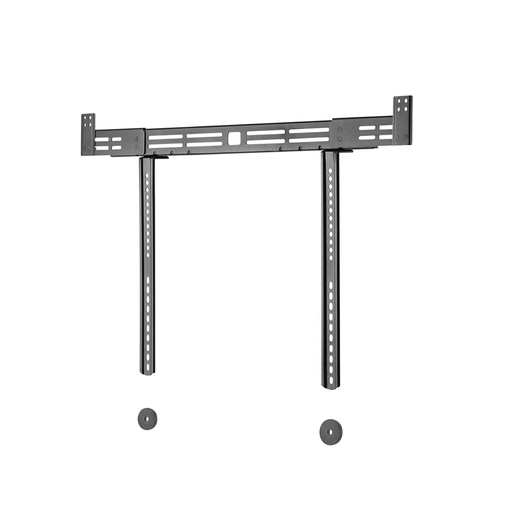
Why this fits the profile: This compact mount is designed for screen mounting with VESA holes and offers a practical solution for a videobar or soundbar above or below the screen.
The product specification states an adjustable depth of 0 to 4.2 cm and height adjustment. This gives you more room to fine-tune the position than with a completely fixed bracket.
Maximum load capacity of 10 kg, adjustable width and mounting via VESA holes.
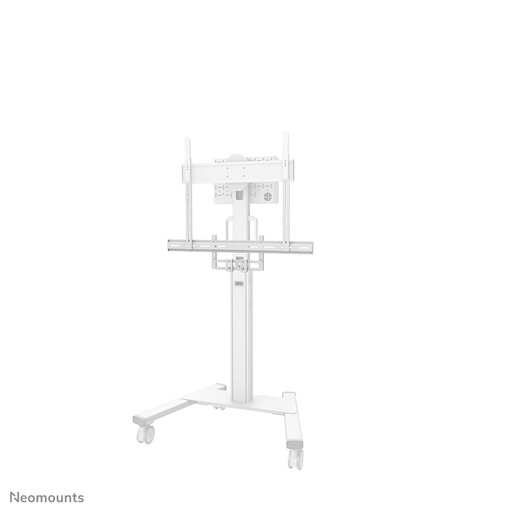
Why this fits the profile: For large screens in meeting rooms, the wide size range is practical. According to the product information, this model is intended for screens from 43 to 110 inches.
The VESA frame is adjustable in width and height, and the videobar support can be placed above or below the screen. This reduces the risk of incorrect alignment.
VESA 200 × 200 to 800 × 600 mm, maximum 10 kg and includes alignment aid according to the product description.
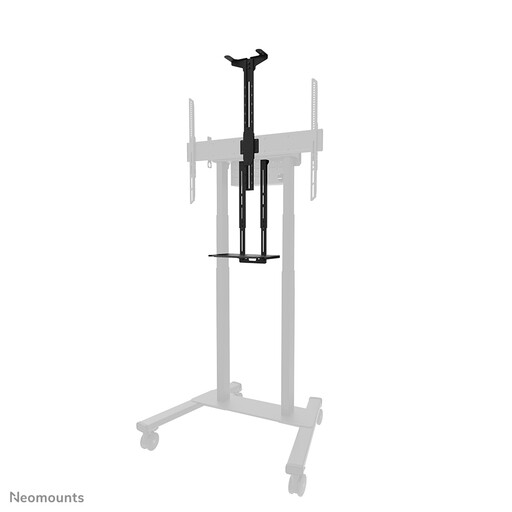
Why this fits the profile: This kit is intended for specific Neomounts FL55-875BL1 and WL55-875BL1 mounts and, according to the product information, includes adapters for Logitech Rally Bar and Rally Bar Mini.
The compatibility with the underlying floor or wall mount is clearly described. Check that combination before you order; this is not a standalone VESA mount for every screen.
Suitable for camera and multimedia platforms, height-adjustable camera shelf and maximum 9 kg load capacity.
We've put together a complete, up-to-date list of products that fully meet these strict selection criteria and comply with current European safety regulations.
So use universal videobar mount primarily as a practical description, not as a guarantee that every device will fit. A correct match between VESA size, weight capacity, screen size and mounting position determines whether the installation is safe and usable.
That depends on the model. Some mounts are designed for only one position. The Neomounts AWL29-750BL1 and AV2-500WH state mounting above and below the screen, with height adjustment. Always check whether the chosen position suits the camera and microphone setup.
No. Check the dimensions, weight and fixing method. The Neomounts AFL-875BL1 states an adapter for Logitech Rally Bar and Rally Bar Mini, but this kit is intended for specific FL55-875BL1 and WL55-875BL1 mounts.
The lifespan depends on the material, load, installation quality and usage. A steel mount can remain stable when used within its specified load and checked regularly for loose screws. Also follow the manufacturer's warranty and maintenance information.
