
Mixer working with multiple project versions
Wants to arrange the timeline, mixer or reference windows clearly when working on an acoustic recording.


A 34-inch ultrawide is a good fit if you want more horizontal space for your timeline and side-by-side windows while mixing. A 27-inch 4K screen may suit you better if you’re looking for a more compact display and a detailed view of individual windows. Measure your workspace and check the video connection, any USB-C power delivery and the monitor’s adjustability. A computer monitor won’t change how your mix sounds.
Wants to arrange the timeline, mixer or reference windows clearly when working on an acoustic recording.
Wants a clear DAW display and is weighing screen size and resolution against the space available.
Wants to check that the monitor connection suits the laptop’s video connection and any power requirements.
A good fit if: you want more horizontal space for the DAW timeline and side-by-side windows while editing.
Bear in mind: measure your desk to check the screen will fit, and make sure your computer can handle the desired resolution through your chosen connection. Extra screen space won’t open or synchronise project versions for you.
A good fit if: you’re looking for a more compact screen that lets you view individual DAW windows in detail.
Bear in mind: there’s less physical width for side-by-side windows than on a 34-inch ultrawide. Check that your DAW remains easy to read at your preferred scaling setting.
A good fit if: you mainly switch between project views and want to check first whether your DAW can arrange or save those windows.
Bear in mind: switching between layouts won’t show you all the windows at once. Logic Pro, for example, supports saved window layouts; check what your own DAW can do.
When comparing screens for DAW work, visibility, readability, connections and your physical setup can all be deciding factors. Avid describes separate editing and mixing views; the exact layout depends on the DAW you use.
| What to consider | What should you check? | Who should pay particular attention? |
|---|---|---|
| Viewing the timeline and windows | Compare the physical width, aspect ratio and resolution with the windows you want to view at the same time. | If I want to arrange the timeline, mixer and project windows side by side, I focus on horizontal workspace. Around 40% of shoppers prioritise an uncluttered overview. |
| Reading fine detail | Consider screen size and resolution together, and check the DAW display using your computer’s scaling setting. | If I want small controls and details to be easy to read, I take screen size and scaling into account. Around 30% of shoppers prioritise clear detail. |
| Connecting to your computer | Check the video output and cable. If using USB-C power delivery, compare the required charging wattage with the specification for the exact model. | If I want to connect my laptop using a single connection, I check that the video and any power delivery suit my laptop. Around 20% of shoppers prioritise a suitable connection. |
| Fitting your workspace | Measure your desk and viewing distance, and check the stand’s adjustment options and any reflections. | If I want to put the screen on my existing desk, I consider the space available and the adjustment options. Around 10% of shoppers want to make sure it fits their workspace. |
A computer screen helps you arrange DAW windows, but its specifications say nothing about how your mix sounds.
First decide whether you want to improve your visual overview or assess the sound.
More screen space is not the same as DAW features for opening, arranging or comparing projects.
Check how your DAW handles windows and projects before choosing a wider screen solely to compare versions.
The USB-C power output varies by model and needs to meet your laptop’s requirements.
Compare the required charging wattage with the specifications for the exact monitor model, and check the video connection too.
If the power output isn’t enough, you may still need a separate laptop charger.
The E Line 346E2CUAE/00 is a curved 34-inch ultrawide option if you want to arrange windows side by side.
The 34WR55QC-B is a 34-inch ultrawide with an adjustable stand.
The Pro 27 Plus P2725QE is a 27-inch 4K USB-C hub monitor for anyone looking for a more compact screen with hub features.
The PD2705U is a 27-inch 4K monitor and an alternative to an ultrawide DAW screen.
These Joybuy products are 34-inch ultrawide monitors for anyone looking for extra horizontal space for their DAW timeline and windows.
 Image unavailable
The 34-inch 21:9 screen is an option if you want to arrange DAW windows side by side; measure the available desk space first.
WQHD, VA, 1800R curvature and 120 Hz.
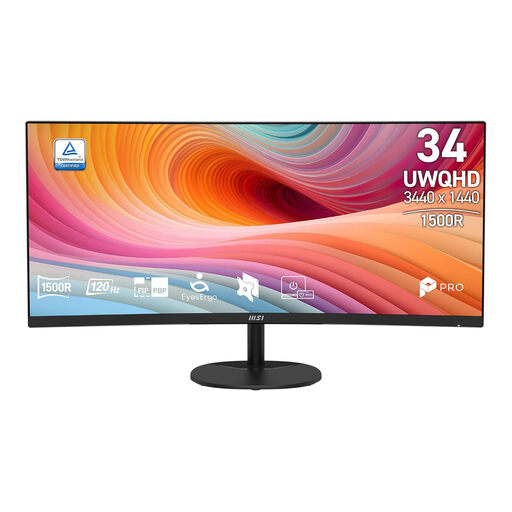 Image unavailable
The 34-inch 21:9 format suits anyone looking for extra horizontal space for multiple windows; check that the curved screen works with your setup.
UWQHD, VA, curved screen and 120 Hz.
 Image unavailable
An option for anyone looking for a wide DAW workspace who values height and tilt adjustment.
3440 × 1440 pixels and a 21:9 aspect ratio. Picture-by-Picture can show two device sources at once; it won’t automatically open or synchronise multiple DAW project versions.
 Image unavailable
The ultrawide aspect ratio is useful if you want to view your timeline and other windows side by side; the adjustable stand lets you change the screen position.
3440 × 1440 pixels. The stated maximum refresh rate varies by connection: 175 Hz via DisplayPort and 100 Hz via HDMI.
 Image unavailable
This extra-wide screen is an option if you’re looking for plenty of horizontal space; check that your desk or mount can support it.
32:9, 5120 × 1440 pixels, 165 Hz, 1500R VA panel and height adjustment. The product description states that the desk or mount must support at least 15 kg.
Not on the basis of the screen specifications. A larger screen can give you more room for DAW windows, but assess the sound separately using your listening setup. Avid describes an editing window for the timeline and a mixing window for channel controls.
No, not automatically: the screen provides workspace, while opening and arranging projects depends on your DAW. Logic Pro, for example, supports saved window layouts, but that doesn’t mean multiple projects will automatically be synchronised and displayed at once.
Check that the height adjustment and viewing position suit your workspace, and watch out for reflections. Arboportaal describes requirements for employees’ workstations when they use a screen for more than two hours a day; this isn’t a universal purchasing requirement for every private buyer.
No. ACM ConsuWijzer explains that your statutory guarantee depends on what you could reasonably expect from the product. If a product breaks too soon under normal use, the seller must provide an appropriate solution free of charge; a separate manufacturer’s guarantee doesn’t replace this right.