What should you look for?
Start with the aspect ratio and the space available on your desk. Then check the refresh rate for each connection, and how to connect your headset and any microphone.
| What to consider |
What should you check? |
Who is this important for? |
| Cockpit view and space |
Aspect ratio and game support; screen and stand dimensions. |
Do you mainly want a wide cockpit view when docking, and will a large screen fit on your desk? Around 36% of consumers in this buying context put cockpit visibility first. |
| Smooth movement |
Refresh rate at your preferred resolution for each input; PC or console output. |
If you want to manoeuvre smoothly, check what your device can output through the connection you’ve chosen. Around 29% of consumers give achievable refresh rates top priority. |
| Headset and microphone |
Whether the monitor outputs audio; where to connect a microphone in your setup. |
If you want to listen and speak while playing, you need to know whether the microphone connects through the monitor or directly to your device. Around 21% of consumers prioritise a headset connection and microphone use. |
| Purchase, maintenance and use |
Current price of the model, model-specific maintenance instructions and EU energy label. |
If you want to consider purchase price, maintenance and energy use as well as picture specifications, compare this information for the specific models. Around 14% of consumers give these costs and maintenance top priority. |
Joybuy monitors for a wider gaming view
These Joybuy products are 34-inch 21:9 monitors for anyone considering a wider gaming view. Check whether your game supports this aspect ratio and whether the connections are compatible with your PC or console.
 No image available
LG UltraWide 34U601B-B, WQHD VA, 120 Hz, 34 inches
A 34-inch 21:9 screen to consider if your game supports a wider view.
The product information lists 3440 × 1440, 120 Hz, a VA panel and 1800R curvature.
View at Joybuy
 No image available
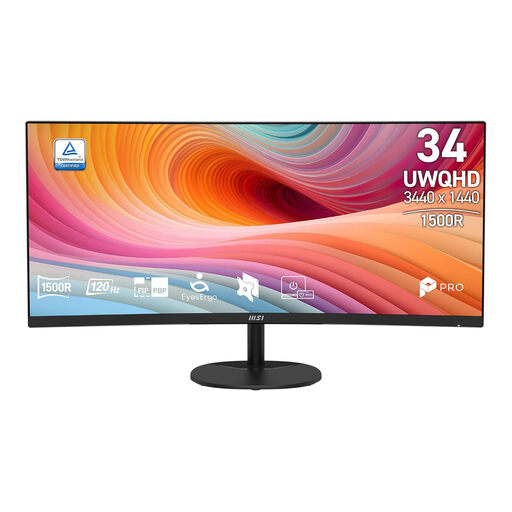
MSI Pro MP341CQ E12, UWQHD, 120 Hz, 34 inches
A curved 34-inch ultrawide to compare if your game displays 21:9 well.
The product information lists 3440 × 1440, 120 Hz and a VA panel.
View at Joybuy
 No image available
Gawfolk 34-inch curved UWQHD monitor, 144 Hz
A wide monitor to consider if your game supports 21:9 and you’re looking for a curved screen.
The product information lists 3440 × 1440, 144 Hz, 1500R curvature and a Fast VA panel.
View at Joybuy
 No image available
LG UltraWide 34U640B-B, WQHD, 144 Hz, 34 inches
An ultrawide option with a headphone output, if your game supports 21:9 and you want audio to come through the monitor.
The product information lists 3440 × 1440, 144 Hz and USB-C with 65 W Power Delivery. It also mentions a headphone output; check separately how to connect your headset microphone.
View at Joybuy
 No image available
Gawfolk GF340C-H, UWQHD, 165 Hz, 34 inches
A 34-inch ultrawide to consider if your game supports the 21:9 format.
The product information lists 3440 × 1440, 165 Hz, 1500R curvature, a VA panel and DisplayPort.
View at Joybuy
Frequently asked questions
Does a monitor’s headphone output also carry my microphone signal?
Not unless this is confirmed for the exact model. MSI lists a headphone output for the MAG 342CQR E2; Dell Support describes the headphone port on its gaming monitors as an audio output only in its FAQ. Check whether you need to connect the microphone directly to your PC or console.
Why can’t I get the stated maximum refresh rate via HDMI?
The maximum refresh rate can vary by input. For the MAG 342CQR E2 at 3440 × 1440, MSI specifies up to 180 Hz via DisplayPort and up to 100 Hz via HDMI 2.0b. Also check which output your device supports.
What should I check during setup and maintenance?
Once connected, check which resolution and refresh rate are available through your chosen input. For an OLED monitor, follow the maintenance instructions for the exact model; Dell Support describes pixel and panel refresh, but the manual for your model remains the definitive guide.
If I buy a monitor online in the Netherlands, do I have a cooling-off period and a guarantee?
According to the Dutch Government, distance purchases often come with a 14-day cooling-off period, although not every online transaction is covered. Faulty products are covered by statutory guarantees, which have no fixed legal time limit in the Netherlands. An additional warranty does not replace these statutory rights.
How can I compare monitors’ energy use?
Check the EU energy label and product information sheet for the specific models. The European Commission lists an efficiency scale from A to G for computer monitors. The label rating alone doesn’t calculate your annual electricity costs.


