What should you consider when choosing?
First decide whether side visibility with three screens or a wide view on a single panel matters more to you. Then check the available space, compatibility with your simulator and PC, and, for OLED, how you use fixed racing information.
| Concern |
What should you check? |
Who is this most relevant to? |
| Side visibility |
Check whether your simulator supports three screens and what resolutions the setup requires. iRacing Support describes several configuration methods and recommends using the same resolution across the screens in the setup it covers. |
I want to be able to see alongside the car while racing, and I have room for three panels. Around 40% of consumers give side visibility top priority. |
| Wide view on one screen |
Compare the aspect ratio and physical dimensions of the exact model with the space and connections in your gaming room. |
I want a wide cockpit view without setting up three separate panels. Around 30% of consumers prioritise a single wide screen. |
| Fixed racing interface |
For OLED, check the care instructions for the exact model and consider any HUD elements that remain visible for long periods. Samsung warns that static images on OLED monitors can cause burn-in. |
I’ll base my choice on how an OLED panel handles racing information that stays in the same place during long stints. Around 20% of consumers consider this their main deciding factor. |
| Graphics load and connections |
Check your graphics card outputs, supported resolutions and simulator settings. A monitor’s maximum Hz rating doesn’t tell you how many frames your own PC can produce in the game. |
I want to know in advance whether my PC can handle my chosen screen layout and settings. Around 10% of consumers put this above their other buying considerations. |
Joybuy monitors for sim racing
These monitors are options for a possible triple-screen LCD setup or a single wide ultrawide screen. With OLED models, a fixed racing interface is also worth considering during long sessions.
 Image unavailable
AOC Q27G42XNE 27-inch QHD monitor
Could be considered as one panel in a three-screen setup; check that your simulator and graphics card support the configuration.
2560 × 1440; 180 Hz; FreeSync Premium; HDR10; 2× HDMI 2.0 and 1× DisplayPort 1.4.
View at Joybuy
 Image unavailable
CRUA 49-inch 32:9 curved ultrawide gaming monitor
An option if you want a single, very wide panel; check in advance that it will fit in your gaming room.
5120 × 1440; 165 Hz; VA panel; 1500R curvature; FreeSync.
View at Joybuy
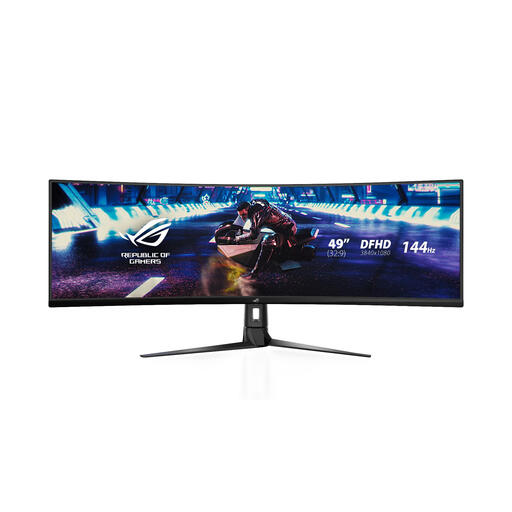 Image unavailable
ASUS ROG Strix XG49VQ 49-inch ultrawide monitor
An option for a single wide panel; check that your simulator supports the display mode you want.
3840 × 1080; 144 Hz; VA LCD panel; FreeSync 2 HDR.
View at Joybuy
 Image unavailable
Philips Evnia 34-inch UWQHD curved gaming monitor
Worth considering if you want one ultrawide panel instead of three separate screens.
3440 × 1440; 180 Hz; VA panel; Adaptive Sync.
View at Joybuy
 Image unavailable
Philips Evnia 49M2C8900/00 49-inch QD-OLED monitor
An ultrawide OLED option if you’re considering this panel type; for long stints with a fixed HUD, bear in mind the warning about static images being displayed for extended periods.
5120 × 1440; 240 Hz; QD-OLED; FreeSync Premium Pro.
View at Joybuy
Frequently asked questions
Can I use three monitors without NVIDIA Surround or AMD Eyefinity?
For iRacing, iRacing Support also describes stretching a window across three monitors. This doesn’t automatically apply to other simulators, so check your own game’s display settings.
Do three monitors need to be identical?
For iRacing with AMD Eyefinity, iRacing Support recommends using the same resolution as a starting point; using the same brand and model is recommended, but not required. Also check that the screens work well together in your setup.
What should I consider when using an OLED monitor with a fixed racing HUD?
A HUD that stays in the same place for a long time is something to consider with OLED. Samsung warns that static images displayed for extended periods can cause burn-in and describes care features for its OLED monitors. For other models, follow the instructions provided with them.
Who should I contact in the Netherlands if my monitor is faulty?
Contact the seller; according to the Dutch government, they must provide a solution if a product is faulty. The Netherlands has no fixed statutory guarantee period, and a manufacturer’s guarantee is in addition to your statutory rights.
Do I have a cooling-off period if I buy a monitor online?
According to the Dutch government, in many cases you have 14 days to change your mind when buying online from a business. Purchases from private individuals aren’t covered by the distance-selling rules.


