Who is this buying guide for?

Laptop user with few power sockets

Wants to build a photo gallery without plugging in a separate laptop charger and dock as well, where possible. Check that the laptop is compatible and that the USB-C charging capacity is sufficient. BenQ, Dell and LG list these features for specific models.

Photo editor who assesses colour

Wants to select and edit photos with colour gamut, colour modes and screen uniformity in mind, not just screen width. BenQ describes these features for the PD3420Q and distinguishes it from its PhotoVue range for photographers.

Gallery builder with two computers

Wants to view photos, files and management software side by side, and may want to share peripherals between computers. Philips lists a KVM switch for the 34B2U5600C/00.

What should you look for when buying?

Ultrawide with specified colour features

Choose this option: if you also assess or edit photos and colour reproduction matters.

Trade-off: the BenQ PD3420Q lists up to 65 W USB-C power delivery. That may not be enough for every laptop, and P3 coverage does not guarantee suitability for every print workflow.

Ultrawide with a USB-C or Thunderbolt hub

Choose this option: if a single connection for video, data and laptop charging matters.

Trade-off: your laptop must support the chosen video connection, and the power supplied must meet its charging needs. Other devices may need their own power supply.

Ultrawide with KVM

Choose this option: if you work with two computers and want to share peripherals.

Trade-off: Philips says the 34B2U5600C/00 has a VA panel; the specifications given do not show an advantage over colour-focused IPS models for colour-critical work.

Concern What to look for when buying Who is this important for?
Fewer plugs and cables Check for USB-C or Thunderbolt video, the charging capacity required, the monitor’s power supply and the cable included. If I want to do without a separate laptop charger, I check that my laptop can output video through the chosen connection and receives enough power. Around 36% of consumers prioritise needing fewer plugs.
Assessing the colour of photos Compare colour modes, stated sRGB or P3 coverage and uniformity features. Separately decide whether you need Adobe RGB or print proofing. Anyone looking to assess or edit photos should consider more than just screen width and match the colour gamut to their workflow. Around 29% of consumers prioritise colour assessment.
Space for photos and controls Check the resolution, physical width and whether the KVM and video connections you need are available. If I want to view photos and control windows side by side, or switch between two computers, screen space and connections matter. Around 21% of consumers prioritise this kind of workspace.
Power consumption during extended use Check the EU energy label or EPREL record for the exact model and compare consumption under the same conditions, such as SDR with SDR. Anyone using their monitor for long periods can consider energy use alongside connectivity and colour features. Around 14% of consumers give this top priority.

Common pitfalls

  • Assuming every USB-C port supports video and supplies enough power

    USB-C power delivery only helps if your laptop supports video through the chosen connection and the charging capacity is sufficient. Otherwise, you may still need a separate charger or dock.

    Compare your laptop’s video and charging requirements with the connection and stated power capacity of the exact monitor model.

  • Assuming a wide colour gamut guarantees accurate prints

    Stated sRGB or P3 coverage alone does not prove that a monitor is suitable for every print workflow. BenQ distinguishes the ultrawide PD3420Q from its separate PhotoVue range, which has print-focused features.

    First decide whether your gallery will mainly be viewed digitally or whether print proofing matters. Then compare the colour gamut and features that suit your workflow.

    Print proofing may require additional colour calibration or a different type of photo monitor.

  • Using extra extension leads to make up for too few connections

    Overloading extension leads or connecting them to one another can create a fire risk. A monitor with USB-C power delivery still needs its own mains connection.

    The Fire Service advises allowing devices to dissipate heat, avoiding damaged extension leads and not connecting them to one another without good reason. If in doubt, have the power supply checked.

Brands to consider

BenQ

The PD3420Q is an ultrawide model with specified features for colour assessment; the PhotoVue range is a separate product line for photographers.

  • BenQ lists 100% sRGB, 98% P3, uniformity technology, KVM and 65 W USB-C power delivery for the PD3420Q.
  • The stated colour gamut is not an independent colour measurement, and 65 W will not necessarily be enough for every laptop.

Dell

The UltraSharp U3425WE is a 34.1-inch ultrawide hub monitor for a laptop workspace.

  • Dell lists a 3440 × 1440 resolution, IPS Black, an integrated hub and 90 W power delivery.
  • Check that the connection and power capacity suit your laptop; the specifications are not an independent assessment of photo colour reproduction.

LG

According to LG, the business ultrawide 34BA85QE-B combines an IPS screen with USB-C and RJ45.

  • LG lists 3440 × 1440, 99% sRGB (typical) and 90 W USB-C Power Delivery.
  • A typical manufacturer’s specification is not an individual colour measurement; check the exact variant and compatibility with your laptop.

Philips

The Curved Business 34B2U5600C/00 is designed for a multi-source workspace, with KVM and USB-C to RJ45.

  • Philips lists a 3440 × 1440 resolution and a VA panel.
  • The product specifications do not support giving it precedence for colour-critical photo editing over the colour-focused models mentioned above.

Joybuy product picks

These Joybuy product picks focus on a wide workspace for selecting photos and viewing other windows. For each model, check that the connections and any USB-C power delivery are suitable for your laptop.

Dell Pro P3426WEV 34.1-inch curved WQHD IPS USB-C hub monitor

Dell Pro P3426WEV

Suited to anyone looking for a spacious laptop workspace and wanting USB-C power delivery to work with a compatible laptop.

34.1-inch curved IPS screen; 3440 × 1440; 21:9; 100 Hz; 99% sRGB.

USB-C with DisplayPort Alt Mode and up to 90 W Power Delivery; integrated hub, KVM and RJ45.

Whether USB-C can replace your laptop charger depends on your laptop’s video and charging support.

View at Joybuy

Dell Pro P3426WEB 34-inch USB-C hub and conference monitor

Dell Pro P3426WEB

Suited to anyone looking for an ultrawide workspace with hub features and who may want to replace their laptop charger using USB-C.

34-inch curved IPS ultrawide; 3440 × 1440; 21:9; 100 Hz; 99% sRGB.

Up to 90 W USB-C Power Delivery; built-in webcam, microphone, speakers, USB hub, RJ45 and KVM.

Your laptop must support USB-C video and the charging capacity you need.

View at Joybuy
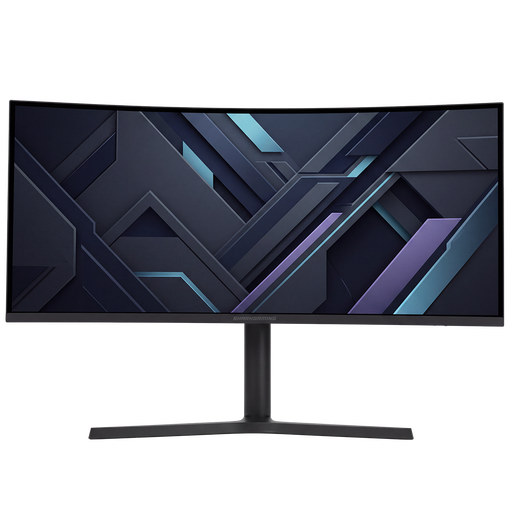
Shark Gaming 34-inch UWQHD gaming monitor

Shark Gaming 34-inch UWQHD

Suited to anyone looking for a wide screen to view photos and control windows side by side.

34-inch curved VA screen; 21:9; 3440 × 1440; 3000:1 contrast ratio; supports 16.7 million colours.

The stand is height-adjustable and can tilt and swivel. Before buying, check that the connections meet your laptop’s needs.

View at Joybuy

LG UltraGear 34GX900A-B 34-inch curved WQHD OLED monitor

LG UltraGear 34GX900A-B

Suited to anyone looking for a spacious workspace and a stated DCI-P3 colour gamut, with USB-C for a compatible laptop.

34-inch curved OLED screen; 3440 × 1440; 21:9; stated 98.5% DCI-P3.

USB-C supports video and data and delivers up to 65 W Power Delivery; the USB hub has two downstream ports.

65 W will not necessarily be enough to charge every laptop.

View at Joybuy

Philips Evnia 49M2C8900/00 49-inch DQHD QD-OLED monitor

Philips Evnia 49M2C8900/00

Suited to anyone looking for extra horizontal space for a photo gallery and other windows.

49-inch curved QD-OLED screen; 32:9; 5120 × 1440; 240 Hz.

According to the safety information, two people are needed to lift, move or install the monitor.

View at Joybuy

Frequently asked questions

Can USB-C free up a power socket?

You may be able to do without a separate laptop charger, but the monitor still needs to be plugged into the mains. BenQ lists 65 W for the PD3420Q; Dell and LG specify 90 W for the models discussed. This only works if your laptop can output video through that connection and charge at the power available.

How can I connect equipment safely when there are few power sockets?

Allow devices to dissipate heat, don’t use damaged extension leads and don’t connect extension leads to one another without good reason. The Fire Service warns that overloading can create a fire risk. USB-C power delivery does not remove the need to keep an eye on the total load on your power supply.

How do I compare monitor energy use?

Compare the energy label and model details in EPREL for the same usage scenario. Normal, maximum, SDR and HDR consumption figures are not directly comparable; annual costs also depend on hours of use and your electricity tariff.

What rights do I have when buying a monitor online in the Netherlands?

For a standard online consumer purchase, you generally have a 14-day cooling-off period after delivery, with some exceptions. You are also covered by the statutory guarantee if the product does not perform as you could reasonably expect under normal use. ACM ConsuWijzer says the retailer must put this right; a manufacturer’s guarantee does not automatically limit your statutory rights.

Does a monitor need an energy label in the Netherlands?

According to the European Commission, electronic displays, including computer monitors, are covered by energy labelling rules with a scale from A to G; some exceptions also apply. Check the label and EPREL record for the specific model.
