
People comparing UVs and 3D
If you assess the texture and the result on the model at the same time, a layout that gives both views enough space and visible detail can make all the difference.


An ultrawide monitor is a good fit if you want to view a UV texture, 3D preview and tools side by side on one computer. Focus on usable resolution and suitable colour reproduction, not just screen width. Keep two physical monitors if you need two independent displays, and choose Picture-by-Picture (PBP) only if you want to show images from two computers on one monitor at the same time. A different monitor won’t fix errors along UV edges, so check these in your software too.
If you assess the texture and the result on the model at the same time, a layout that gives both views enough space and visible detail can make all the difference.
If you compare colours on either side of a seam, pay attention to colour mode and colour management. A factory claim doesn’t automatically tell you how your individual monitor performs now.
If you want to view images from two computers at once, distinguish PBP from arranging two windows side by side on one computer.
A good fit if: you want to place the UV view and 3D preview side by side without a physical bezel between them.
Keep in mind: screen width alone doesn’t tell you how much vertical workspace you’ll have. Microsoft Support describes window snapping as a computer feature, not a second signal source.
A good fit if: you want to display images from two computers on one monitor at the same time, and the exact model supports PBP and has suitable inputs.
Keep in mind: PBP varies by model and splits the available screen space. BenQ, for example, lists the feature for the PD3420Q.
A good fit if: you want two independently positioned displays, for example a main screen for the 3D preview and a separate screen for tools or references.
Keep in mind: the bezel breaks up your workspace, and the same colour can look different on different screens. Adobe lists screen age, calibration status and ambient light among the factors that can affect colour.
| What to consider | What should you check? | Who is this important for? |
|---|---|---|
| Visible workspace | Compare the native resolution and try out your intended layout for the UV view, 3D preview and tools in the available space. | I want to assess seams in the UV view and the 3D result at the same time without making a window too small. Around 36% of consumers prioritise visible detail and workspace above all else. |
| Colour comparison | Match the colour mode to the final result and consider whether you’ll use a colour profile and, if necessary, calibration. | I want to judge whether the colours on either side of a seam match, rather than relying only on how they look on screen. Around 29% of consumers prioritise colour consistency. |
| Windows or sources | Establish whether the images come from one or two computers. If you’re using two sources, check that the exact model has PBP and the right inputs. | I need to view two computers at once and don’t want to find out that arranging windows is different from receiving two incoming signals. Around 21% of consumers prioritise having two signal sources above all else. |
| Connectivity and setup | Check the video output, cable, any laptop charging requirements and the adjustability of the exact model. | I want the monitor to work with my existing laptop and workspace, without choosing a connection or adjustment that doesn’t suit my equipment. Around 14% of consumers prioritise connectivity and workspace setup. |
More screen space won’t change the texture data. Blender describes Seam Bleed as a setting that extends paint beyond the edge of a UV island to avoid visual artefacts.
Check the seam in both the UV and 3D views, and look at the seam bleed settings too before treating extra screen width as the solution.
Arranging windows on one computer is different from displaying two signals at the same time. PBP must be supported by the exact monitor model.
First, work out how many computers will provide images. If you’re using two sources, check that the model has PBP and the necessary inputs.
The Joybuy description for the Dell U3425WE lists a different resolution in the main text from the product title and Dell’s own information. This kind of discrepancy could affect your comparison of available workspace.
If details don’t match, check the model number and key features against the manufacturer’s information.
According to Adobe, screen age, calibration status and ambient light can affect colour reproduction.
Use suitable colour profiles and assess colour-critical differences in a managed working environment.
The PD3420Q is worth considering if you want to assess colour modes and use two sources at the same time.
The ProArt PA34VCNV is an option if sRGB/Rec.709 work and a USB-C laptop connection are both important to you.
According to Dell, the UltraSharp U4025QW offers higher vertical resolution; the U3425WE is a more compact 34.1-inch model with hub features.
The UltraWide 34U650A-B is a 34-inch option for using two windows side by side on one computer.
The B Line 346B1C/00 is a 34-inch WQHD option with USB-C and an adjustable setup.
These products are suited to viewing windows side by side on one computer with a single ultrawide monitor.
 Image unavailable
The ultrawide layout is designed to let you place multiple windows side by side on one computer.
34 inches; VA panel; 3440 × 1440 pixels; 120 Hz; 1800R curvature.
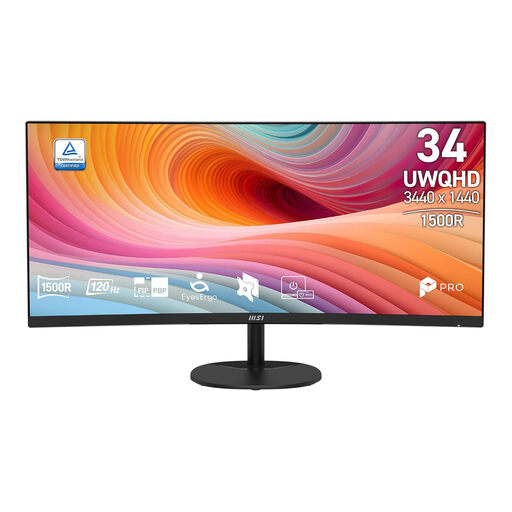 Image unavailable
The 34-inch ultrawide layout is designed for using multiple applications side by side on one computer.
UWQHD, 3440 × 1440 pixels; VA panel; 120 Hz; curved screen.
 Image unavailable
The 21:9 layout gives you room to use windows side by side. Check that the connections are compatible with your computer.
34.1 inches; IPS panel; 3440 × 1440 pixels; 100 Hz; 99% sRGB; up to 90 W USB-C power delivery; KVM switch; webcam.
 Image unavailable
The ultrawide resolution is designed to give you a workspace with multiple windows side by side.
3440 × 1440 pixels; 144 Hz; 1500R curvature; Fast VA panel; 100% sRGB; no speakers.
 Image unavailable
The stated WUHD resolution is worth considering if you want more pixels for a multi-window workspace.
34 inches; curved screen; 5120 × 2160 at 120 Hz in Dual Mode; up to 140 W USB-C power delivery; USB hub; KVM switch.
Not if both windows are on one computer: in Windows, you can use Snap to place them side by side. PBP is useful if you want to display images from two separate sources at the same time; BenQ lists this feature for the PD3420Q.
No, a different monitor won’t change the texture data. Blender describes Seam Bleed as a setting that extends paint beyond the edge of a UV island to avoid visual artefacts, so check your UV and painting settings too.
Use suitable colour profiles and colour management before attributing any difference to the texture itself. Adobe lists differences between screens, screen age, calibration status and ambient light among the factors that affect how colours appear.
Arboportaal explains employers’ responsibilities around breaks or changes of activity, and the setup of screen workstations. What applies depends on the working situation; these aren’t product specifications for every individual buyer.
For online purchases from a business, you generally have 14 days to change your mind, but check which terms apply to your purchase. The legal guarantee isn’t simply a fixed two-year period in the Netherlands: what you can reasonably expect from the product matters, and the seller is your point of contact if there’s a problem.