What should you look for when choosing?
First, measure the space available for the monitor and stand. Then compare the colour information, working area and connections with what you actually need.
| What to consider |
What should you check? |
Who is this important for? |
| Fit on your desk |
Measure the available width and depth, then compare them with the dimensions including the stand. Also check that you’ll have room for your input devices. |
If my desk has limited space, I want to know whether the screen and stand will fit without making my workspace impractical. Around 29% of consumers put desk fit first. |
| Colour assessment |
Compare the colour mode, stated coverage and calibration information for the exact model; check the selected mode when you first set it up. |
When I assess the colours in vector illustrations, I want to know what colour information is provided for the model and what it does and doesn’t tell me about my individual monitor. Around 29% of consumers prioritise colour assessment. |
| Space for windows |
Check the resolution and try your usual window layout with your applications, references and scaling settings. |
If I want to view illustrations, panels and references at the same time, a wide layout matters more than screen size alone. Around 24% of consumers prioritise having workspace for multiple tasks at once. |
| Laptop connection |
Check video over USB-C, the supported resolution and refresh rate, the power required and any hub settings. |
For my laptop setup, I want to know in advance whether the monitor and laptop support the connection and power delivery I need. Around 18% of consumers give connectivity top priority. |
Brands to compare
These models illustrate different screen shapes, colour information and connections. The features mentioned apply to the specific model and are not a general assessment of the brand.
BenQ
The flat DesignVue PD3420Q is designed for creative work and, according to BenQ, offers colour modes and a factory calibration report.
- BenQ specifies 100% sRGB, 98% P3 and VESA 100 × 100 mm for this model.
- The stated dimensions, including the stand, are 825,8 × 244,3 mm (width × depth). These are manufacturer specifications, not an independent colour measurement.
ASUS
According to ASUS, the flat ProArt PA348CGV combines an IPS screen with colour settings, USB-C and an adjustable stand.
- For this model, ASUS specifies 100% sRGB, factory calibration and dimensions of 817,6 × 245 mm, including the stand.
- The stated ΔE < 2 is a model specification; check the colour mode and whether the stand fits on your desk.
LG
According to LG, the curved 34WQ75C-B combines a wide working area with a USB-C connection.
- LG lists a resolution of 3440 × 1440 pixels, 99% sRGB as a typical value and 90 W of USB-C power delivery.
- The stated depth, including the stand, is 260 mm. Typical colour coverage is not the same as verified colour accuracy.
Dell
Dell describes the curved UltraSharp U3425WE as offering a business hub, adjustability and specified colour modes.
- For the U3425WE, Dell lists 3440 × 1440 at 120 Hz, IPS Black and an average ΔE < 2 per colour mode.
- These claims apply to the U3425WE and are not independent measurements of your individual monitor. The curved design is worth considering when checking lines.
Philips
According to Philips, the curved 346B1C/00 is a 34-inch ultrawide monitor with USB-C and an adjustable stand.
- Philips describes different USB-C display modes, depending on the USB hub setting.
- Check the resolution and refresh rate combination you need; the stated model information is not a reason to prioritise this screen for colour-critical work.
Ultrawide monitors at Joybuy
Below are ultrawide monitors that may suit a wide working layout. Compare the dimensions, screen shape and connections of the exact model with your desk and laptop.
 No image available
LG UltraWide 34U650A-B 34-inch
May suit anyone looking for an ultrawide monitor for a wide window layout.
34-inch ultrawide; model 34U650A-B.
View at Joybuy
 No image available
iiyama ProLite 34-inch IPS ultrawide
May suit anyone looking for a flat screen who wants to display two video sources at once.
IPS; PiP and PbP; height-adjustable stand.
View at Joybuy
 No image available
LG UltraWide 34U601B-B WQHD VA monitor
May suit anyone looking for a wide workspace; bear in mind that this model is curved when visually checking vector lines.
34-inch; WQHD; VA; curved with 1800R; 120 Hz.
View at Joybuy
 No image available
Dell Pro P3426WEV 34.1-inch WQHD monitor
May suit anyone looking for an ultrawide monitor with a USB-C hub; the curved design is worth considering when assessing vector lines.
IPS; USB-C hub; webcam; 100 Hz; 90 W Power Delivery.
View at Joybuy
 No image available
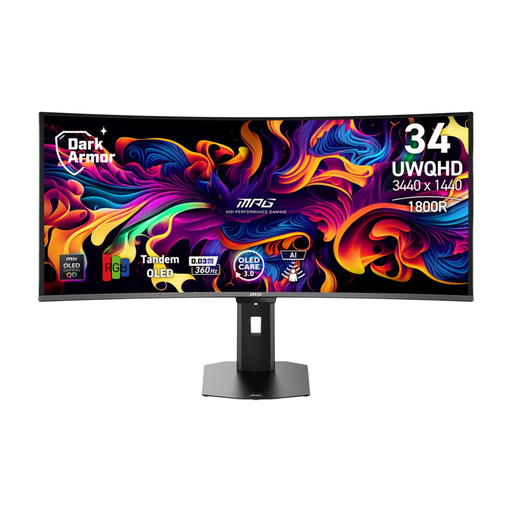
MSI MPG 341CQR QD-OLED X36
May suit anyone looking for a wide screen for multiple windows; check whether the curved design works for the way you assess vector lines.
34-inch; QD-OLED; 3440 × 1440 pixels.
View at Joybuy
Frequently asked questions
For a small desk, should I measure the screen diagonal or the stand?
Measure the available width and depth of your desk and compare them with the dimensions of the exact model, including the stand. LG lists 816,7 × 260 mm for the 34WQ75C-B and BenQ lists 825,8 × 244,3 mm for the PD3420Q, both including the stand. Make sure you also leave room for your input devices and a comfortable working position.
How should I set up my screen for assessing illustrations?
Adjust your screen and workstation to suit your body measurements, reduce reflections and make sure symbols are easy to read. Arboportaal recommends varying your screen-based work and regularly looking away for a moment; this doesn’t guarantee that a particular screen will prevent discomfort.
Does factory calibration guarantee accurate colours on my screen?
No. Stated colour gamut coverage or a calibration report is not an independent measurement of your individual monitor. Check which colour mode you’re using and treat factory information as model specifications.
What can I do if a monitor doesn’t meet my expectations after buying it online in the Netherlands?
For an online purchase, consumers generally have a statutory 14-day cooling-off period from delivery, with some exceptions. You’re also entitled to a product that does what you could reasonably expect; if a product is faulty, the seller is responsible for providing an appropriate solution. ACM ConsuWijzer explains these rights. A fixed statutory guarantee of exactly two years is not a general description of the rules in the Netherlands.
Does every private buyer in the Netherlands have to choose a particular screen size?
No, the Dutch workplace rules cited do not require every private buyer to choose a particular screen size. There are requirements for screen-based work that apply to employers and employees, depending on the working situation. Arboportaal describes, among other things, varying your tasks and having an adjustable workstation; check what applies to your situation.


