Start by measuring the space on your desk, including the monitor stand and room for your keyboard and mouse. A 29-inch ultrawide may be the more compact option, while a 34-inch screen can offer more pixels for viewing a form, code and a preview side by side. LG Netherlands lists a resolution of 2560 × 1080 pixels for the 29U511A-B; the 34-inch models reviewed from brands including Dell and Philips have a resolution of 3440 × 1440. Measure the setup for the exact model, and check separately that your computer supports the video connection you want to use.
Who is this buying guide for?
Form designer with a small desk
Needs room for the screen and stand without sacrificing space for controls or a comfortable viewing position. That’s why the dimensions of the exact monitor matter more than the diagonal measurement alone. Arboportaal outlines points to consider when working with screens.
Designer who wants to see a preview alongside code
Wants to keep several windows readable at once and is comparing screen size and resolution. LG Netherlands, Dell Netherlands and Philips Netherlands list model-specific resolutions for their ultrawide monitors.
Laptop user with limited ports
Wants to connect the monitor easily, but needs to check that the laptop and monitor support the same video connection and that USB-C power is compatible with both. Dell Netherlands and Philips Netherlands describe USB-C on specific models.
What should you look for when choosing?
29-inch ultrawide, 2560 × 1080
Suitable if: desk space is your priority and you can keep your form readable alongside a second window. LG Netherlands lists the 29U511A-B as a model in this class.
Keep in mind: the LG model reviewed has 1080 vertical pixels, compared with 1440 on the 34-inch models reviewed. Compare the stand dimensions and try out your own window layout.
34-inch ultrawide, 3440 × 1440
Suitable if: the screen and stand fit, with room for a comfortable viewing position, and you want to view a form, code or reference material at the same time. Dell Netherlands, Samsung Netherlands and Philips Netherlands list models with this resolution.
Keep in mind: more pixels don’t guarantee readable text at your chosen scaling setting. USB-C power only works if the monitor, laptop and connection support it.
| What to consider |
What should you check? |
Who is this most important for? |
| Will the setup fit? |
Measure the available width and depth, then compare them with the dimensions of the exact model, including its stand. Leave room for your keyboard, mouse and viewing position. |
I want to know whether the screen and stand will fit without taking over my workspace. Desk space is the biggest purchase concern for around 36% of consumers. |
| Will the windows remain readable? |
Compare the resolution and try your own form, code and browser zoom. LG Netherlands lists 2560 × 1080 for the 29U511A-B; the 34-inch models mentioned from Dell Netherlands and Philips Netherlands have a resolution of 3440 × 1440. |
I want to read a form alongside code or reference material without making the text too small. A readable workspace layout is the main reason for around 29% of consumers. |
| Will the connection work? |
Check the video output, cable, supported resolution and any charging requirements for both the laptop and monitor. Dell Netherlands lists USB-C power of up to 90 W for the P3425WE; check that your own laptop supports it. |
I want to connect my own computer without discovering afterwards that the connection is incompatible. The connection is the biggest purchase concern for around 21% of consumers. |
| Can you position the screen comfortably? |
Check how adjustable the exact model is, and consider the light, readability and available space. Arboportaal outlines points to consider when working with screens. |
I want to position the screen somewhere comfortable and easy to read without the larger display compromising my posture. Positioning is the most important factor for around 14% of consumers. |
Common mistakes
-
Choosing based on screen size alone
The diagonal measurement doesn’t tell you how much desk space the monitor and stand will take up. Your setup may not work if the stand doesn’t fit.
Before buying, compare the dimensions of the exact model, including its stand, with the available space and your planned viewing position.
If the supplied stand doesn’t fit, you may need a different stand or mounting solution.
-
Assuming more pixels automatically mean readable windows
Resolution isn’t the only factor that determines whether your form and a second window will remain readable at your chosen scaling setting.
Before choosing a screen size, try your own form alongside a second window, using your preferred text size.
-
Treating a wide desktop view as a mobile test
An ultrawide monitor won’t automatically show you how content rearranges itself in a narrow viewport.
Test the contact form in a narrow browser view too, and check that all content and functionality remain available.
Brands to compare
LG
LG Netherlands lists the 29U511A-B as a 29-inch ultrawide with a resolution of 2560 × 1080.
- The listed resolution offers more horizontal pixels than a 1920 × 1080 screen.
- The 1080 vertical pixels and the dimensions of the stand are important things to check for your workspace layout and desk.
Dell
According to Dell Netherlands, the Dell P3425WE is a 34.1-inch WQHD work monitor with a USB-C hub.
- Dell lists USB-C power of up to 90 W and RJ45 for this model.
- Check that your laptop supports the required video connection and power, and that the monitor and stand will fit on your desk.
Samsung
The ViewFinity S5 S50GC is a 34-inch ultrawide model that Samsung Netherlands describes as an Ultra-WQHD screen with a 100 Hz refresh rate.
- The model specifications list a 34-inch screen and a 100 Hz refresh rate.
- The screen size doesn’t prove that the monitor and stand will fit on a small desk. Measure your setup and consider how you arrange your own windows.
Philips
Philips Netherlands describes the E Line 346E2CUAE/00 as a 34-inch monitor with 3440 × 1440 pixels and USB-C.
- The listed resolution and USB-C connection are useful features to compare.
- Check which video and charging features work with the exact laptop and cable you plan to use.
Ultrawide monitors at Joybuy
This selection includes 29- and 34-inch ultrawide monitors for arranging a form alongside other work windows. Measure the available space and check which screen size suits your setup.
 No image available
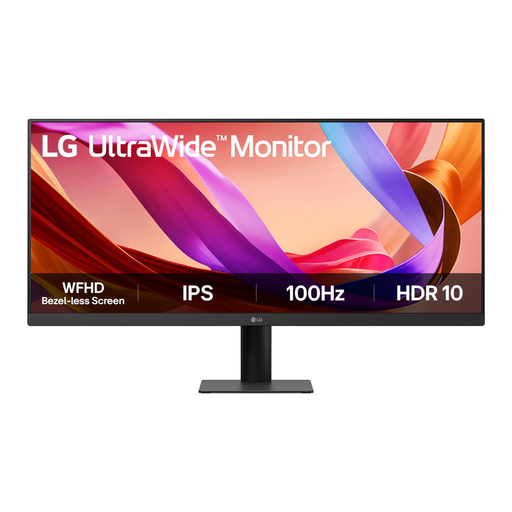
LG UltraWide 29U511A-B, 29 inch
A 29-inch model may suit you if you’re looking for a more compact ultrawide option. Measure the monitor with its stand and check that your windows remain readable.
LG Netherlands lists a resolution of 2560 × 1080 for the 29U511A-B.
Joybuy
 No image available
LG UltraWide 34U601B-B WQHD VA monitor, 34 inch
This 34-inch monitor is the larger option. Before choosing the extra screen space, check that the complete setup will fit on your desk.
Listed features: WQHD, VA, curved and 120 Hz.
Joybuy
 No image available
Dell Pro P3426WEV USB-C hub monitor
This larger monitor may suit you if your desk has enough room and your laptop supports the required USB-C features.
Listed features: 34.1 inches, curved, WQHD, IPS, webcam, 100 Hz and USB-C Power Delivery up to 90 W. Charging requires a compatible laptop and DisplayPort Alt Mode.
Joybuy
 No image available
Dell Pro P3426WEB USB-C hub monitor for video conferencing
A 34-inch model is the larger option for a small desk. Compare the dimensions with the stand to the space you need for your keyboard and mouse.
The product name lists a USB-C hub and video conferencing use.
Joybuy
 No image available
Gawfolk 34-inch curved UWQHD monitor
This 34-inch monitor is a larger option. Check your desk space and try your own form alongside a second window.
Listed features: 3440 × 1440, 21:9, 144 Hz and 1500R. The product name does not list speakers.
Joybuy
Frequently asked questions
Will an ultrawide make my contact form suitable for mobile too?
No. An ultrawide monitor doesn’t prove that your form works well on a narrow screen. Test the page separately in a narrow browser viewport. For its reflow criterion, the W3C describes a width equivalent to 320 CSS pixels, subject to the stated exceptions.
How should I set up a screen for extended use?
Set the display to a readable size and consider the height, reflections and ambient light. Arboportaal states that, for employees who work with screens for more than two hours a day, the screen and keyboard must not be attached to each other.
What are my rights if I’m unhappy with a monitor bought online or it develops a fault too soon?
For an online consumer purchase, you generally have up to 14 days from delivery to change your mind, subject to legal exceptions; ACM ConsuWijzer explains this period. Your statutory guarantee is separate from the manufacturer’s warranty: if a product develops a fault too soon under normal use, the seller must offer a solution under the applicable terms.
Is an energy label relevant for computer monitors?
Yes. The European Commission lists energy labelling and ecodesign requirements for electronic displays. Compare the label for the exact model; screen size or resolution alone doesn’t tell you its energy class.


