Choose a 29-inch ultrawide if desk space is your main constraint and your script fits alongside your call at a text size you can comfortably read. A 34-inch model with a 3440 × 1440 resolution gives you more vertical pixels for lines of script, but takes up more room. Also check that your laptop supports the connection you want and how you’ll connect your camera and microphone.
Who is this guide for?
Script reader with a small desk
You want to see a call and a readable script side by side, but need to check whether the screen and stand will fit on your desk. The models and dimensions are based in part on product specifications from LG Netherlands.
Reader of longer scripts
Look at the number of vertical pixels and the text size, not just the screen diagonal. LG Netherlands and Dell Netherlands list different resolutions for the 29- and 34-inch models considered here.
Laptop user who makes frequent calls
You want to connect your laptop easily without overlooking the camera, microphone or compatibility. Dell Netherlands lists USB-C power delivery and RJ45 for the P3425WE, but no webcam.
What should you look for when choosing?
| What to consider |
What to look for |
Who is this important for? |
| Desk space |
Measure the available width and depth, then compare them with the dimensions of the exact model, including its stand. LG Netherlands lists the LG 34WQ75C-B as measuring 816,7 × 569,7 × 260,0 mm with the stand at its highest setting. |
If I have a small desk, I want to know first whether the screen and stand will fit together; around 34% of consumers say desk space is their top priority. |
| Room for your script |
Compare the vertical resolution and try out your window layout with your own script. LG Netherlands lists 2560 × 1080 for the 29U511A-B and 3440 × 1440 for the 34WQ75C-B; Dell Netherlands lists 3440 × 1440 for the P3425WE. |
If I want to see my script and call side by side without making the text too small, I focus on vertical space; around 33% of consumers say space to read a script is their top priority. |
| Connecting your laptop |
Check that your laptop and monitor support video over your preferred connection and that the power delivery is sufficient. Dell Netherlands lists USB-C power delivery up to 90 W and RJ45 for the P3425WE; this does not guarantee that every laptop will work with a single cable. |
If I want fewer separate cables, my laptop needs to support video and power through the connection I choose; around 20% of consumers say ease of connection is their top priority. |
| Camera and microphone |
Decide whether you’ll use your laptop’s camera or separate equipment, and check the built-in features of the exact model. Dell does not list a webcam for the P3425WE. |
If I want to be seen and heard clearly during a call while reading my script, I want to know in advance what equipment I’ll need; around 13% of consumers say call equipment is their top priority. |
Common buying mistakes
-
Looking only at the screen diagonal
A 34-inch screen might fit widthways but take up too much desk depth once you add the stand.
Measure the available space and compare it with the dimensions of the exact model, including its stand. Leave room for your keyboard and a comfortable viewing distance, too.
A different stand or monitor arm could mean an extra purchase. Check in advance that it’s suitable for both the screen and your desk.
-
Assuming an ultrawide means more readable lines of script
The LG 29U511A-B considered here has 1080 vertical pixels; the LG 34WQ75C-B and Dell P3425WE have 1440. How much text you can comfortably read also depends on the font and window sizes.
Compare the vertical resolution and test a realistic window layout using your own script and preferred text size.
-
Expecting USB-C to replace all your call equipment
A monitor with USB-C does not automatically mean your laptop can send video through that port or that the monitor has a webcam and microphone. Dell does not list a webcam for the P3425WE.
Check your laptop’s video connection and power requirements, and decide separately how you’ll connect your camera and microphone.
A separate camera, microphone, cable or adapter could mean an extra purchase; check what your setup needs.
Relevant brands to compare
LG
The Dutch product pages describe both a 29-inch model with a 2560 × 1080 resolution and a 34-inch model with a 3440 × 1440 resolution.
- The LG 34WQ75C-B is listed with USB-C power delivery and a height-adjustable stand.
- The dimensions listed for the 34WQ75C-B with its stand do not apply to the 29U511A-B. These are manufacturer specifications, not an independent hands-on test.
Dell
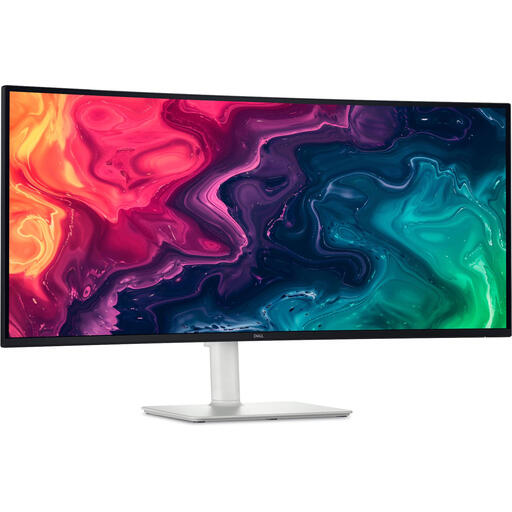
Dell describes the P3425WE as a 34.1-inch hub monitor with a 3440 × 1440 resolution, USB-C power delivery up to 90 W and RJ45.
- The hub features are useful if you’re connecting a compatible laptop through the monitor.
- Dell does not list a webcam for this model. Also check whether your laptop supports the features you want over a single cable.
Samsung
Samsung describes the 34-inch ViewFinity S6 S65UC, model LS34C652UAUXEN, as having a 3440 × 1440 resolution, USB-C up to 90 W and LAN.
- Samsung lists a VA panel and 1000R curvature for this model.
- Check that the curvature, stand and connections suit your desk and equipment; the manufacturer’s specifications are not an independent comparison with IPS models.
Philips
The Dutch product page describes the 34-inch B Line 346B1C/00 as a curved ultrawide with USB-C and an ergonomic stand.
- The USB-C connection and stand are worth considering when comparing office setups.
- Philips’ claims about viewing comfort are manufacturer claims; they do not prove that discomfort will be reduced in this reading scenario.
Joybuy monitors for scripts and calls
These Joybuy picks focus on 34-inch ultrawides for anyone who wants to display a script and a call side by side. Measure your desk beforehand to make sure the screen and stand will fit.
 No image available
Dell Pro P3426WEV 34.1-inch curved WQHD IPS USB-C hub monitor with webcam, 100 Hz and 90 W
An option to consider if you’re looking for an ultrawide with video-call features and have enough desk space.
The product name lists a curved IPS screen, USB-C hub, webcam, 100 Hz and 90 W Power Delivery.
View at Joybuy
 No image available
Dell Pro P3426WEB 34-inch USB-C hub monitor for video conferencing
A good fit if you want to compare hub monitors for video calls; check in advance that the features you want will work with your laptop.
The product name describes a USB-C hub monitor for video conferencing.
View at Joybuy
 No image available
Philips 6000 series 34B2U6603CH/00 34-inch 3440 × 1440 LCD monitor
A 34-inch model to consider if you want to position your script and call side by side and have enough space on your desk.
The product name lists 86,4 cm (34 inches), 3440 × 1440 pixels and an LCD screen.
View at Joybuy
 No image available
Dell S3425DW 34-inch 3440 × 1440 LCD monitor
A possible choice if you want a 34-inch screen for a layout with your script and call, provided your desk can accommodate the complete setup.
The product name lists 86,4 cm (34 inches), 3440 × 1440 pixels and an LCD screen.
View at Joybuy
 No image available
Iiyama ProLite 34-inch curved UWQHD monitor with USB-C dock, LAN, KVM and 15 cm height adjustment
An option to consider if you want to compare ultrawides with a USB-C dock; check the space available on your desk and your laptop’s connection.
The product name lists a curved screen, USB-C dock, LAN, KVM and a stand with 15 cm of height adjustment.
View at Joybuy
Frequently asked questions
Should I always choose a 29-inch model for a small desk?
No. Compare the available width and depth with the dimensions of the exact model, including its stand, and try out your preferred layout for your script and call. A 34-inch model gives you more vertical pixels if the complete setup will fit.
How should I set up my screen for a longer script while working?
Choose a readable text size and adjust your screen, lighting and working position to suit you. Arboportaal sets out requirements and guidance for workstations and breaks from screen work for employees who work with screens; which ones apply depends on your working situation.
Does a USB-C hub monitor automatically include a webcam and laptop charger?
No. Dell lists USB-C power delivery up to 90 W for the P3425WE, but no webcam. Check that your laptop supports video and power through the connection you’ve chosen, and arrange a separate camera and microphone if needed.
What are my rights when buying a monitor online in the Netherlands?
ACM ConsuWijzer generally states that you have 14 days to change your mind after delivery when buying online as a consumer; check which exceptions and returns conditions apply. You’re also covered by the legal guarantee: the product must meet what you could reasonably expect from it. A manufacturer’s guarantee does not replace this legal right.
What can I do with my old monitor?
According to Milieu Centraal, when you buy a new, similar electrical appliance, you can hand in your old one free of charge under the old-for-new scheme, including when you buy online. A local council recycling centre is another option.


