
Reading a script during calls
You want to keep the script in view while following the conversation, so window layout and readable text matter more than extra screen features.


Start by choosing a screen that lets you arrange your script and call window side by side, with text that stays readable at your viewing distance. Then compare the connections available for the laptops used at the desk and the monitor’s adjustment options. A built-in webcam is especially useful if its position and performance suit your calls.
You want to keep the script in view while following the conversation, so window layout and readable text matter more than extra screen features.
You regularly switch between laptops or users and want to use the connections and screen settings without having to reconfigure everything each time.
You’re looking for a permanent monitor setup with a camera and microphone, provided their position and performance suit your calls.
Start with the layout and readability of your script and call. Then check the connection options for each laptop and the settings needed for different users.
| What to consider | What should you check? | Who is this important for? |
|---|---|---|
| Script and call side by side | Compare screen size and resolution, and check that both windows fit at your preferred text size. | I want to follow my script and call at the same time without making the text too small to read. Around 31% of consumers rank reading space as their top purchasing priority. |
| Connecting and switching between laptops | Check that each laptop’s USB-C port supports video, and that the power delivery and any hub ports suit your needs. | If several people use the same workspace, I want to connect and switch laptops easily. Around 25% of consumers rank easy connectivity as their top priority. |
| Reading comfort and screen adjustment | Check the height adjustment or mounting options, the space available on your desk and the text size in the apps you use. | I want to adjust the screen position and text size when users or conditions vary. Around 19% of consumers prioritise adjustable reading comfort. |
| Camera and microphone | Check whether the exact model includes both, and whether their position and settings work with your calling software. | If I don’t want to use a separate camera, the built-in camera and microphone need to suit my setup. Around 13% of consumers rank integrated video calling as their top priority. |
| Total cost | Compare the current price and check which cables or accessories you’ll need. Also check the energy label for power consumption. | I want to know in advance whether I’ll need any extra equipment and what the running costs will be for my situation. Around 12% of consumers rank total cost as their top priority. |
A wide workspace doesn’t guarantee that text will be easy to read from your viewing distance or that the screen will fit your desk.
Try your preferred window layout at the text size you use, and check the monitor’s adjustment options.
For a single-cable setup, both the laptop and monitor need to support the required video transfer, and the power delivery must be suitable.
Check what the USB-C port on each laptop can do, along with the specifications of the exact monitor model.
A built-in camera may replace a separate device, but its position and performance need to suit the user, desk and software.
Compare the camera position and audio settings with the equipment you already use.
The Dutch government states that statutory rights apply even without an additional warranty product, and that the retailer is your point of contact.
Before taking out an extended warranty, check what additional rights or services it actually offers.
The E-line 346E2CUAE/00 offers ultrawide space for arranging windows; the business-focused 34B1U5600CH/00 is a different model with conferencing equipment.
The P3425WE is a business-focused 34.1-inch ultrawide hub monitor for a shared laptop workspace.
The ViewFinity S6 S65UC LS34C652UAUXEN is a 34-inch business ultrawide with USB-C and LAN.
The 34U650A-B is a 34-inch 21:9 model with an IPS panel.
AOC describes the CU34V5CW/BK as a 34-inch ultrawide with a webcam and USB-C.
These Joybuy products are suited to keeping a script and call side by side at a shared desk, with models offering features such as video calling and laptop connectivity.
 No image available
Worth comparing if you’re looking for an ultrawide screen with a webcam for a shared workspace.
34.1 inches, WQHD, IPS, USB-C hub, webcam, 100 Hz and 90 W Power Delivery.
 No image available
Worth considering if you’re looking for a 34-inch monitor to show your script and call side by side.
34 inches and a USB-C hub, according to the product name.
 No image available
A model to compare for a shared desk where you need your script and call on screen at the same time.
34 inches, 3440 × 1440 pixels and LCD.
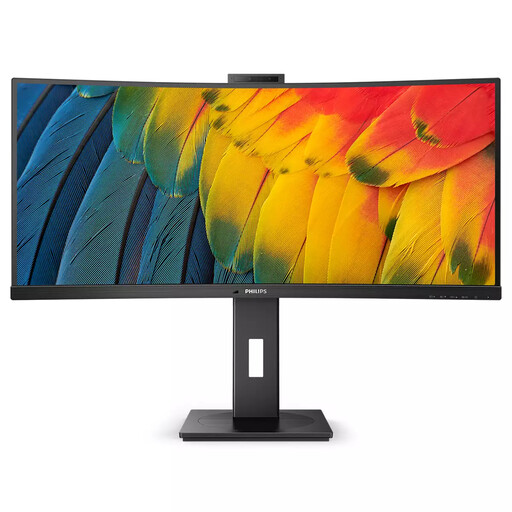 No image available
Worth comparing if you want to use your script and call side by side and are also considering built-in conferencing equipment.
34 inches and 3440 × 1440 pixels. Philips lists a 5 MP pop-up webcam and microphone for this model.
 No image available
A model to consider if you use multiple computers at a shared desk and want to compare connections and screen positioning.
USB-C dock, LAN, KVM switch and a height-adjustable stand with 15 cm of adjustment.
In Windows 10 or 11, you can use Snap to place two app windows side by side and drag the divider between them. Then adjust the text scaling and the screen resolution recommended by Windows to suit your reading needs.
No, it depends on the equipment you already have and the setup you want. Philips lists a built-in webcam and microphone for the 34B1U5600CH/00; Dell doesn’t list a webcam for the P3425WE. Check the camera’s position and how it works with your calling software before choosing an integrated camera.
The energy label shows consumption in kWh per 1000 hours. You can use it to compare the stated figures for specific models; your own costs will also depend on how long you use the monitor and your electricity tariff.
The Dutch government states that there is no fixed statutory warranty period in the Netherlands and that the retailer is your point of contact if a product is faulty. According to ACM ConsuWijzer, online purchases usually come with a 14-day cooling-off period from delivery, subject to applicable exceptions.
For employees who spend more than 2 hours a day doing screen-based work, Arboportaal states that the screen and keyboard must not be fixed together. This rule applies in the relevant employment context and isn’t necessarily a product specification for every private buyer.