
Student who edits photos
You want to check colours before sharing or printing your photos. The screen profile and the lighting in your room can both make a difference.


For photo editing, an ultrawide monitor with suitable colour settings and the option to calibrate it is more useful than simply having a wide screen. Check how it looks in your working environment, too. If you mainly want to organise or display photos, first consider how much desk space you have and what resolution your laptop can support through its port. Manufacturer specifications describe features, but they can’t guarantee colour accuracy in your room.
You want to check colours before sharing or printing your photos. The screen profile and the lighting in your room can both make a difference.
You want to view several images or windows side by side, and use the same screen for your studies.
You’re looking for an ultrawide monitor that fits on your desk without the screen or stand taking up too much room.
Start with your main task: checking colours or viewing images side by side. Then check that the screen will fit on your desk and connect properly to your laptop.
| What to consider | What should you look for? | Who is this important for? |
|---|---|---|
| Checking colours | Check the colour modes, whether you can calibrate the monitor and which colour profile you use. | If I edit photos, I want to check colours carefully before sharing or printing them. Around 33% of consumers say colour accuracy is their top priority. |
| Room for windows | Check the resolution of the exact model and whether your computer supports it through its video output. | If I want to view photos and study materials at the same time, I need room to arrange windows side by side. Around 27% of consumers prioritise this workspace. |
| Fitting it on your desk | Measure your desk and compare its dimensions with the monitor’s full size, including the stand. | With a small desk, I want to leave enough room for my other things. For around 20% of consumers, placement is their main buying concern. |
| Connecting to your laptop | Check the video output, cable and whether the USB-C charging power suits your laptop. | If I want to connect my study laptop, the connection needs to carry video and meet its power requirements. Around 20% of consumers start by checking the laptop connection. |
A colour gamut alone doesn’t tell you how accurately photos will look on your screen. Calibration, ambient light, the condition of the screen and software can all affect the colours you see.
Use specifications to compare models, then check how the screen performs in your own workflow.
Calibration and checking prints can take extra time or materials.
The monitor’s width and depth, including the stand, determine whether you’ll have room on your desk for study materials.
Compare the monitor’s full dimensions with the space available on your desk.
Video support and charging power need to be suitable for both the laptop and the monitor.
Check your laptop’s port and its power requirements before choosing a monitor.
Depending on the connection, you may need a different cable or a separate laptop power supply.
The DesignVue PD3420Q is worth comparing if you want to combine photo editing, colour modes and a wide workspace.
The ProArt PA348CGV is worth considering if you want to view photos side by side, with colour settings and laptop charging too.
The UltraSharp U3425WE is worth comparing if you’re looking for a wide workspace with hub features for a laptop setup.
The 34E1C5600HE/00 is an option if you want to combine an ultrawide workspace with video calls at the same desk.
These models offer a wide workspace for viewing photos and study materials side by side. Compare their screen sizes and connections with your desk and laptop.
 No image available
An ultrawide option if you want to view photos and study materials side by side.
34-inch, WQHD, VA panel, 1800R curvature and 120 Hz, according to the product name.
 No image available
An option if you want to use a wide screen for photos and other windows.
The product name lists 3440 × 1440, 144 Hz, 1500R curvature, a VA panel and 100% sRGB. A stated colour gamut doesn’t guarantee colour accuracy in your workspace.
 No image available
The product name describes a wide 32:9 screen for viewing lots of windows side by side. Measure the space available on your desk first.
49-inch, DQHD 5120 × 1440, 32:9, 165 Hz, 1500R curvature and a VA panel, according to the product name.
 No image available
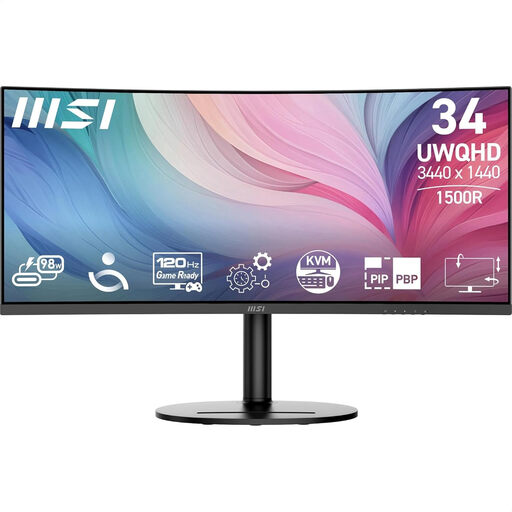
A model to compare if you want to view photos and study materials on one wide screen.
The product name lists 34 inches and 3440 × 1440.
 No image available
An option to compare if you want to view photos and study materials side by side.
The product name lists 34 inches and 3440 × 1440.
No, sRGB coverage alone isn’t enough. Adobe lists calibration, the condition of the screen, ambient light and software among the factors that affect how images look. Check the colour profile and calibrate the screen if colour accuracy matters to you.
Only if the laptop supports video through that USB-C port and the charging power is suitable for it. BenQ lists DisplayPort Alt Mode and 65 W Power Delivery for the PD3420Q; ASUS lists DisplayPort Alt Mode and 90 W for the PA348CGV. Check your own laptop’s connections and power requirements.
Check the colour profile and screen settings, and calibrate the monitor if that suits your workflow. Adobe also lists ambient light and calibration status as factors that can cause colour differences.
For an online consumer purchase in the Netherlands, you generally have a 14-day cooling-off period, according to the Dutch government. Statutory warranty is separate from any additional manufacturer’s or seller’s warranty. ACM ConsuWijzer explains that the seller is responsible for offering a suitable solution if a product doesn’t perform as you could reasonably expect under normal use. Check the terms that apply to your purchase.
Making a private copy for your own use is different from making photos public or sharing them. The Dutch government says you can’t share or make a private copy public, so check that your gallery will remain private before using other people’s photos.