What should you look for?
First, check that your laptop’s USB-C port supports video and that the monitor’s power delivery is suitable for your laptop. Then compare the screen layout, colour information and connections that suit your design work.
| What to consider |
What to look for |
Who is this important for? |
| Power sockets and laptop charging |
Check USB-C video support, your laptop’s charging requirements and the cable. Dell lists up to 90 W USB-C power delivery for the P3425WE; BenQ lists 65 W for the PD3420Q. |
I want to use my laptop without routinely connecting its charger as well. Around 36% of consumers put laptop charging and access to power sockets at the top of their list. |
| Colour assessment |
Compare the colour gamut, colour modes and calibration information for the exact model. BenQ lists 100% sRGB, 98% P3 and a factory calibration report for the PD3420Q; LG lists 99% sRGB typical for the 34BA85QE-B. |
When I assess portfolio images and colours, I want to know what colour information is available for the screen. Around 29% of consumers prioritise colour assessment. |
| Design and browser side by side |
Check the screen size, resolution and text scaling for your intended layout. Dell lists 34.1 inches and 3440 × 1440 for the P3425WE; Philips lists 34 inches and 3440 × 1440 for the 34B2U3600C/00. |
I want to view my design and browser preview at the same time without constantly switching between windows. Around 21% of consumers prioritise this kind of workspace. |
| Energy use |
Check the energy label and consumption information for the exact model; only compare figures when the stated usage conditions match. The European Commission describes an A to G energy label scale for electronic displays. |
When setting up my workspace, I also want to take energy use into account, separately from whether I need a laptop charger. Around 14% of consumers put energy use at the top of their list. |
Joybuy monitors for an ultrawide workspace
These models are options to compare when you’re looking for an ultrawide workspace for portfolio design. Check that each model’s connections and any laptop power delivery are suitable; every screen needs its own mains power.
 No image available
Dell Pro P3426WEV
An option for a laptop workspace that can combine USB-C video and laptop power delivery, provided your laptop and cable support it.
34.1 inches, curved WQHD IPS, 3440 × 1440, 100 Hz and up to 90 W Power Delivery via USB-C. The product information also lists a USB hub, KVM and RJ45.
View at Joybuy
 No image available
Dell Pro P3426WEB
An ultrawide option for viewing your design and browser side by side; check that its USB-C power delivery is suitable for your laptop.
34 inches, curved WQHD IPS and 3440 × 1440. The product information lists USB-C for video and data, up to 90 W Power Delivery, and a built-in webcam, microphone and speakers.
View at Joybuy
 No image available
LG UltraGear 34GX900A-B
An ultrawide option to include when comparing screen size and stated colour gamut for portfolio design.
34 inches, curved WQHD, 3440 × 1440 and WOLED. The product information lists 98.5% DCI-P3 coverage and up to 65 W Power Delivery via USB-C; the stated colour gamut isn’t an independent measurement of colour accuracy.
View at Joybuy
 No image available
CRUA 49-inch curved ultrawide monitor
The wide 32:9 format is worth comparing if you want to arrange your design and browser on a single screen.
49 inches, 5120 × 1440, 32:9 and a VA panel. The product information lists 120% sRGB coverage; before buying, check that the connections suit your laptop and intended use.
View at Joybuy
 No image available
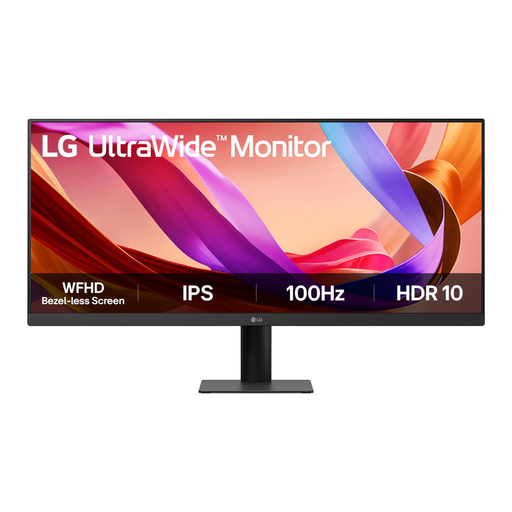
LG UltraWide 29U511A-B
A 29-inch ultrawide option to compare for a side-by-side design and browser layout.
21:9 format, 2560 × 1080 and an IPS panel. The product information also lists HDR10 support and a 100 Hz refresh rate.
View at Joybuy
Frequently asked questions
With USB-C, do I still need a power socket for the monitor?
Yes. With a compatible laptop, USB-C can combine video, data and laptop power delivery, but the monitor itself needs mains power. Compare the monitor’s power delivery with your laptop’s requirements.
How do you set up an ultrawide screen for homepage design?
You can use the available width to place your design environment next to a browser preview, then choose a text size that’s comfortable to read. For colour work, also compare the colour modes and calibration information for the exact model.
How do I compare monitors’ energy use?
Compare the energy labels and consumption information for the exact models on the same basis of use. The European Commission describes an A to G efficiency scale for electronic displays; also check the usage conditions for individual consumption figures.
What rights do I have as a private buyer in the Netherlands?
According to the Dutch government, when you buy online from a business, you generally have 14 days to change your mind, with some exceptions. You’re also entitled to a product that’s fit for purpose. The Netherlands has no fixed legal warranty period, and if a product is faulty, the retailer must provide an appropriate solution.
Do computer monitors in the EU need an energy label?
The European Commission states that energy labelling rules also cover computer monitors. Use the label and model information to compare screens; this doesn’t mean you have to choose a particular energy class.


