First, choose a screen layout that lets you view your timeline, canvas and essential panels clearly. A 34-inch ultrawide with a resolution of 3440 × 1440 pixels is one option; Philips lists these specifications for the 346E2CUAE/00, but they don’t guarantee that your software layout will fit. Also measure the space needed for the screen and stand, and prioritise colour specifications or USB-C only if your project or laptop requires them.
Who is an ultrawide suitable for?
Student with a busy animation timeline
Wants to see frames, the canvas and work panels at the same time, so first checks how much usable screen space the layout offers. Adobe describes the timeline as the place where animation in a document is displayed.
Animator with a small desk
Has limited space for a screen and stand, and wants a clear, comfortable setup for longer working sessions. Arboportaal highlights factors such as readability and reflections when working with screens.
Student working on colour-critical projects
Needs to assess illustrations or video as well as frames, for a specific colour space. BenQ and ASUS publish colour specifications for their individual models; compare these with the requirements of your project.
What should you look for when buying?
First, test your timeline and panel layout at a readable scale. Then measure the available desk space, including room for the stand.
| What to consider |
What should you check? |
Who will value this? |
| Viewing the timeline and canvas together |
Try your animation software at the scale you want to use. Compare the resolution and aspect ratio with the windows you want to have open side by side. |
If I want to see frames, the canvas and panels at the same time, a readable timeline is essential. Around 36% of consumers give an overview of the timeline top priority. |
| A desk-friendly size |
Measure the available width and depth, including the stand. Also check that the height adjustment and readability suit your seating position. |
When desk space is limited, I want to know whether the screen and stand will fit without making my workspace unusable. Around 29% of consumers put how well a monitor fits on their desk first. |
| Colour for your projects |
First identify the colour space required for your project, then compare it with the specifications and any calibration information for the exact model. |
If I need to assess images in a specific colour space, I want to match the model specifications to those requirements. Around 21% of consumers put colour work first. |
| Connecting your laptop |
Check whether your laptop outputs video through the relevant USB-C port, how much charging power it needs and what features the monitor port supports. |
If you often disconnect your laptop, check whether one suitable connection can provide both picture and power. Around 14% of consumers give laptop connectivity top priority. |
Buying pitfalls
-
Choosing based on screen size alone
The screen layout, stand and available desk space all determine whether the extra width will work for your setup.
Measure the width and depth of the screen and stand. Also try your timeline and panels at a readable scale.
-
Confusing colour gamut coverage with accuracy in your workspace
A stated sRGB or P3 percentage doesn’t, by itself, tell you how the individual screen is set up in your workspace.
Choose based on the colour space required for your project and check the specifications for the exact model.
-
Assuming USB-C always does everything with one cable
Your laptop, cable and monitor must all support the video and power functions you need.
Compare the port features and charging power required by your laptop with those offered by the monitor.
If the connections or charging power aren’t compatible, you may need a separate power adapter or video connection.
Brands to consider
Philips
According to Philips, the E Line 346E2CUAE/00 is a 34-inch ultrawide with a resolution of 3440 × 1440 pixels and a VA panel.
- Philips lists USB-C and MultiView for this model.
- Check separately whether its colour specifications meet your project’s requirements.
Dell
According to Dell, the Dell Pro 34 Plus P3425WE combines a 34.1-inch screen with a resolution of 3440 × 1440 pixels, USB-C power delivery of up to 90 W and RJ45.
- The listed USB-C power delivery may be useful with a compatible laptop.
- The maximum charging power doesn’t automatically mean your laptop can output video through that port.
BenQ
The PD3420Q is a 34-inch IPS model. BenQ lists colour coverage for several colour spaces and says a calibration report is included.
- BenQ lists 100% sRGB, 100% Rec.709, 98% P3 and 65 W USB-C power delivery.
- Compare these manufacturer specifications and the charging power with your project and laptop.
ASUS
The ProArt PA348CGV is a 34-inch IPS ultrawide. ASUS lists factory calibration, colour specifications and USB-C for this model.
- ASUS specifies 98% DCI-P3 and 90 W USB-C power delivery.
- The stated colour space and calibration are manufacturer specifications, not a measurement of your screen in your workspace. Also check that the screen and stand will fit across your desk.
LG
According to LG, the LG 34U650A-B is a curved 34-inch IPS ultrawide with a resolution of 3440 × 1440 pixels.
- LG lists 99% sRGB as a typical value.
- A wide workspace doesn’t guarantee that every software layout will fit without adjustment.
Joybuy product picks
These product picks are aimed at providing a wide screen layout for your animation timeline, canvas and panels. For each model, check that its screen layout, dimensions and connections suit your software and desk.
 No image available
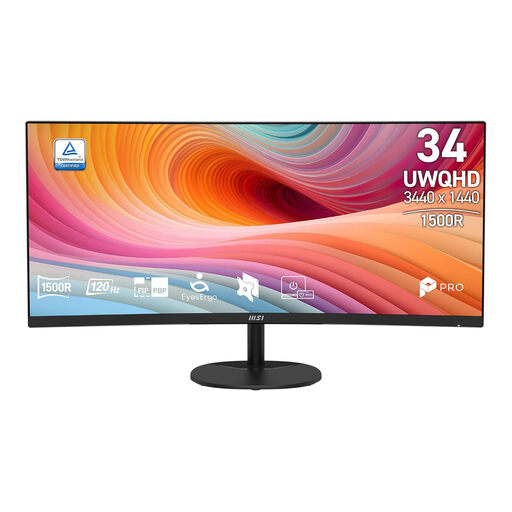
MSI Pro MP341CQ E12 34-inch UWQHD monitor
An option for assessing a wide layout for your timeline and canvas; check that windows remain readable in your animation software.
34 inches; UWQHD; 120 Hz; curved VA panel.
View at Joybuy
 No image available
Dell Pro P3426WEV 34.1-inch curved WQHD IPS USB-C hub monitor with webcam
An option for anyone looking to assess a wide workspace layout and a laptop setup with hub features; check compatibility with your own laptop.
34.1 inches; curved WQHD IPS panel; USB-C hub; webcam; 100 Hz; Power Delivery up to 90 W.
View at Joybuy
 No image available
Dell Pro P3426WEB 34-inch USB-C hub monitor for video conferencing
Worth considering if you’re looking for a monitor with hub features for video conferencing as well as your animation work.
34 inches; USB-C hub; monitor for video conferencing.
View at Joybuy
 No image available
Philips 34B2U5900C/00 34-inch curved Dual-Mode Business Monitor
A model to include in your comparison; check which screen layout and modes suit your animation software.
34 inches; curved; Dual-Mode Business Monitor.
View at Joybuy
 No image available
LG UltraWide 34U650A-B 34-inch monitor
This ultrawide may give you room to use several programme elements side by side; test whether your own windows remain readable.
34 inches; 3440 × 1440 pixels; 21:9; curved IPS panel. LG lists 99% sRGB as a typical value.
View at Joybuy
Frequently asked questions
Should I mainly look for a high refresh rate for animation frames?
Not necessarily. First check that the timeline, canvas and panels fit at the scale you want to use. If you also assess fast-moving footage, compare the refresh rates of models that meet those basic needs.
How should I set up my monitor for longer working sessions?
Set the screen and text to a readable size, avoid reflections, and take breaks from screen work while changing your posture. Arboportaal recommends these measures; the employer guidance it mentions for screen work doesn’t automatically constitute a legal requirement for a student working privately in a student room.
Do I get a cooling-off period and a guarantee when buying online in the Netherlands?
For a typical online purchase as a consumer, you generally have a statutory cooling-off period of up to 14 days after delivery, subject to legal exceptions. The seller is also responsible if the product doesn’t meet what you could reasonably expect under normal use; a statutory guarantee isn’t simply a fixed two-year period. ACM ConsuWijzer explains these consumer rights.
Will every ultrawide with USB-C charge my laptop?
No. Check whether your laptop outputs video through the relevant port, how much charging power it needs and how much power the exact monitor model supplies. For example, BenQ lists 65 W for the PD3420Q; Dell specifies up to 90 W for the P3425WE.


