
Gamers who want a wide cockpit view
You want more horizontal space on your space routes, but you’ll need to check that your game displays the cockpit and HUD properly in 21:9, and that the screen fits on your desk.


If you game on a PC and your game displays the cockpit well in 21:9, an ultrawide screen gives you more horizontal space. First, check the game interface, your desk and what your PC can handle. Choose OLED if deep blacks in dark scenes are your priority, bearing in mind that HUD elements may stay in the same place for long periods. LCD may be a better fit if you’re more concerned about static elements or easier maintenance. Also check the resolution and refresh rate available through each input, and decide separately how you’ll connect your headphones.
You want more horizontal space on your space routes, but you’ll need to check that your game displays the cockpit and HUD properly in 21:9, and that the screen fits on your desk.
Deep blacks and bright highlights matter to you, but you’ll also want to consider that the cockpit HUD may stay in the same place during long gaming sessions.
You want to know in advance where to plug in your headphones and whether your chosen video input supports the picture mode you want.
First, check that your game and platform display ultrawide images properly. Then choose a panel type, and finally check the video and audio connections.
| What to consider | What should you check? | Who is it for? |
|---|---|---|
| Cockpit space | Check that your game supports 21:9 and displays the HUD properly. Also measure the screen width and stand to make sure they fit on your desk. | I want the cockpit and HUD to remain easy to use on a wide screen. Around 29% of consumers put a usable wide flight view top of their list. |
| Dark scenes | Check the panel type, the protective features of the exact model and the terms of its panel coverage. | For dark space scenes, I weigh up black levels against having the HUD on screen for long periods. Around 24% of consumers make this their main consideration. |
| Headphone audio | Check the audio output, plug type, whether you need a microphone and your PC or console’s audio settings. | I want to know where to connect my headphones and whether the microphone will work too. Around 18% of consumers prioritise the headphone connection. |
| Refresh rate | Compare the resolution and refresh rate you want on each input with your PC’s output and capabilities. | I want to combine my preferred resolution with a refresh rate my system can manage. Around 18% of consumers make this their top priority. |
| Space and power consumption | Measure the available width and depth, including the stand, and compare the energy labels of the specific models. | The monitor needs to fit on my desk, and I want to factor in its energy use. Around 11% of consumers prioritise finding a practical fit. |
For the MSI MAG 342CQRF E20 at 3440 × 1440, MSI lists a maximum of 200 Hz via DisplayPort and 100 Hz via HDMI. So the highest quoted figure doesn’t automatically apply to every connection.
Before choosing a monitor and cable, compare the resolution and refresh rate you want with what each port supports.
MSI says that a static image left on screen continuously for a long time can contribute to OLED burn-in. OLED Care isn’t proof that the risk disappears.
Weigh up black levels against how you use the HUD, and check the maintenance and warranty terms for the specific model.
Your game and platform need to support the aspect ratio you want. A headphone output on the monitor doesn’t, by itself, confirm that every headset or microphone feature will work.
Check the game, platform and audio ports separately. If your monitor doesn’t have a suitable audio connection, plug your headphones into your PC or console.
MSI offers a range of ultrawide options, including VA LCD and QD-OLED.
According to LG, the LG UltraGear 34GX900A-B is a 34-inch OLED monitor with a 21:9 aspect ratio and a resolution of 3440 × 1440.
With the AW3426DWM, Dell offers an ultrawide VA LCD option for anyone who isn’t looking for an OLED panel.
With the ROG Swift OLED PG34WCDN, ASUS offers an ultrawide OLED option.
These ultrawide gaming monitors are suited to PC games that display the cockpit clearly in a widescreen format. Check each model’s connections and specifications against your own setup.
 No image available
Could suit a PC game where you want a wide cockpit view; check how it looks in the specific game you play.
The product name lists 3440 × 1440, 21:9, a VA panel, 1500R and 165 Hz.
 No image available
Could suit a PC setup with an ultrawide cockpit view; check that your game supports the aspect ratio.
The product name lists 3440 × 1440 and Fast VA. For this resolution, the product information specifies a maximum of 180 Hz via DisplayPort and 100 Hz via HDMI.
 No image available
Could suit you if you want an ultrawide cockpit view and a headphone output on the monitor; check that your game and audio source are compatible.
MSI lists 3440 × 1440 and a maximum of 200 Hz via DisplayPort or 100 Hz via HDMI. MSI also lists a headphone output.
 No image available
Could suit a PC game with a usable ultrawide cockpit view; check the picture mode and audio connection for your setup.
The product name lists a 34-inch LCD screen with a resolution of 3440 × 1440.
 No image available
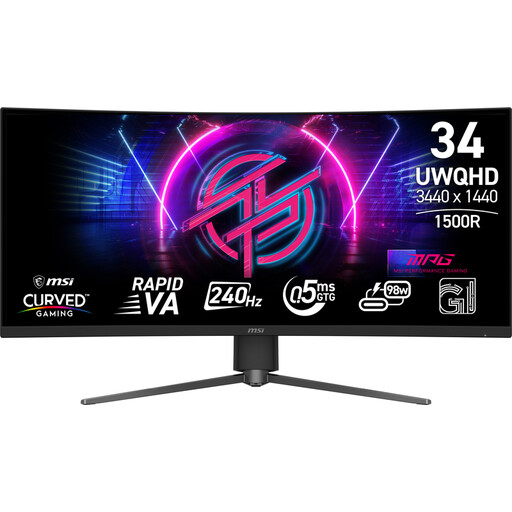
Could suit an ultrawide PC gaming setup; check how your cockpit is displayed and how to connect your headphones.
The product name lists a 34-inch screen with a resolution of 3440 × 1440.
No, it depends on your game and platform. A PC game may give you extra horizontal space in 21:9, but check that the cockpit and HUD display properly. According to RTINGS, consoles don’t support ultrawide aspect ratios.
Connect your audio through your PC, console or a suitable monitor output, then check what your source can support. MSI lists a headphone output for the MAG 342CQRF E20 and, at 3440 × 1440, a maximum of 200 Hz via DisplayPort compared with 100 Hz via HDMI.
According to MSI, static images displayed for long periods can contribute to OLED burn-in. Follow the protection and maintenance instructions for your chosen model, but don’t treat them as a guarantee that burn-in is impossible.
LG recommends switching off the monitor and disconnecting the cables before cleaning it. Also follow the instructions for cleaning products and the screen coating in the manual for your specific model.