Start by checking your device and whether the specific puzzle game supports the controller: a controller that works with a PC won’t necessarily work with every game or connection type. With a Windows PC, you can weigh up a wired USB connection against wireless play from the sofa; a Switch, Switch 2 or Android TV may have model-specific requirements. Also check that both players can use supported input at the same time, and what the controller needs for power or charging.
Who is this guide for?
PC players on the sofa
You connect a compact Windows PC to a screen and want to play puzzle games together. The game’s compatibility, available connections and distance from your seat all affect which controller connection is practical. Logitech G, 8BitDo and Xbox describe different ways to connect to a PC.
Switch players short on space
You want to use the controllers you already have for multiplayer games. Nintendo says that using Joy-Con individually depends on the software and play style; also check whether you have the original Switch or Switch 2.
Players using a TV device
You might be using Android TV rather than a Windows PC. Compatibility with your exact device and the connection type are key; Logitech G and 8BitDo describe support for specific devices and applications.
What should you look for?
Start with your device and game, then decide whether a cable will reach or a wireless connection would work better from your seat.
| What to consider |
What should you check? |
Who is this important for? |
| Device and game compatibility |
Check the exact device, game and required connection type. |
If I want to make sure my controller works with both my device and the puzzle game I’ve chosen, I check each one separately. Around 36% of consumers put compatibility first. |
| Two players at once |
Check local co-op, the player count and the input each player needs. |
I want to play with two players on one screen, so I want to know in advance whether the game supports two controllers or, for example, individual Joy-Con. Around 29% of consumers prioritise input for two players at the same time. |
| Space and connection |
Check the cable route, available USB ports and Bluetooth support on the exact model. |
If I’m playing from the sofa, I don’t want a cable in the way, and any receiver needs to fit into my setup. Around 21% of consumers focus mainly on space and connection type. |
| Power and additional costs |
Check what’s included with the model and how the controller is powered. |
I want to know what I’ll need to use and charge both controllers, so I can plan my setup accordingly. Around 14% of consumers focus mainly on power and additional costs. |
Common buying mistakes
-
Assuming ‘wireless’ means the same connection on every device
According to 8BitDo, the 8BitDo Ultimate 2C Wireless uses 2.4 GHz or a cable on Windows, and Bluetooth on Android. So the word ‘wireless’ alone doesn’t tell you which connection will work with your device.
Check the connection options for the exact model and your device, and see whether you’ll need a free USB port.
-
Assuming two Joy-Con are the same as two full-size gamepads
Nintendo says that using a Joy-Con individually depends on the software and supported play style. A game may therefore require different input from what you expect.
Check the controller requirements for the specific puzzle game before relying on individual Joy-Con.
-
Assuming DualSense features will work wirelessly on PC
Sony says that haptic feedback on PC requires a USB connection when supported by the game.
Check whether the game supports the feature you want and which connection it requires.
-
Confusing the manufacturer’s warranty with all your statutory rights
ACM ConsuWijzer explains that your statutory rights can apply alongside any manufacturer’s warranty, and that the seller is responsible. The lifespan you can reasonably expect depends on the product and the circumstances.
Keep your proof of purchase and contact the seller if the product develops a fault through normal use.
Relevant brands
Xbox
An option for Windows PCs and other devices listed by Xbox for the specific model.
- Xbox lists Bluetooth, a hybrid D-pad and button mapping.
- Support for one device doesn’t prove that every game or unlisted TV device will work. Also check the exact model and its power requirements.
Logitech G
The wired F310 could suit a PC within cable reach; Logitech also lists a specific application for Android TV.
- Logitech lists XInput, DirectInput and a four-switch D-pad.
- The cable restricts where you can sit. Logitech says the DirectInput mode requires software installation.
8BitDo
The Ultimate 2C Wireless is designed for specific Windows and Android connection options.
- 8BitDo lists Hall Effect joysticks, extra assignable buttons and an included 2.4 GHz adapter.
- The Bluetooth connection listed is for Android; don’t assume this model supports Bluetooth gaming on Windows.
PlayStation
DualSense is an option for PS5 or a PC game that specifically supports this controller.
- Sony lists USB and Bluetooth connections for Windows PCs.
- Support varies by game and device. Sony says haptic feedback on PC requires a USB connection when the game supports this feature.
Nintendo
Joy-Con may suit an existing Switch setup if the game supports using them individually.
- Nintendo explains that a Joy-Con held horizontally can be used individually as a controller on the original Switch, depending on the software and play style.
- Nintendo says Joy-Con 2 don’t work with the original Switch. Check your console version and the play style required.
Joybuy product picks
This selection includes wireless controllers for PC and Switch setups, an option aimed at Android TV, and a wired controller. Check which inputs and connections are supported by your device and puzzle game.
 No image available
Xbox Wireless Controller Robot White
A wireless option for playing from the sofa; check that your device and chosen game support the connection you want.
Joybuy
 No image available
GameSir Cyclone 2 Black-Bundle Edition
An option for a PC or Switch setup; the product listing specifies TMR sticks and a charging dock. Check that your chosen game supports this controller.
Joybuy
 No image available
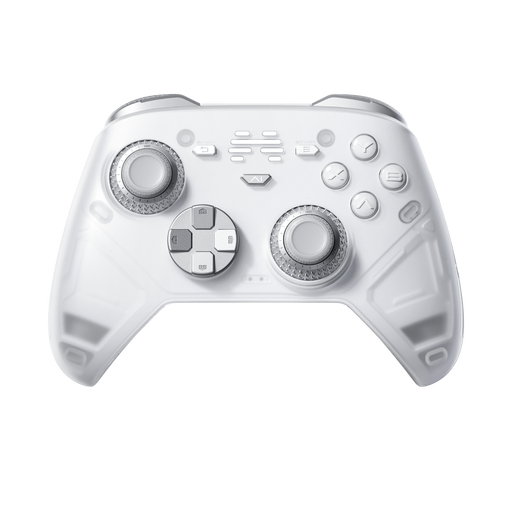
BEITONG KP70 Elite Wireless Gaming Controller
The product title lists PC, Nintendo Switch, Switch 2, Steam and Android; check compatibility with your exact device and game.
Listed features include haptic triggers, adjustable stick resistance and six programmable buttons.
Joybuy
 No image available
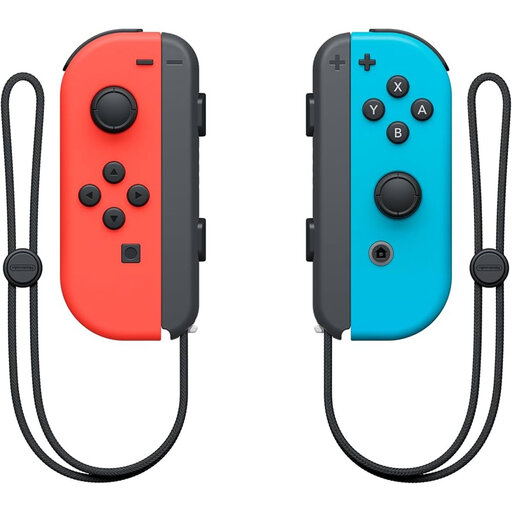
Nintendo Official Switch Joy-Con Controller Pair Neon Red/Neon Blue
A pair of Joy-Con may suit multiplayer gaming on a Switch if the specific game supports using them individually. Nintendo says this depends on the software and play style.
Joybuy
 No image available
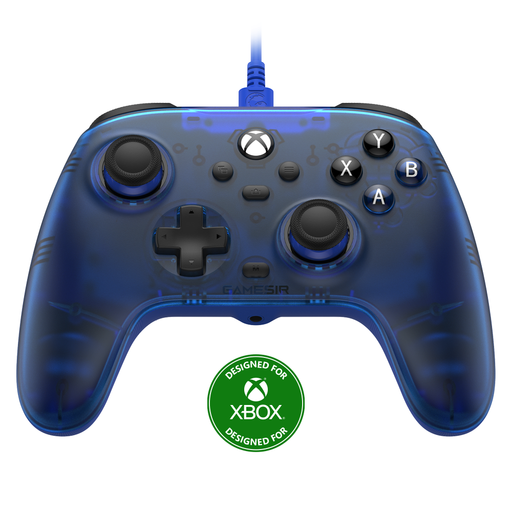
GameSir T7 Wired Xbox Controller Blue
A wired option for an Xbox or PC setup when your seat is within cable reach. The title also lists Steam support; check the game’s input requirements.
Joybuy
Frequently asked questions
Will two controllers automatically work with every local co-op game?
No. Check each game to see whether it supports local co-op and which controllers and connection types it lists. The Steam page for It Takes Two specifies split-screen co-op and lists DualSense and DualShock controllers as USB inputs.
How do you connect an 8BitDo Ultimate 2C Wireless to a Windows media setup?
According to 8BitDo, you can plug the 2.4 GHz adapter into a USB port on Windows or connect the controller with a cable. The Bluetooth connection listed by 8BitDo is for Android.
Can you share your two existing Joy-Con between two players on Switch?
You can with games that support this play style. Nintendo says that each Joy-Con can be held horizontally and used as an individual controller, depending on the software; check this for the specific game.
What can you do if a controller breaks too soon with normal use?
Contact the seller and keep your proof of purchase. ACM ConsuWijzer explains that the seller is responsible and that your statutory rights can apply alongside a manufacturer’s warranty; the lifespan you can reasonably expect depends on the product and the circumstances.
Do you have a cooling-off period when buying online in the Netherlands?
For distance purchases from a business, a 14-day cooling-off period applies in many cases, but there are exceptions. The Dutch government recommends checking the information for your specific purchase.


