Who is this buying guide for?

Housemates sitting in different places

If not everyone sits directly in front of the screen, viewing angle, reflections and screen size from different positions are all worth considering. The Dutch Consumers’ Association discusses viewing angle and distance as factors to consider when choosing a TV.

Rugby fans who care about motion

If you want to follow fast-paced play and camera movements, compare the stated refresh rate with the motion processing on the exact model. The number on the box alone doesn’t tell you how rugby will look on screen.

Housemates sharing the cost

Agree together on which costs to include, such as the TV, any installation and access to the match. The energy rating and any additional services are separate points to consider.

What should you look for when buying?

LCD or QLED TV

When to choose it If keeping shared costs down is important and the screen looks good from your seating positions.

Trade-off QLED is an LCD technology, not proof in itself of better sports performance. Compare viewing angle, reflections and motion on each model.

OLED TV

When to choose it If housemates often watch from an angle and the chosen model fits your shared budget.

Trade-off According to the Dutch Consumers’ Association, OLED generally offers a wider viewing angle and deeper blacks; some QLED TVs can be brighter.

TV with a high panel refresh rate

When to choose it If smooth motion is a priority, or if you also want to use the TV with a compatible games console.

Trade-off The Dutch Consumers’ Association explains that image processing can make motion look smoother, but can also introduce artefacts with unpredictable movement.

What to consider What should you check? Who does this matter more to?
Motion handling Compare the panel refresh rate and motion processing on the exact model. Also look for picture artefacts during fast, unpredictable action. If I want to follow fast-moving rugby, I’ll look beyond the hertz figure alone. Around 29% of consumers say motion handling is their top buying priority.
Visibility from every seat Measure the distance from different seats and assess the viewing angle and light in the room. The Dutch Consumers’ Association suggests around 2.4 times the screen diagonal as a starting point for viewing distance, not a fixed rule. If you sit at the back or off to the side, you’ll want to be able to follow the match from there. Around 29% of consumers put visibility for the group first.
Shared costs Agree on a total budget and compare the energy labels of the exact TVs you’re considering. Factor in any installation and match access separately. If we’re paying for the TV together, I want to know in advance which costs we’ll be sharing. Around 21% of consumers say shared costs are their top priority.
Access to the match Check the latest match listings, which service you need and whether it works on the TV, receiver or external player you plan to use. If you want to know how you’ll watch a particular rugby match on the shared TV, check the broadcast and how you’ll stream it. Around 21% of consumers put access to the match first.

Common pitfalls

  • Confusing a high refresh rate with the broadcast’s frame rate

    The Dutch Consumers’ Association explains that TV signals are usually 50 Hz. So a higher panel refresh rate doesn’t automatically mean a rugby broadcast arrives with as many frames per second. Image processing can also introduce artefacts when movement is unpredictable.

    Compare independent tests of the exact model and check how it handles motion before paying extra for a higher stated refresh rate.

  • Judging the TV only from the seat in the middle

    The furthest seats and those at an angle can give you a different view of the screen from the one directly in front of it. Light falling on the screen can also affect your viewing experience.

    Measure the viewing distance from several seats and assess the viewing angle and light in the room before deciding on the screen size and position.

  • Assuming a sports app or subscription comes with the TV

    Not every smart TV has the same apps available. A provider showing rugby doesn’t confirm that every future match will be available through that service or on your TV.

    Check the specific match and how you’ll watch it before buying. Also agree who will cover any ongoing costs.

Brands to compare

TCL

The P8K range is a QLED option to compare if refresh rate and built-in sound are priorities.

  • TCL lists a native refresh rate of 144 Hz and an ONKYO 2.1 system for the P8K.
  • These manufacturer specifications don’t prove that every rugby broadcast or viewing position will look better. Check the exact size and version.

Philips

The 55PUS8510/12 is a 55-inch QLED model with Ambilight, worth considering if the viewing environment also matters to you.

  • Philips lists Ambilight, 4K and Titan OS for this model.
  • Check the viewing angle, motion handling and availability of your preferred sports app separately. Ambilight doesn’t guarantee that these features meet your needs.

Samsung

The QE55Q7F3AUXXN is a 55-inch 4K QLED model you can compare for its size, screen type and smart TV features.

  • Samsung identifies this exact version and lists a Q4 AI Processor.
  • This model information doesn’t show that its sports performance or app selection is better than another model’s. Compare these points separately.

LG

OLED is worth comparing if several housemates often watch from an angle. Check which version is available and whether it suits your needs.

  • The Dutch Consumers’ Association describes OLED TVs as generally offering a wider viewing angle.
  • The Dutch product information consulted lists the OLED55B56LA as discontinued. This says nothing about the availability or performance of other LG models.

TVs at Joybuy

This selection includes 43-, 55- and 86-inch TVs with different screen types and stated features. Compare their size and picture features with your seating, viewing distance and match source.

Hisense 55A6S 55-inch 4K UHD LED TV

Hisense 55A6S 55-inch 4K UHD LED TV

A 55-inch screen to weigh up against the distance and seating in your living room.

55 inches (139 cm), 4K UHD, LED, 2026; energy rating E.

View at Joybuy

METZ 86MQE8000Z 86-inch QLED Google TV

METZ 86MQE8000Z 86-inch QLED Google TV

Consider this large screen only if it suits your viewing distance, available space and seating.

86 inches, QLED, Google TV, 144 Hz, 4K HDR10+ and 2.1.2 sound system.

View at Joybuy
Hisense 43A6S 43-inch 4K UHD smart TV

Hisense 43A6S 43-inch 4K UHD smart TV

A 43-inch screen to compare if your viewing distance or available space calls for a smaller TV.

43 inches, 4K UHD, 60 Hz, Dolby Vision and VIDAA.

View at Joybuy
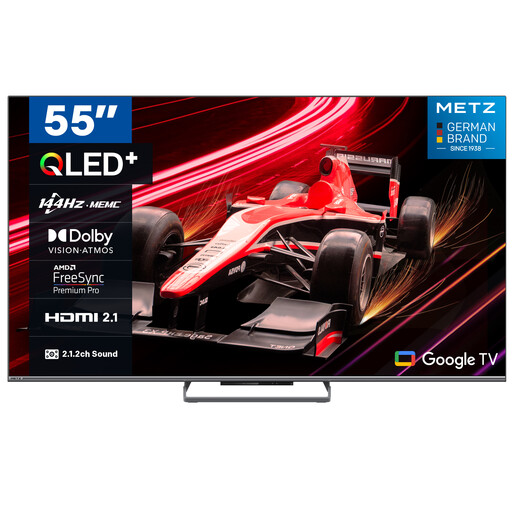
METZ 55MQE8000Z 55-inch QLED Google TV

METZ 55MQE8000Z 55-inch QLED Google TV

A 55-inch model to compare with other sizes. Consider its stated refresh rate alongside the broadcast and motion handling.

55 inches (140 cm), QLED, Google TV, 144 Hz, 4K HDR10+ and 2.1.2 sound system. Also listed: Sports Mode, ALLM, VRR and MEMC.

View at Joybuy

METZ 55MNE8000Z 55-inch QD-Mini LED Google TV

METZ 55MNE8000Z 55-inch QD-Mini LED Google TV

A 55-inch model to compare with other sizes and check against the picture features you want.

55 inches (140 cm), QD-Mini LED, Google TV, 144 Hz, 4K HDR10+ and 2.1.2 sound system. Also listed: Sports Mode, ALLM, VRR and MEMC.

View at Joybuy

Frequently asked questions

Is 55 inches always big enough for our student house?

No, it depends on the viewing distance and seating. Measure from the usual seats to where you plan to put the screen. The Dutch Consumers’ Association suggests around 2.4 times the screen diagonal as a starting point, not a requirement, and recommends looking at nearby sizes too.

Do we need 144 Hz to watch a rugby match?

Not necessarily. According to the Dutch Consumers’ Association, a TV signal is usually 50 Hz. Processing on a faster panel can make motion look smoother, but can also create picture artefacts during unpredictable action. Compare the specific model and the picture settings you plan to use.

Can we watch every rugby match through an app on the smart TV?

No. Check the latest listings for the specific match, then check which service you need and how to watch it. A provider’s rugby coverage doesn’t confirm that every future match will be available. Not every app is available on every smart TV either.

Should we buy extra cover for our shared TV?

You don’t need extra cover to have statutory rights. The Dutch Authority for Consumers and Markets’ ConsuWijzer service states that your statutory rights apply even without an additional warranty if a product doesn’t perform as you could reasonably expect under normal use. The retailer is responsible for this. Extra cover has its own terms and conditions.

Can we return a TV bought online?

For online consumer purchases, you generally have a statutory 14-day cooling-off period from delivery, according to the Dutch Authority for Consumers and Markets’ ConsuWijzer service. Check which exceptions and returns terms apply to your purchase.
