What should you look for when buying?
Start with screen size and motion, then consider visibility, access to the race and running costs for your viewing set-up.
| What to consider |
What should you look for? |
Who is this important for? |
| Motion during the race |
Compare moving sports footage on the exact model. Check the screen refresh rate, and assess picture processing separately from gaming or VRR specifications. |
I want to follow the peloton and camera movements clearly. Around 25% of consumers put motion handling first. |
| Screen size and placement |
Measure your viewing distance and the available width and height. Also check the TV’s overall dimensions with the stand attached. The Consumentenbond suggests dividing the viewing distance by 2.4 as a starting point for the screen diagonal, using the same unit of measurement. |
I want to watch comfortably from my seat without the TV dominating the available space. Around 25% of consumers put a good fit first. |
| Visibility in daylight and from the side |
Watch the same type of footage from the seats you’ll use, with lighting similar to that in your room. Consider both reflections and how clearly you can see on-screen information. |
I watch during the day or sit at an angle to the screen, and want to follow the race from that spot. Around 20% of consumers prioritise visibility in daylight or from an angle. |
| Access to the race |
Check that the required channel, service or app works with your subscription and the exact TV platform. If you watch through a receiver, check the HDMI connection and your provider’s requirements too. |
I want to know in advance whether I can watch the race I want through my channel or streaming service. Around 15% of consumers put access to the race first. |
| Purchase and running costs |
Compare energy-label consumption per 1000 hours and check whether your set-up needs a separate receiver or installation. Milieu Centraal recommends using consumption per 1000 hours as a point of comparison. |
I want to factor in electricity use and any extra equipment, as well as the purchase price. Around 15% of consumers prioritise overall costs. |
TVs at Joybuy
This selection includes compact 42- and 43-inch TVs to compare by viewing distance, race picture and reception.
 No image available
LG OLED42C68LA 42-inch 4K OLED Smart TV
The 42-inch size is a specific option to compare with your viewing distance and the space available.
The product name lists 4K Ultra HD, Dolby Vision, HDR10 and HDMI 2.1.
View at Joybuy
 No image available
METZ 43MQF7500Z 43-inch QLED 4K UHD Google TV
The 43-inch size gives you another option to compare with the space available. Also check whether the tuner suits your reception set-up.
The product name lists HDR10+, Dolby Vision, VRR, MEMC and a triple tuner for DVB-T/T2/C/S/S2. Check what the listed picture features mean for TV broadcasts.
View at Joybuy
 No image available
TCL 43V5D 43-inch FHD QLED Smart TV
This 43-inch TV is a size to compare with your viewing distance and where you plan to put the set.
The product name lists FHD, QLED and 120Hz. Check what the refresh-rate figure means, and assess the picture on the exact model.
View at Joybuy
 No image available
Hisense 43E7S 43-inch 4K QLED Smart TV
The 43-inch size can be compared with the space available. Check whether the listed tuner suits the way you watch TV.
The product name lists 4K QLED and 120Hz. The product information also mentions a digital tuner, smart TV features and MEMC; a refresh-rate figure alone doesn’t predict how a broadcast will look.
View at Joybuy
 No image available
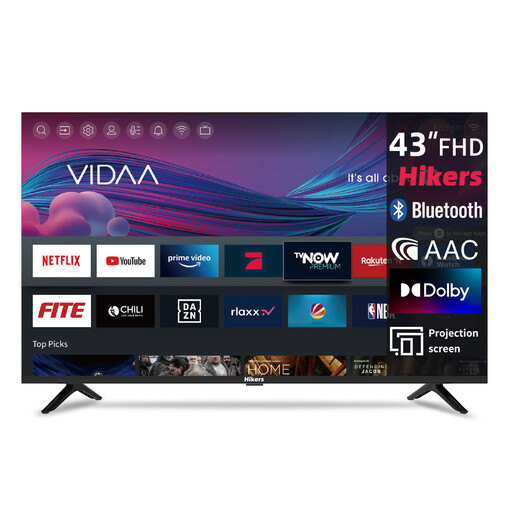
Hikers 43-inch FHD Smart TV
The 43-inch screen size can be compared with your viewing distance and the space available.
The product name lists FHD, VIDAA and a triple tuner for DVB-C/S2/T2, as well as streaming apps.
View at Joybuy
Frequently asked questions
What size TV will fit in my small living room?
Measure the distance from your eyes to where you plan to put the screen, then check that the TV will fit with its stand attached. The Consumentenbond suggests dividing the viewing distance in centimetres by 2.4 as a starting point for the screen diagonal in centimetres. This is a guide, not a required size.
Does 4K make every cycling broadcast look sharper?
No. To see the extra detail, the race must also have been filmed and broadcast in 4K. According to the Consumentenbond, this is generally not the case for regular TV programmes, so check how the race you want to watch is being broadcast.
Can I watch TV without a separate receiver?
Sometimes. With a built-in tuner, your provider and subscription may still require a smart card or CI+ module. For streaming, the app you need or a connected media player must work. Check this for the race and service you use.
How can I keep an eye on power consumption during long stages?
Compare energy-label consumption per 1000 hours, and factor in any decoder you use. Milieu Centraal also advises limiting direct light on the screen. Set the brightness to a level that’s comfortable to watch.
What are my rights if I’m unhappy with a TV bought online or it breaks too soon?
For a standard online purchase, you generally have a statutory 14-day cooling-off period from the date of delivery. ACM ConsuWijzer gives a TV bought online as an example. If the TV is faulty, the retailer is responsible under the statutory guarantee, which is not automatically limited to the manufacturer’s guarantee.
Do TVs in the Netherlands have to carry an energy label?
Yes. The Dutch Government lists TVs among the products that must carry an energy label. It provides information to help you compare products; it doesn’t mean you have to choose a particular label rating.


