
Vandaag of morgen in huis

Kwaliteit gegarandeerd

Welkomstaanbiedingen ontgrendelen: GRATIS bezorging | Tot 80% korting | Gratis 30 dagen JoyPlus-proefperiode
Download de app
Mounting a new television on the wall instantly gives your living room a sleek, uncluttered look. A TV wall mount is the key to achieving this. But with so many choices, it's easy to fall into a trap that leads to frustration, a crooked TV, or worse. As a Product Recommendation Officer at Joybuy, I'm here to help you see through the marketing jargon and make the right choice. Pay close attention to these common missteps:
tilting TV wall mount or a full-motion swivel TV mount would have been the solution. The wrong choice leads to a permanently poor viewing experience.television mounting bracket for a concrete wall requires very different mounting hardware than one for a drywall stud. Without the right anchors and screws, your TV simply won't be secure.To avoid the mistakes above, there are a few technical details you must check before buying a wall mount for your TV.
VESA is a universal standard for the distance between the four mounting holes on the back of your television. If your TV's VESA pattern doesn't match the mount's, it simply won't fit.
VESA mount with the correct specification is therefore a strict requirement.Every TV mount has a maximum load capacity. The weight of your TV (without its stand) must be well below this limit.
Think carefully about how you will use the TV. This determines which type of mount you need for mounting a TV to the wall.
Based on these criteria, we have highlighted a few popular choices that suit different user profiles.
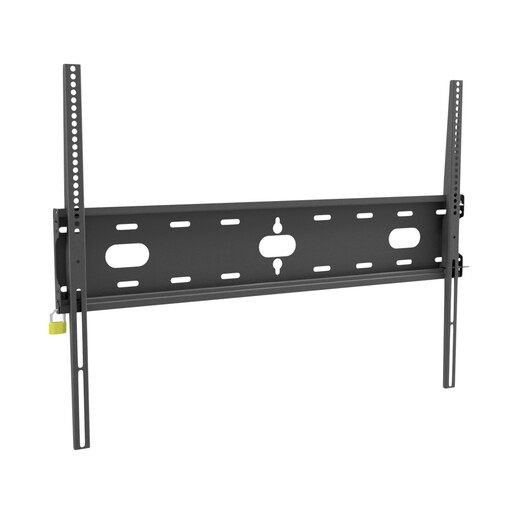
Why This Fits Their Persona: Ideal for those seeking a 'set it and forget it' solution. This mount is extremely strong and fits a wide range of TVs, so you don't have to worry about compatibility for a standard fixed installation.
Tackles the 'wrong size or weight' pitfall. With a load capacity of 125 kg and broad VESA compatibility (up to 800x600), it's highly unlikely your TV won't fit or will be too heavy.
Extremely high load capacity: At 125 kg, this mount offers a huge safety margin.
Wide compatibility: Suitable for a very large range of VESA sizes.
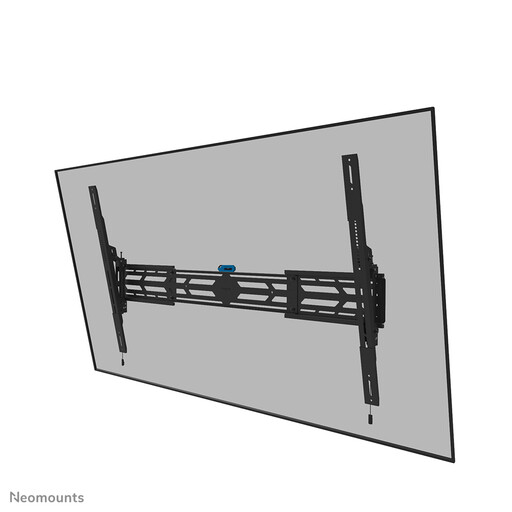
Why This Fits Their Persona: Designed for those with a very large TV (up to 110 inches) who need flexibility. The tilt function is perfect for creating the ideal viewing angle in a home cinema and avoiding reflections.
Solves the 'wrong functionality' pitfall by providing a tilt mechanism. Its enormous 160 kg load capacity eliminates any concerns about the weight of even the heaviest screens.
Suitable for heavyweights: Supports screens up to 160 kg and 110 inches.
Tiltable: Create the optimal viewing angle (4°, 8°, or 12°).
Lockable: Can be locked for extra security.
We have compiled a complete, up-to-date list of products that fully meet these strict selection criteria and safety regulations.
Not without the right preparation. A solid wall of concrete or brick is most suitable. For hollow walls, like drywall, you need special hollow-wall anchors, and sometimes extra reinforcement behind the board is recommended. Always check your wall's load-bearing capacity and use the correct mounting hardware intended for your wall type.
The VESA size is almost always listed in your TV's manual or on the specifications page on the manufacturer's website. You can also easily measure it yourself: measure the distance between the mounting holes on the back of your TV, first horizontally and then vertically. The size is noted as 'horizontal x vertical' in millimetres, for example, 400x200.
With the right tools and a clear manual, it's quite manageable for most people. Make sure you have a level, a power drill (with a hammer function if needed), and the correct screwdrivers on hand. It is highly recommended to do this with two people, especially when hanging larger, heavier televisions. If you're in doubt, you can always consider hiring a professional installation service.
