
Vandaag of morgen in huis

Kwaliteit gegarandeerd

Welkomstaanbiedingen ontgrendelen: GRATIS bezorging | Tot 80% korting | Gratis 30 dagen JoyPlus-proefperiode
Download de app
Hanging a new TV on the wall seems like a simple job. You pick a TV mount, drill a few holes, and you're done. But in reality, the wrong choice often leads to frustration: a TV that doesn't fit, a mount that sticks out, or in the worst-case scenario, an unsafe setup. Many marketing promises don't make the decision any easier. Let's avoid the most common pitfalls so you can choose the right wall mount for your television from the get-go.
Pitfall 1: The "universal" mount that doesn't fit. The term "universal" is often used, but it means little without context. A mount might be universal for a specific VESA size or weight class but ignore the cable placement on your specific TV model. The result? An HDMI or power port that becomes inaccessible after installation.
Pitfall 2: A flat mount that isn't flat. You buy a flat TV mount for a sleek, minimalist look, but after installation, the TV sits inches from the wall. The specified depth of a mount is often the measurement of the frame itself, without accounting for the mounting plates and the space needed for cables.
Pitfall 3: Underestimating the wall. The sturdiest television mount is useless if the wall cannot support the weight. A standard drywall wall is unsuitable for supporting a modern, heavy television without additional reinforcement. This is a safety risk that is often overlooked.
To avoid making the wrong choice, check three essential specifications. These determine if a TV hanging bracket is suitable for your TV and your situation.
The VESA size is the standardised distance between the screw holes on the back of your television, expressed in millimetres (width x height). This is the most important factor for compatibility. A TV with a 400x200 mm VESA size will only fit on a VESA wall mount that supports this pattern. You can find the VESA size in your TV's manual or by measuring the distance between the holes yourself.
Although manufacturers often specify an inch size (e.g., 55 inch TV mount or 65 inch TV mount), the maximum weight capacity in kilograms (kg) is far more important. The weight of televisions varies greatly, even within the same screen size. Always check the weight of your TV and choose a mount that can comfortably support it. Do not take any risks here.
The mount's function determines your viewing flexibility.
flat TV mount hangs the TV as close to the wall as possible for a sleek look. Ideal if you always sit directly in front of the TV.tilting TV mount allows you to angle the screen vertically. This is useful for reducing glare or if the TV is mounted higher up, for example, in the bedroom.swivel TV mount, also known as a full-motion TV mount, offers the most freedom. You can pull the TV forward, swivel, and tilt it. Perfect for corner installations or rooms where you watch TV from multiple positions.Based on these specifications, we have selected several popular choices that suit different user profiles.
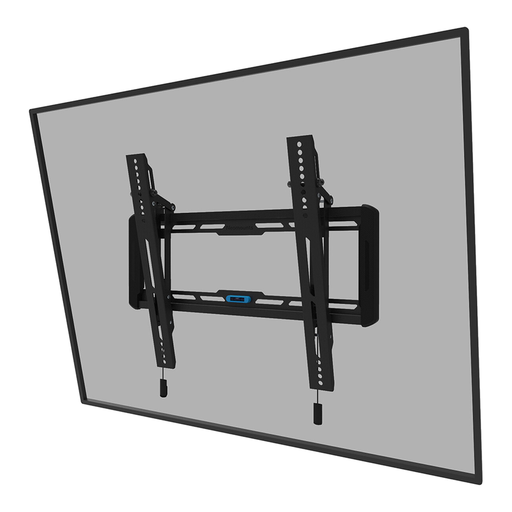
Why This Fits Their Persona: Ideal for the living room or bedroom. This mount is a no-nonsense solution that does its job well: hanging the TV securely and flush, with the option to tilt to combat annoying glare.
This mount specifies a clear VESA range (100x100 to 400x400 mm) and a weight capacity of 50 kg. No vague "universal" claims, just clear specifications you can verify.
The 3.3 cm depth ensures a flush installation. According to the manufacturer, Neomounts, the magnetic 'pull & release' system simplifies installation.
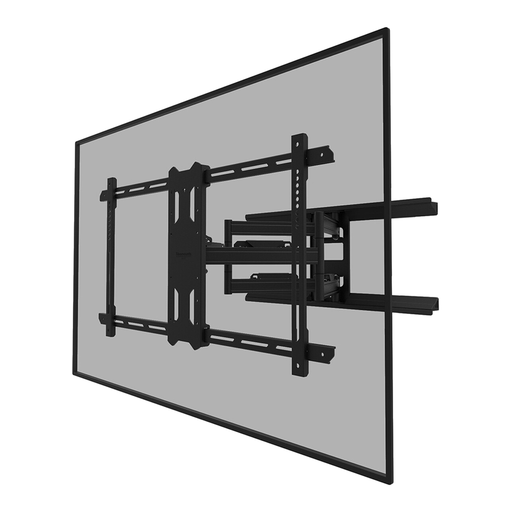
Why This Fits Their Persona: For those who want to place a large TV (e.g., a `75 inch TV mount`) in a corner or need to watch from both the dining table and the seating area. This full-motion mount offers maximum freedom of movement.
This mount provides a specific depth range (5-61 cm). This way, you know exactly how close and how far the TV can be from the wall, avoiding the pitfall of an unexpectedly protruding mount.
Offers tilt, swivel, and rotation functions for an optimal viewing angle. The steel construction and 60 kg weight capacity are designed for larger, heavier screens.
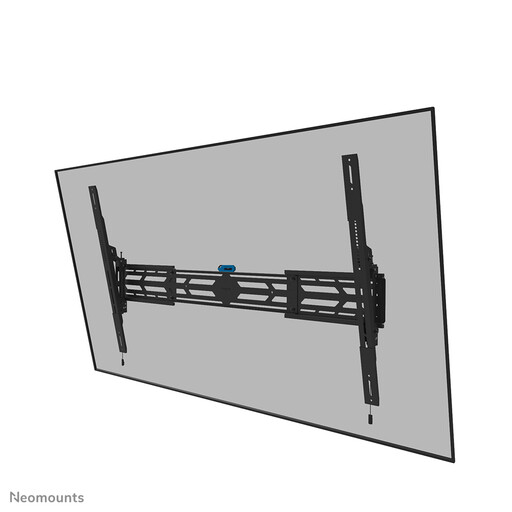
Why This Fits Their Persona: Designed for the toughest jobs: very large screens in offices, hospitality, or public spaces. Safety and reliability are paramount here. Suitable for both landscape and portrait mode.
This mount is explicitly designed for heavy screens up to 160 kg, addressing the safety risk of overloading. The option to secure it with a padlock provides theft prevention in public spaces.
Extremely high weight capacity (160 kg) and a very wide VESA range (up to 1500x900 mm). The portrait mode option is ideal for digital signage applications.
Not every TV or situation is the same. For those looking for a mount that can extend further from the wall, we've put together a dedicated selection.
Directly mounting a TV mount onto drywall (plasterboard) is strongly discouraged, as the board cannot support the TV's weight. For a secure installation, the mount must be screwed into the wooden or metal studs behind the drywall. If this is not possible, special hollow-wall anchors can be a solution, but always verify that the combined load capacity of the anchors is more than sufficient for the weight of the TV and the mount. When in doubt, consult a professional.
The VESA size is usually listed in your television's manual or on the manufacturer's product page. If you can't find it, you can easily measure it yourself. Measure the horizontal distance between the screw holes (in mm) and then the vertical distance. The VESA size would then be, for example, 400x200.
