
Vandaag of morgen in huis

Kwaliteit gegarandeerd

Welkomstaanbiedingen ontgrendelen: GRATIS bezorging | Tot 80% korting | Gratis 30 dagen JoyPlus-proefperiode
Download de app
Mounting a TV on the wall is an effective way to save space and give your room a sleek, modern look. Moreover, proper positioning ensures an enhanced viewing experience. But with an overwhelming selection of mounts available, making the right choice can be difficult. Which TV mount is right for your screen and your wall?
This guide will help you get started. We'll cover the key factors to consider and provide specific recommendations based on product specifications, so you can make an informed decision.
By the Joybuy Product Recommendation Officer
Before you purchase a TV wall mount, there are three key factors to consider. Checking these in advance will help you avoid making the wrong purchase and ensure a safe installation.
The VESA standard is the standardised distance between the four mounting holes on the back of your television, expressed in millimetres (width x height). Common sizes include 200x200 mm and 400x400 mm. You can find this measurement in your TV's manual or by measuring the distance yourself. Every VESA mount is designed for specific VESA patterns.
Additionally, each wall mount has a maximum weight capacity and is suitable for a specific screen size range (in inches). Always check the weight of your TV and ensure the mount can comfortably support it.
TV wall mounts come in three main types, each with its own function:
swivel TV mount with one or more arms allows you to tilt, swivel, and pull the TV away from the wall. Ideal for corner placements or if you watch from various spots in the room.A safe installation starts with the wall itself. A solid wall made of concrete or brick is most suitable. For hollow walls or plasterboard, you'll need special anchors and sometimes extra reinforcement. Many mounts, like a Neomounts TV mount, come with a mounting template and a spirit level to simplify installation.
Also, look for cable management features. Hooks or channels in the mount's arm help to neatly conceal cables for a tidy look.
Based on functionality and specifications, we have selected a few options for different scenarios.
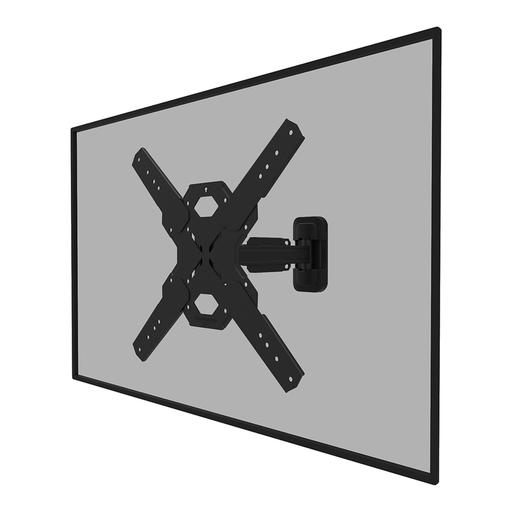
Why it stands out: This is a versatile full-motion TV mount suitable for the most common TV sizes. According to the manufacturer, Neomounts, the Easy-release system allows for quick attachment of the TV. The included spirit level and mounting template simplify the installation process.
Pros:
Who it's for: This is a practical choice for anyone looking for a flexible solution for a TV in the living room or bedroom. For example, the mount is a great match for a 65-inch TV mount.
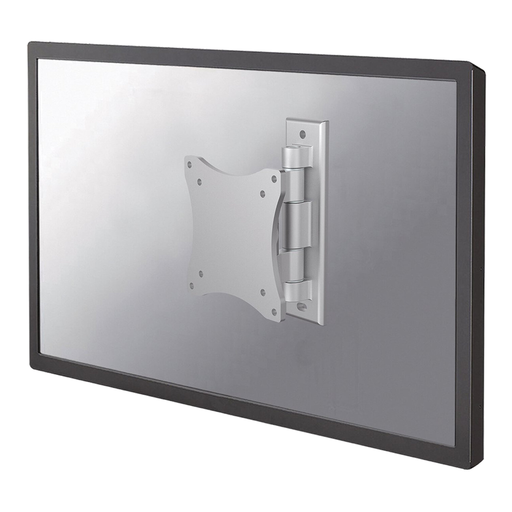
Why it stands out: This compact TV wall mount is designed for smaller screens and computer monitors. With two pivot points and a wide swivel angle (180°), it offers great freedom of movement in smaller spaces. The depth is adjustable from 4 to 7 centimetres.
Pros:
Who it's for: Perfect for mounting a monitor in a home office, a small TV in the kitchen, or a screen in a caravan or boat where flexibility is essential.
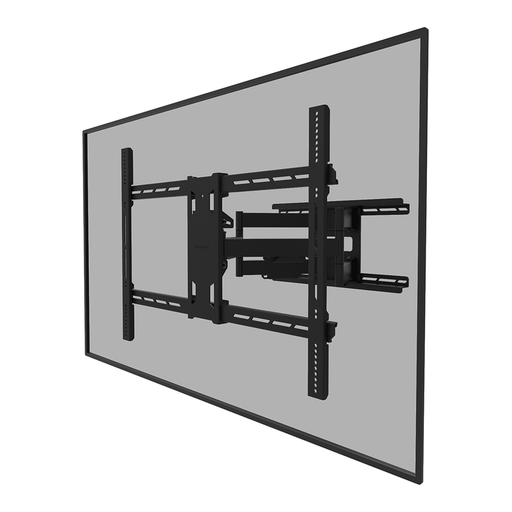
Why it stands out: This heavy-duty mount is built for the largest and heaviest screens. With an impressive weight capacity of 125 kg, it combines strength with full-motion flexibility, including tilt, swivel, and rotation.
Pros:
Who it's for: The designated solution for home cinema enthusiasts with a large-screen TV. Also highly suitable for business use in conference rooms, hospitality, or for digital signage where a robust and flexible mounting solution is required.
These recommendations cover several common scenarios, but the selection is much larger. For example, are you looking for a specific dual-arm TV mount for extra stability and a greater range of motion? Then check out our full range for more options.
The VESA standard is the standard distance between the mounting holes on the back of your TV. You can find it by measuring the horizontal and vertical distance between the holes in millimetres (e.g., 400 mm wide and 200 mm high is VESA 400x200). The size is also often listed in your television's manual. It is crucial that the VESA mount you choose is compatible with your TV's standard.
No, the wall must be strong enough to support the combined weight of the TV and the mount. Solid walls of concrete or brick are the most reliable. For mounting on a hollow wall (like plasterboard), you need special hollow-wall anchors, and it is recommended to attach the mount to the underlying wooden or metal studs. When in doubt, always consult a professional.
A good rule of thumb is to hang the centre of the screen at eye level from your most common viewing position (usually sitting on the sofa). This often translates to a height of about 100 to 120 cm from the floor. If you have to mount the TV higher, a tilting TV mount can help correct the viewing angle.
