
Viewers spread across the sofa
You watch with others from different angles and want the picture to remain clear and enjoyable from the outermost seat, too.


Start by checking the picture from the outermost seat. OLED is generally a good option for viewing from an angle, while an LCD TV with a demonstrably wide viewing angle may also suit you. Then assess the sound quality of the exact model and check that it has the connections you need. Consider viewing angle, reflections, screen size and energy consumption together, in the context of your room and setup.
You watch with others from different angles and want the picture to remain clear and enjoyable from the outermost seat, too.
You want to listen to the recital through your TV or existing audio equipment, so you check the sound and connections on the specific model.
You take reflections and the screen size you want in your own room into account, rather than relying on the panel name alone.
A good fit if: several viewers sit at an angle and good picture quality from the side matters.
Consider: assess reflections and sound quality on the exact model separately; the panel technology does not determine how good the music sounds.
A good fit if: you want an LCD TV and the viewing angle on the exact model looks good from the outermost seat.
Consider: RTINGS.com explains that IPS generally has a wider viewing angle than VA, while VA generally offers higher contrast.
A good fit if: the seats are directly in front of the screen, or you can angle the TV towards the viewers.
Consider: RTINGS.com explains that VA generally has a narrower viewing angle than IPS, so assess the picture from your own seats.
| What to consider | What should you check? | Who is this important for? |
|---|---|---|
| Picture from the side | Compare the exact model from the outermost seat; viewing angle and contrast vary by panel and model. | If I watch with others from different seats, I want the recital to remain enjoyable from the side. Around 42% of consumers put viewing angle first. |
| Music and connections | Listen to similar music on the TV and check that its connections work with your existing equipment. | Those who prioritise the sound of music and voices want to enjoy the recording and connect their equipment. Around 25% of consumers put this first. |
| Reflections and room lighting | Assess the screen from your seats in similar lighting, and consider reflections alongside brightness and viewing angle. | In a bright living room, I want to see how windows and lamps reflect on the screen. Around 17% of consumers focus mainly on room lighting. |
| Size, source and energy consumption | Measure your viewing distance, check how you’ll play the recording and compare the energy labels of suitable screen sizes. | If I’m mainly looking for a suitable size and a practical way to play the recording, I also want to compare energy consumption. Around 16% of consumers put these factors first. |
The name alone doesn’t tell you how the picture will look from the outermost seat. With LCD TVs, viewing angles vary according to factors such as panel type.
Check the viewing angle of the exact model and compare the picture from the seats you’ll actually use.
A screen specification won’t tell you how enjoyable music or voices will sound through the TV.
Listen to similar recordings on the specific model and check that its connections work with your audio equipment.
A separate audio setup may require extra equipment and space for connections.
A bigger or sharper screen won’t necessarily suit every viewing distance or recording source.
Measure the distance from your seats, check the recording quality and compare energy consumption on the energy label.
In the Netherlands, there is no fixed period for the statutory guarantee. The Dutch government states that retailers must take back a similar old appliance free of charge when you buy a new one.
Ask which services are included with your purchase, and treat any paid dismantling or installation as separate from the guarantee and take-back service.
An optional dismantling or installation service may be charged separately.
The OLED55C5ELB is a 55-inch OLED model you can compare with other screens for side seating.
According to its product description, the 55OLED810/12 combines a 55-inch OLED screen with Ambilight.
The BRAVIA 8 II is a QD-OLED model to compare with other screen types.
The QE55S90FAEXXN is a 55-inch OLED model to compare from the same seats.
This selection includes OLED models and a QLED TV for you to compare. The panel name alone won’t confirm how a specific TV performs from your side seats; also check the sound, connections and screen size for your setup.
 No image available
The OLED designation makes this model worth comparing for seats at an angle; check the viewing angle on the TV itself.
 No image available
This 83-inch OLED model is worth comparing if the screen size suits your viewing distance; the model name alone doesn’t give you a viewing angle measurement.
The product name specifies 4K.
 No image available
This 65-inch OLED model is worth comparing for a setup with side seats; check the picture from the outermost seat.
The product name specifies 4K.
No image available
This 55-inch OLED model is worth comparing if the size suits your viewing distance; assess the viewing angle on the exact TV.
The product name specifies 4K.
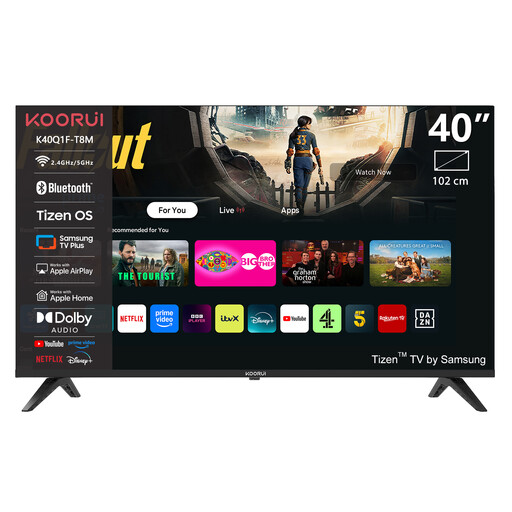 No image available
This 40-inch model is worth comparing if its compact size suits your room; the QLED designation alone doesn’t confirm the viewing angle.
The product name specifies Full HD and Tizen OS.
No, OLED isn’t the only option. According to the Dutch Consumers’ Association, OLED TVs generally offer a wider viewing angle, but an LCD model with a wide viewing angle may also suit you. Compare the exact TV from the outermost seat.
First, measure the viewing distance from the seats you’ll use. The Dutch Consumers’ Association suggests around 2.4 times the screen diagonal as an average guideline based on its own research. Use this as a starting point, and check the picture from the outermost seats too.
It depends on the exact file and TV model. Sony lists USB file systems and playback codecs for the 65-inch K-65XR8M2; this doesn’t prove that every file or another model will be compatible. Check the specifications for both the TV and your recording.
Check for reflections from your seats in the lighting conditions you usually watch in, and compare suitable screens using the EU energy label. Milieu Centraal recommends comparing consumption per 1000 hours; the energy label also distinguishes between SDR and HDR consumption.