If several people sit at an angle to the screen, OLED is a sensible place to start: according to the Consumers’ Association, OLED TVs generally have a wider viewing angle, but check the exact model from your furthest seat. An LCD TV with a confirmed IPS panel may also be worth comparing, although it will typically offer less contrast in dark scenes than VA. Also check how your own older source material looks, and keep the original aspect ratio for 4:3 recordings.
Who is this buying guide for?
Viewers on a wide sofa
You often watch together and want faces and colours to remain clear from the seats at either end of the sofa. Check the viewing angle from those positions, not just from directly in front of the screen. The Consumers’ Association and RTINGS.com discuss viewing angle as a factor to consider when people sit in different positions.
Fans of older recordings
You watch classic series, DVDs or other older sources and want to preserve the original aspect ratio. Bear in mind that picture processing cannot restore details that aren’t in the source. RTINGS.com explains the difference between older 4:3 recordings and the standard 16:9 screen format.
Buyers comparing LCD TVs
You want to consider LCD TVs as well as OLED models. Check the panel type of the exact model, and weigh up the usual differences in viewing angle and contrast in dark scenes. The Consumers’ Association and RTINGS.com explain the trade-offs between IPS and VA panels.
What should you look for?
OLED
Best for: several viewers sitting at an angle to the screen who value picture quality from those positions.
Bear in mind: check for reflections and assess the exact model; the Consumers’ Association notes that static picture elements displayed for long periods can be a concern.
LCD with IPS panel
Best for: anyone comparing LCD TVs who values wide viewing angles.
Bear in mind: IPS typically offers less contrast in dark scenes than VA, according to RTINGS.com.
LCD with VA panel
Best for: seats closer to the centre, if contrast in dark scenes matters more than picture quality at the ends of the sofa.
Bear in mind: a standard VA panel typically has a narrower viewing angle than IPS. Check any viewing-angle technology on a model-by-model basis, according to RTINGS.com.
| What to consider |
What should you check? |
Who should consider this? |
| Picture from the side |
Compare viewing-angle tests for the exact model and, if possible, watch it from the seat where you’ll be sitting at the sharpest angle. |
When I watch from the ends of the sofa, I want colours and picture quality to remain clear. Around 36% of consumers put viewing angle first. |
| Older recordings |
If possible, try your own source and check that 4:3 images are shown without stretching or cropping. |
When I watch classic series, I want to preserve the original picture shape and see how my source is displayed. Around 29% of consumers give older picture sources top priority. |
| Choosing between LCD and OLED |
Check the panel technology of the exact model and compare tests for the right screen size. |
When I compare OLED with an LCD TV, I want to weigh up viewing angle against contrast in dark scenes and consider my own buying priorities. Around 21% of consumers start with this trade-off. |
| Reflections and room lighting |
Assess the screen in the place you plan to put it, under the lighting you usually watch in. |
If windows or lamps in my room might reflect on the screen, I want to know how clearly I’ll still be able to see the picture. Around 14% of consumers put reflections first. |
Common pitfalls
-
Assuming ‘QLED’ or ‘LED’ means a wide viewing angle
QLED is a type of LCD; with LCD, the usual trade-off between viewing angle and contrast varies by panel technology. The Consumers’ Association and RTINGS.com explain the differences between IPS and VA.
Check the panel technology and viewing-angle tests for the exact model before choosing a TV for seats at either end of the sofa.
-
Stretching an old 4:3 recording to fill the screen
A 4:3 recording has a different aspect ratio from a modern 16:9 screen. Stretching it can distort the picture.
Choose the original aspect ratio and check the result with the comedies you actually watch.
-
Judging a TV under shop lighting and shop settings
The Consumers’ Association notes that shop settings are often brighter than those used at home. Reflections also depend on the lighting in your room.
Compare the TV in a picture mode suited to home viewing, and check where you plan to put it in relation to windows and lamps.
-
Assuming an extended warranty replaces your statutory rights
An extended warranty package is separate from your statutory rights. The Dutch Government states that the Netherlands has no fixed statutory warranty period.
Read what cover an additional package offers, and contact the seller if the product is faulty.
An extended warranty package costs extra; the price and additional cover vary from one offer to another.
Brands to compare
LG
The OLED55C68LA from the C6 series is a specific OLED model to compare for a wide seating arrangement.
- LG lists an OLED screen and picture processing by the α11 Gen3 processor.
- These specifications are not an independent measurement of viewing angle or performance with older comedy recordings. Check those points for the exact model.
Philips
The 55OLED810/12 combines an OLED screen with Ambilight, if you want to factor that lighting into your choice as well as picture quality.
- Philips lists a 55-inch screen, OLED, Ambilight and a P5 picture processor for this model.
- Philips’ claim about viewing from an angle is a manufacturer claim; Ambilight does not prove a wider viewing angle.
Sony
The BRAVIA 8 II K55XR8M25BP.CEI is a 55-inch QD-OLED model to compare if picture processing and connections are important to you.
- Sony specifies QD-OLED for this model.
- The screen technology doesn’t confirm how your older source or viewing position at an angle will look; check the exact model for yourself.
Joybuy product picks
The product picks below are mainly OLED TVs to compare for seating at an angle to the screen, plus a portable TV whose viewing angle you’ll need to check separately for your setup.
 No image available
LG OLED83C67LA, 83-inch OLED evo AI C6
This OLED model is worth comparing if picture quality from seats at an angle matters to you. According to the Consumers’ Association, OLED TVs generally have a wider viewing angle, but check the exact model from your own seat.
The product title lists an 83-inch screen, 4K, α11 AI Processor 4K Gen3 and VRR up to 165 Hz.
View at Joybuy
 No image available
LG OLED65C68LA, 65-inch OLED evo AI C6
This OLED model is worth comparing if several viewers won’t be sitting directly in front of the screen. The Consumers’ Association says OLED TVs generally have a wider viewing angle, but check the exact model from the side for yourself.
The product title lists a 65-inch screen, 4K, α11 AI Processor 4K Gen3 and VRR up to 165 Hz. The product description mentions AI Super Upscaling 4K, but this feature alone doesn’t guarantee a particular result with any specific older source.
View at Joybuy
No image available
LG OLED55C68LA, 55-inch OLED evo AI C6
This OLED model is one to compare if you often watch from a seat at an angle. According to the Consumers’ Association, OLED TVs generally have a wider viewing angle, but check the picture on the exact model.
The product title lists a 55-inch screen, 4K, α11 AI Processor 4K Gen3, 120 Hz native and VRR up to 165 Hz. The product description mentions AI Super Upscaling 4K, but makes no guarantee about the result with any specific older source.
View at Joybuy
 No image available
Samsung S85F GQ55S85FAU, 55-inch OLED 4K
This OLED model is worth comparing if you want to assess the picture from several seats. The Consumers’ Association says OLED TVs generally have a wider viewing angle, but test the exact model from the side.
The product title lists a 55-inch OLED screen with 4K resolution.
View at Joybuy
 No image available
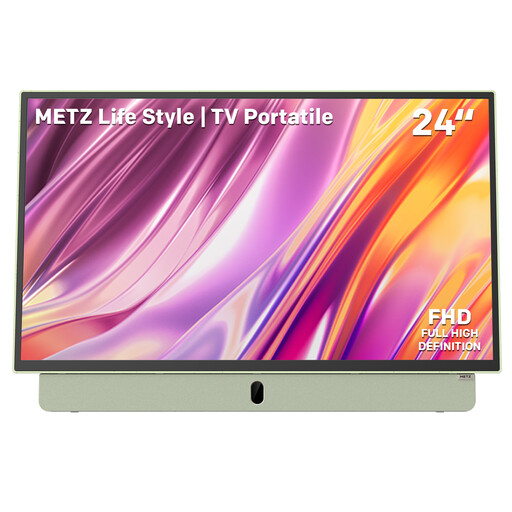
Metz MPE7200Z portable TV, 24-inch
The title describes a portable TV; the panel specification alone doesn’t confirm its viewing-angle performance. Check the picture from the seats where you plan to use the TV.
The product title lists a built-in battery, 12V car charger, anti-glare screen, LED and FHD.
View at Joybuy
Frequently asked questions
Should you stretch a classic series in 4:3 to fill the screen?
No. When you watch 4:3 content on a 16:9 TV, side bars are a normal result of the difference in aspect ratio. Choose the original ratio if you don’t want to stretch faces or crop parts of the picture.
How should you set up a TV at home to assess the picture?
Assess the TV in your usual room lighting, rather than relying only on a bright shop setting. The Consumers’ Association notes that shop settings are often brighter than those at home; then adjust the picture mode and brightness to suit your preferences.
Where can you compare the energy use of two TVs?
Compare the European energy labels for the exact models. The European Commission states that electronic displays use an energy-efficiency scale from A to G.
Are you always entitled to just a two-year guarantee on a TV in the Netherlands?
No. The Dutch Government says there is no fixed statutory warranty period in the Netherlands; what you can expect from a product depends, among other things, on the product and normal use. If a product is faulty, contact the seller; a manufacturer’s guarantee is separate.
Can you try a TV bought online from a business at home and cancel the purchase?
For distance purchases from a business, you usually have a statutory 14-day cooling-off period, according to the Dutch Government. Check which terms apply before you buy, and distinguish this right from any more generous returns policy offered by the seller.


