A 32-inch TV is a sensible choice when furniture space is limited and you sit close to the screen; a 43-inch TV gives you a larger picture if the viewing distance and space for the screen and stand allow it. Also compare the sound quality of the specific model and check that your recording source works with the required connection, app or file format. As the Consumers' Association points out, a 4K label does not automatically mean that a recording from a lower-resolution source will show more detail.
Who is this choice relevant to?
Viewer with limited furniture space
You want to watch recordings of theatre performances without the TV dominating your compact room. Before choosing a screen size, measure the viewing distance, available furniture width and the depth of the stand. The Consumers' Association discusses viewing distance as a starting point for making this choice.
Fan of dialogue and music
You want to hear actors clearly and enjoy the music, without needing a large audio setup. When assessing TV sound, the Consumers' Association considers factors such as speech clarity and music playback; check these features for each model.
Viewer with their own recording sources
You play recordings of theatre performances via a connected device, USB or smart TV service, for example. For your source, check the exact model for the required input, app and supported file format; Sony and LG publish model-specific information about connections and features.
What should you look for?
Start with your viewing distance and the space available for the whole TV. Then compare the picture, sound and how you’ll play your recordings.
| What to consider |
What should you check? |
Who is this most relevant to? |
| Screen size and placement |
Measure the viewing distance and the width and depth of your furniture. The Consumers' Association suggests around 2.4 times the screen diagonal as a starting point, not a hard-and-fast rule. |
If my seat is close to the TV and there’s little space on the furniture, I want to know whether the screen and stand will fit. For around 28% of consumers, space and viewing distance are the main priorities. |
| Speech clarity and music |
Compare the exact model’s sound for speech and music; if you’re using external audio, check that the required output is available too. |
I want to follow dialogue and enjoy the music without having to make room for a separate audio setup straight away. For around 22% of consumers, speech clarity and music playback are top priorities. |
| Picture quality in stage scenes |
Compare contrast and reflections across individual models; also check the resolution of your own recordings. |
If dark and brightly lit scenes matter to me, I look beyond the 4K logo. Picture quality is the main concern for around 22% of consumers. |
| Playback and connections |
For the exact model, check the required HDMI input, app or USB file format. |
I want to play my recordings using the source I already use and find out in advance whether the required connection or app will work. For around 17% of consumers, playback compatibility is the main priority. |
| Running and additional costs |
Compare the EU energy label and consumption in kWh per 1000 hours; also consider whether you’ll need an extra device for sound. |
I want to factor in electricity use and know whether the TV itself is up to the job for dialogue and music. For around 11% of consumers, running and additional costs come first. |
Common buying mistakes
-
Choosing based only on screen size
The diagonal measurement doesn’t tell you how wide or deep the TV is, including its stand. This can make it awkward to position, even if the screen size suits your viewing distance.
Measure the viewing distance and the available furniture space, and check the full dimensions of the exact model.
An unsuitable stand may mean you need to change the TV’s position or choose different furniture.
-
Assuming 4K will make every old recording look sharper
The improvement you can see depends on the source resolution. A 4K screen doesn’t turn a lower-resolution recording into an original 4K recording, notes the Consumers' Association.
Check the resolution of your own source, and compare reflections, contrast and sound as well as resolution.
-
Assuming a small soundbar will automatically solve the problem
A compact soundbar won’t necessarily sound good. The Consumers' Association notes that smaller, lighter soundbars often perform only moderately in tests.
First assess the TV’s own sound, then check which audio output is available if you’re considering an external solution.
-
Mistaking a related model for the same TV
A different model code may indicate another model or product version, with different connections or features.
Before relying on a match, compare the full model code and relevant specifications on the product page.
Brands to consider
Philips
Philips offers models ranging from 32-inch Full HD to 43-inch 4K QLED with Ambilight, as listed for the specific product ranges.
- For the 32PFS6900/12, Philips lists a 32-inch Full HD screen and Ambilight; the 43PUS8450/12 is a 43-inch 4K QLED model with Titan OS.
- Check the app selection, dimensions and sound for the exact model. Manufacturer information is not the same as independent test results.
Samsung
The F6000F range is one option to consider if a 32-inch Full HD smart TV suits the space you have available.
- Samsung Netherlands lists the UE32F6000FUXXN as a 32-inch Full HD smart TV.
- This model’s specifications don’t, on their own, tell you how clearly it plays theatre dialogue, and they don’t automatically apply to other ranges.
LG
According to LG Netherlands, the 43UA73006LA is a 43-inch 4K smart TV with webOS, for a setup where this size will fit.
- LG lists 4K and upscaling for this model.
- LG says that the picture quality of upscaled content depends on the source resolution; this doesn’t show how a particular theatre recording will look.
Sony
The BRAVIA 3 K-43S3 may be worth considering if you’ll be using several connected sources.
- For the K-43S3, Sony lists four HDMI inputs, eARC/ARC, 4K and dimensions including the stand.
- These connection details don’t confirm that your specific recording, app or audio setup will work as you’d like.
TCL
The Netherlands P7K range includes a 43-inch QLED version to compare if there’s room for a larger screen.
- TCL lists support for Dolby Vision and HDR10+ for the P7K.
- These formats don’t mean that every theatre recording contains HDR, or tell you how a specific model sounds. Check the full model code and connections.
Joybuy TVs for compact viewing
This selection includes a 32-inch Full HD TV and 43-inch models for anyone looking for a larger picture. Choose the bigger size only if your viewing distance and furniture space allow it.
 No product image available
KOORUI K32Q1FFQ-T8 32-inch Full HD QLED smart TV
This 32-inch option suits a compact setup; measure the viewing distance and space for the stand beforehand.
Joybuy product information lists Full HD, QLED, Tizen OS, Dolby Audio and HDMI ARC.
View at Joybuy
 No product image available
Philips 43PUS8001/12 43-inch 4K TV
This model is for anyone looking for a larger screen who has enough space for the TV and stand.
Joybuy product information lists 4K UHD, HDR10+, Titan OS, three HDMI ports and 20 W speaker output; one HDMI port supports eARC.
View at Joybuy
 No product image available
TCL 43T6C 43-inch 4K QLED smart TV
A 43-inch option for anyone looking for a larger picture and able to accommodate its dimensions.
The product name lists 4K QLED and 120 Hz. Product information also mentions Dolby Audio, a smart TV interface and HDMI connections.
View at Joybuy
 No product image available
Hisense 43E7S 43-inch 4K UHD QLED smart TV
This version gives you a larger screen; check that it suits your viewing distance and the space available on your furniture.
Joybuy product information lists 4K UHD, 3840 × 2160, HDR10+, VIDAA, Wi-Fi, three HDMI 2.1 ports and energy class E.
View at Joybuy
 No product image available
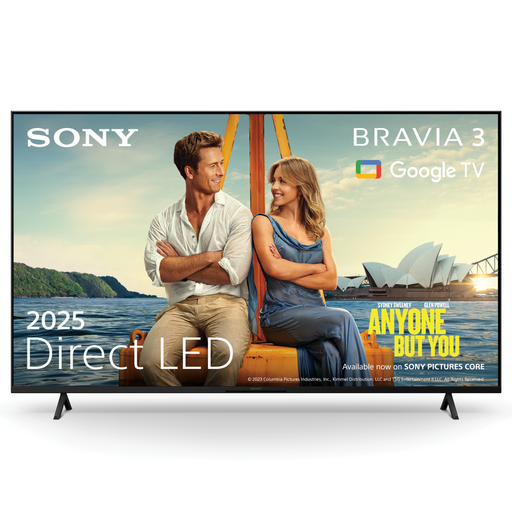
Sony K43S32BP.CEI BRAVIA 3 43-inch 4K LED smart TV
This 43-inch model suits a larger viewing setup, if your available space allows for it.
Product information lists Google TV, Google Cast and Apple AirPlay 2. Sony describes the X-Balanced Speaker as designed for clear dialogue; this is a manufacturer claim, not an independent sound assessment.
View at Joybuy
Frequently asked questions
How can I tell whether a 32-inch or 43-inch TV will fit in my room?
Measure the distance from your seat to where you plan to place the screen, and check the space available for both the screen and stand. The Consumers' Association suggests around 2.4 times the screen diagonal as a starting point for a comfortable viewing distance; it’s also worth looking at nearby sizes.
Do I need permission to wall-mount a TV in a rented home?
It depends on the alteration. The Government of the Netherlands gives filling in small holes as an example of a change that can be reversed without much expense. For changes that are not easy to reverse, you’ll need to consider whether your landlord’s permission is required. Check the wall and fitting instructions too; placing the TV on a suitable piece of furniture avoids wall mounting.
Can I play theatre files directly from a USB drive?
That depends on the file and the codecs supported by the model you choose. For example, Sony publishes a list of USB file formats for the K-43S3; compare it with your own recordings before relying on direct playback.
How do I compare electricity use, and what if I’m not happy with a TV bought online?
Compare the EU energy label, which runs from A to G, and consumption in kWh per 1000 hours; the European Commission provides separate information for SDR and HDR. According to the Government of the Netherlands, a 14-day cooling-off period applies in many cases when you buy from a business online as a consumer. Different rules apply when buying from a private seller.
Is the legal guarantee on a TV in the Netherlands always exactly two years?
No. The Government of the Netherlands says there is no fixed statutory guarantee period in the Netherlands: you’re entitled to a product that works properly, with factors such as its expected lifespan and the circumstances taken into account. If a product is faulty, the retailer is your point of contact; an additional manufacturer’s guarantee does not replace this right.


