
Viewer with a narrow shelf
You want to follow a tennis match, but the available width and depth will determine which TV can stand safely on your shelf. Consumentenbond recommends taking the TV’s actual dimensions into account.


First, measure your shelf and check the TV’s dimensions, including its stand. Then choose a screen size you can comfortably follow from your seat. Consumentenbond suggests using roughly 2.4 times the screen’s diagonal as a starting point for viewing distance, not as a hard-and-fast rule. A higher advertised motion rate or 4K resolution alone won’t guarantee a better picture for tennis.
You want to follow a tennis match, but the available width and depth will determine which TV can stand safely on your shelf. Consumentenbond recommends taking the TV’s actual dimensions into account.
You want to follow the ball and the action from your usual seat, so you’re weighing screen size against motion handling. Consumentenbond discusses viewing distance and picture quality for sport.
You’re considering wall mounting, but want to check first that the wall, bracket and exact TV model are suitable. Sony provides model-specific mounting advice for BRAVIA TVs.
Best for: situations where shelf width or depth limits your choice and you sit relatively close to the screen. Consumentenbond lists 32 inches as a common small size.
Trade-off: the court may look smaller from further away. Check the exact stand dimensions and leave room for connections.
Best for: a seat further from the screen, provided the TV fits safely on the shelf with its stand. Consumentenbond suggests 43 inches as a nearby size for a viewing distance of 270 cm, not as a universal limit.
Trade-off: a larger screen needs more space, and higher resolution alone doesn’t guarantee a better picture for sport.
Best for: a shelf that’s too shallow, provided the wall and mounting hardware are suitable for the exact TV model.
Trade-off: a matching VESA pattern alone doesn’t prove that a bracket is suitable. Sony highlights this for its BRAVIA TVs. Also check the screws, weight capacity and installation instructions.
| What to consider | What should you check? | Who is this important for? |
|---|---|---|
| Shelf space | Measure the TV’s width and depth with the stand, and allow for the position of the stand and connections. | If my shelf has limited space, I want to know in advance whether the TV will fit securely. Around 36% of consumers prioritise shelf space. |
| Motion handling | Check the panel’s actual refresh rate and, if possible, look for an independent review of the exact model’s picture quality for sport. | For tennis, I want to follow the fast-moving ball and camera; picture processing can also make movement look less natural. Around 29% of consumers prioritise motion handling. |
| Screen size and viewing distance | Measure your viewing distance and compare it with the screen’s diagonal. Treat Consumentenbond’s guideline of 2.4 times the screen diagonal as a starting point, not a requirement. | From my seat, I want to follow the action without choosing a screen that’s too big for my shelf. Around 21% of consumers prioritise visibility at their viewing distance. |
| Reception and running costs | Check whether your preferred service works via a connection, tuner or app, and compare the EU energy labels for the specific models. | I want to know whether I can watch the match using my chosen setup, and what the running costs will be. Around 14% of consumers prioritise reception and running costs. |
The diagonal doesn’t tell you whether the TV will fit on your shelf with its stand. The stand’s position and space for cables can also make a difference.
Measure your shelf and check the dimensions of the exact model, including its stand and connections, before buying.
An advertised figure doesn’t necessarily reflect the panel’s actual refresh rate. Picture interpolation can make movement look smoother, but it can also cause picture artefacts during unpredictable action, according to Consumentenbond.
Check the panel’s refresh rate and, if possible, compare an independent review of the exact model’s motion handling.
Consumentenbond points out that some Full HD TVs can have better picture quality than certain ultra-HD TVs. Resolution alone doesn’t determine which TV is right for your viewing distance and source.
Compare picture quality and motion handling using the source you’ll actually watch, rather than looking only at the number of pixels.
Your statutory rights are separate from a commercial manufacturer’s warranty. According to ACM ConsuWijzer, what you can expect from a TV depends on factors including the product and the circumstances.
Keep your proof of purchase and contact the retailer if a product doesn’t meet reasonable expectations. Assess any extended warranty on its own terms.
Philips Netherlands describes the 32PFS6900/12 as a compact Full HD TV with Ambilight. It could be a useful reference if you’re looking for a TV to put on a shelf, but check the dimensions of the version with its stand.
LG describes model 32LQ63006LA as a 32-inch Full HD smart TV with webOS.
Samsung Netherlands lists, among others, the 32-inch F6000F and H5000F. Check the full model name and resolution before treating different versions as the same.
Sony Netherlands provides model-specific information about wall brackets and screw holes for BRAVIA TVs.
This selection features 32-inch TVs for compact setups. Before buying, check the dimensions with the stand, as the screen size alone won’t tell you whether a model will fit on your shelf.
 No image available
The 32-inch size suits a compact TV setup. Check the stand dimensions of this exact model to make sure it fits your shelf.
 No image available
The 32-inch size is a compact option. Measure your shelf and check the TV’s dimensions with the stand before choosing.
 No image available
This 32-inch model suits a compact setup. Check that the stand fits on the shelf you have available.
 No image available
The 32-inch size could suit a limited space, but the exact dimensions including the stand will determine whether this model fits on your shelf.
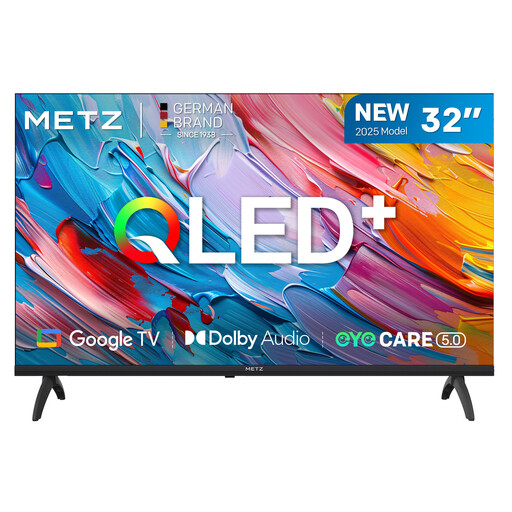 No image available
This 32-inch model is designed for a compact setup. Measure the space available and check the dimensions with the stand.
Measure the distance from your eyes to where the TV will sit, then compare it with nearby screen sizes. Consumentenbond suggests roughly 2.4 times the screen’s diagonal as a starting point. Also check the dimensions of the exact model with its stand.
No, 100 Hz isn’t a general requirement for watching tennis. Consumentenbond explains that picture processing can make movement look smoother, but may also cause artefacts during unpredictable action. So compare the motion handling of the specific model.
No. Sony warns that, for BRAVIA TVs, the screw holes and screw depth also matter, and that a matching VESA pattern alone doesn’t guarantee a suitable bracket. Follow the instructions for the exact TV and bracket, and check the wall’s weight capacity.
The European Commission describes an energy label for electronic displays, with ratings from A to G and information about features including HDR. Compare the labels for the specific models you’re considering.
For an online purchase, you generally have a statutory 14-day cooling-off period after delivery; ACM ConsuWijzer explains the conditions. Your statutory rights are separate from any manufacturer’s warranty. If the TV doesn’t meet what you could reasonably expect, the retailer is responsible for providing an appropriate solution.