What should you look for in a TV for subtitled dramas?
Start by measuring the distance, then assess the seating positions, your preferred streaming service and the running costs. This helps you avoid letting screen size or panel terminology dictate whether a TV is right for your needs.
| What to consider |
What should you look for? |
Who should bear this in mind? |
| Subtitles and screen size |
Measure the viewing distance and try watching a subtitled scene from the furthest seat. The Consumentenbond recommends around 32–43 inches at 2 metres and around 43–55 inches at 3 metres as a guide. |
If I want to be able to read the text from the furthest seat, I’ll check its legibility before choosing a screen size. Around 33% of consumers in this situation make readable subtitles their top priority. |
| Viewing angle and reflections |
Watch the same scene from the usual side seats and check for reflections under your usual lighting. Assess the specific TV, not just the panel type. |
When housemates sit in different places, I want to be able to watch from their usual seats and assess any problems caused by reflections. Around 27% of consumers prioritise visibility from the side seats. |
| Streaming and subtitles |
Check that your preferred service is available on the exact TV model, then try its subtitle language and display settings. Netflix warns that selected display options may not appear on some older devices. |
I want to use the drama app we already choose at home and adjust the subtitles on the TV itself. Around 20% of consumers prioritise streaming access and subtitle controls. |
| Shared costs and use |
Compare the energy labels for the exact models and agree how the purchase and running costs will be shared in the house. The European Commission describes EPREL as a source of additional product information, accessible via the QR code on the energy label. |
If we’re sharing the TV, I want to agree in advance how much everyone will contribute and how we’ll cover the ongoing costs. Around 20% of consumers make shared costs their top buying priority. |
Joybuy TVs for this viewing distance
This selection features 43-inch smart TVs. Use your measured viewing distance as a starting point: the Consumentenbond recommends 32–43 inches at 2 metres and 43–55 inches at 3 metres as guidelines, not fixed rules.
 No image available
METZ 43MQF7500Z 43-inch QLED 4K UHD Google TV
This 43-inch smart TV is worth considering if the measured viewing distance suits this screen size.
The product title lists QLED, 4K UHD and Google TV.
Also listed: HDR10+, Dolby Vision & Atmos, HDMI 2.1, VRR and MEMC.
View at Joybuy
 No image available
TCL 43V5D 43-inch FHD QLED Smart TV
This 43-inch model is worth considering if that screen size suits your viewing distance.
The product title lists FHD, QLED and 120Hz.
View at Joybuy
 No image available
Hisense 43E7S 43-inch 4K QLED Smart TV
Consider this 43-inch model if its size suits your measured viewing distance and available space.
The product title lists 4K, QLED and 120Hz.
View at Joybuy
 No image available
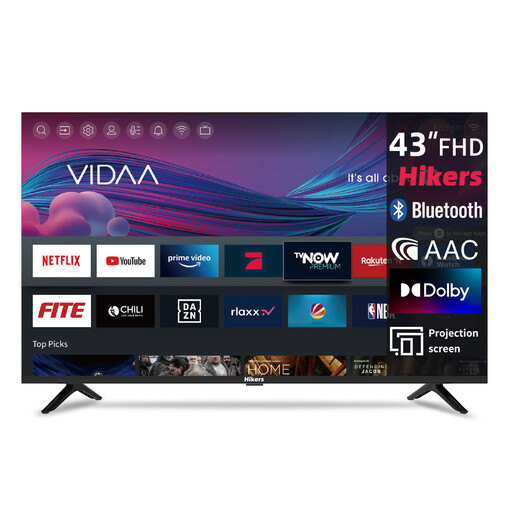
Hikers 43-inch FHD Smart TV with VIDAA
This 43-inch model is worth comparing if that screen size suits the room and viewing distance.
The product title lists FHD, Wi-Fi, VIDAA and a triple tuner.
Also listed in the title: Molotov, Netflix, Prime Video, Disney+ and YouTube. Check that your preferred service is available on the exact TV.
View at Joybuy
 No image available
CHiQ U43QM10E 43-inch 4K Ultra HD QLED Smart TV
This 43-inch TV is worth comparing with other models if that size suits your viewing distance.
The product title lists 4K Ultra HD, QLED and Google TV.
Also listed: HDR10, VRR, ALLM, Dolby Audio and a triple tuner.
View at Joybuy
Frequently asked questions
What size TV is right if the sofa is about 3 metres from the screen?
The Consumentenbond recommends 43–55 inches at 3 metres as a guide, not a fixed rule. Measure from your usual seat, try reading subtitles from the furthest spot and check that the TV will fit in the room.
Can I make subtitles bigger on the TV?
That depends on the streaming service and device. Netflix explains how to adjust subtitle display settings, but warns that selected options may not appear on some older devices. Try the setting with the service and TV you plan to use.
How can I check that everyone in the student house can see the screen clearly?
Watch a scene from the seats you usually use, including those at the side, and check for reflections under your usual lighting. Assess the specific TV in the position you plan to use it.
What can I do if our streaming app isn’t available on the TV?
First, check the apps available on the exact TV model, as these vary between smart TVs. A separate streaming device may be an alternative if the TV has the connection it needs.
How can I compare TVs’ energy use?
Compare the energy labels for the exact models. According to the European Commission, the QR code on the label links to additional product information in EPREL. Your annual costs will also depend on how long you watch TV and your electricity tariff.


