Start with the distance between your eyes and the TV: the Dutch Consumers’ Association suggests dividing the viewing distance by 2.4 to get a starting point for the screen’s diagonal measurement, not a fixed size. Test subtitles using your own streaming service from your seat. Then choose between OLED, which generally offers deeper blacks and a wider viewing angle, and LCD, which can often deliver higher brightness, based on the light in your room and your viewing angle.
Who is this choice relevant to?
Long-distance viewer
You sit a long way from the screen and first want to know which size will suit the measured distance and the available wall or TV stand. The Dutch Consumers’ Association describes viewing distance as a starting point for choosing a screen size.
Subtitle reader
You follow a lot of dialogue through subtitles and want to check how easy they are to read from your own seat, including the settings available on your streaming service. The Netflix Help Centre points out that not all subtitle options are available on every connected TV device.
Drama fan dealing with tricky lighting
You watch dark scenes in a bright room or from different seats, and want to weigh up black levels, reflections and viewing angle. The Dutch Consumers’ Association describes the differences between OLED and LCD, but your experience also depends on the specific model and where you sit.
What should you look for when choosing?
The Dutch Consumers’ Association uses the viewing distance in centimetres divided by 2.4 as a starting point for the screen’s diagonal measurement. Also compare nearby sizes and check that the TV will fit in the available space.
| What to consider |
What to look for when buying |
Who is this important for? |
| Size for a long viewing distance |
Measure the distance from your eyes and compare screen sizes around the calculated starting size. Also check the width and height, including the stand. |
I want to follow what’s happening on screen from my furthest seat without choosing a TV that won’t fit in the room. Around 36% of consumers prioritise a suitable size for a long viewing distance. |
| Easy-to-read subtitles |
Test a familiar scene from your usual seat. Check that your streaming service, language and playback device offer text settings that work for you. |
If I follow dialogue through subtitles, I want to be able to read them easily from my usual seat and know what settings my app offers. Around 29% of consumers prioritise easy-to-read subtitles. |
| Contrast in dark scenes |
Compare a dark scene with light subtitles on the specific model. From your usual viewing angle, look for detail, black levels and any halos around bright areas. |
When watching dark drama series, I want to see the details without bright subtitles dominating the picture. Around 21% of consumers prioritise contrast in dark scenes. |
| Daylight and energy consumption |
Assess reflections in lighting conditions similar to those in your room. Compare the energy label for the exact model and take account of the usage modes listed. |
If daylight or reflections affect where I sit, I also want to consider the energy consumption of suitable models. Around 14% of consumers prioritise picture quality in ambient light or energy consumption. |
Common pitfalls
-
Choosing a fixed screen size without measuring your viewing distance
Viewing distance is a starting point, but the TV’s overall dimensions and stand also determine whether it will fit where you plan to put it.
Measure the distance from your eyes, along with the available width and height. Then compare several screen sizes around the calculated starting size.
-
Assuming a bigger screen lets you customise subtitles
Subtitle options can vary by app, device and language; a bigger screen won’t change those settings.
Test the streaming service and language you use from your usual seat, and check the options on the playback device you plan to use.
-
Choosing based on the name OLED or mini-LED alone
Lighting, viewing angle and local dimming vary by model. The technology name alone won’t tell you how a screen handles light subtitles over a dark scene.
Compare the same kind of dark scene with subtitles on the specific TV, in lighting conditions similar to those in your room.
-
Confusing an extended warranty with your statutory rights
An optional warranty product and your statutory rights are not the same thing.
Read what an extended warranty covers and compare its terms with your existing statutory rights.
Brands to compare
LG
The OLED B6 range in the Netherlands includes the 77-inch OLED77B68LA, a model to consider when comparing large OLED screens.
- LG lists 4K, OLED and webOS among this model’s features.
- These specifications don’t automatically mean subtitles will be easy to read from your seat. The Dutch Consumers’ Association highlights image retention as something to consider if a static image is displayed for an unusually long time.
Samsung
The 75-inch QN90F is a Neo QLED 4K mini-LED model to compare if you’re considering a large LCD screen.
- Samsung identifies the model as QE75QN90FATXXN and describes it as Neo QLED 4K with mini-LED.
- Don’t assume from the technology name that this model will have the fewest reflections or halos from where you sit; assess the picture for yourself.
Sony
The K-75XR75M2, BRAVIA 7 II, is a 75-inch LCD model to compare if local dimming and connections matter to you.
- Sony lists a 4K screen, local dimming and four HDMI inputs. The stated dimensions and weight can help you decide where to place it.
- These specifications alone don’t prove that subtitles will look better.
Philips
The 75PML9009/12 is a 75-inch QD mini-LED TV with Ambilight to consider when comparing screens and smart platforms.
- Philips lists mini-LED, Ambilight and Titan OS for this model.
- Check that the streaming app you want and the subtitle settings on this model meet your needs.
TVs to compare on Joybuy
This selection includes TVs with 65, 75 and 77-inch screens, so you can weigh up the size for a long viewing distance. It features OLED, QLED and QD mini-LED models. Test subtitles and picture quality from your own seat before making a choice.
 No image available
OLED77G68LW
An OLED model to assess from your own seat when watching dark drama series with light subtitles.
Joybuy
 No image available
LG 65NU800B6LA 65-inch NANO 4K UHD Smart TV
Compare the 65-inch screen size with your measured viewing distance and available space. Also check the subtitle options on your own streaming service.
Joybuy
 No image available
Hisense 65A6S 65-inch 4K UHD Smart TV
Compare the 65-inch screen size with your calculated starting size, and test whether subtitles are easy to read from your seat on the device you use.
Joybuy
 No image available
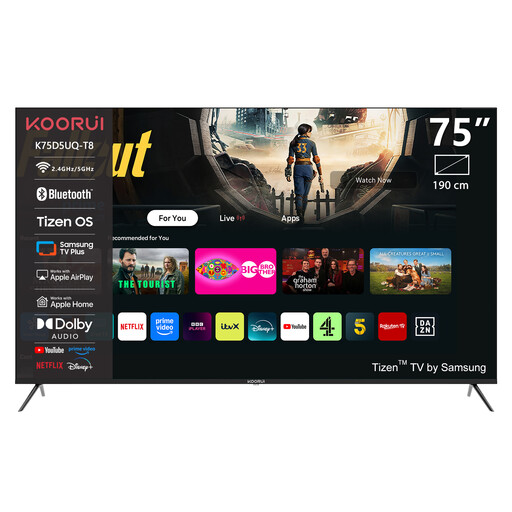
KOORUI K75D5UQ-T8 75-inch 4K UHD QLED Smart TV
Compare the 75-inch screen size with your measured viewing distance and check that the TV will fit in the available space.
Joybuy
 No image available
TCL 75T8D 75-inch QD-Mini LED 4K TV
This model is worth assessing alongside OLED; compare a dark scene with light subtitles from your own viewing position.
Joybuy
Frequently asked questions
What size TV is right for a sofa that’s a long way from the screen?
Measure the distance from your eyes to where you plan to put the screen. The Dutch Consumers’ Association uses the distance in centimetres divided by 2.4 as a starting point for the screen’s diagonal measurement. Compare nearby sizes and check that the TV will physically fit.
Can you make subtitles bigger on every smart TV?
Not always. The Netflix Help Centre says some options may not be available on connected TV devices or in certain languages. So test your own app, language and playback device from your usual seat.
How do you set up a TV for a dark drama series?
Watch a familiar scene at home, with both dark and bright areas, under your usual room lighting. The Dutch Consumers’ Association notes that shop settings often use higher brightness than you need at home. Adjust the picture settings to show the details you want to see in both parts of the scene.
What rights apply when buying a TV in the Netherlands?
For a typical online consumer purchase, you generally have a statutory 14-day cooling-off period from delivery, according to ACM ConsuWijzer. You also have statutory rights to a product that meets the required standards. The Dutch government states that there is no fixed statutory warranty period for this.
What energy regulations apply to TVs in the Netherlands?
The European Commission states that electronic displays in the EU are subject to ecodesign requirements and energy labelling. Compare the label and product information for the exact model. These can help inform your choice, but they don’t determine which energy class is right for your circumstances.


