What should you look for when choosing?
Start with the space and viewing distance, then check how you’ll play the showreel and whether the screen size and picture settings are right for the presentation. The Consumers’ Association highlights viewing distance, HDMI connections and picture settings as factors to consider.
| Consideration |
What should you check? |
Who is this important for? |
| Reliable playback |
Check the connection on your source device and whether you have a suitable HDMI input and, if needed, an adapter. Test both picture and sound in advance; if you’re using USB, try the exact video file. |
If I want to control my showreel from a laptop, I want to know everything works before the presentation. Around 28% of consumers prioritise a reliable playback method. |
| Size and space |
Measure the viewing distance and the available width and height of the unit. Compare these with the TV’s dimensions, including its stand. |
With limited space, I want a screen that fits on the unit without compromising the viewing distance. Around 22% of consumers prioritise limited space for the setup. |
| Detail and picture settings |
Compare the TV’s resolution with that of your showreel. Watch a familiar scene with light and dark areas in the lighting conditions of the presentation space. |
If fine details and light and dark scenes matter, I want to be able to assess my own showreel in the actual space. Around 22% of consumers prioritise picture quality. |
| Viewing from different positions |
Measure the greatest viewing distance and check the picture from the furthest seats. Look out for viewing angles and reflections from ambient light. |
For a group presentation, I want people to be able to follow the showreel from more than just directly in front of the screen. Around 17% of consumers prioritise visibility from different seats. |
| Total cost and usage |
Check which cables or adapters you already have and look at the EU energy label for the exact model. Make sure you know which connections you actually need. |
If I want to avoid unnecessary features or extra accessories, I compare what my setup requires. Around 11% of consumers prioritise the total cost. |
TVs at Joybuy
This selection includes compact TVs for smaller setups and larger models for viewers sitting further away. Check that each model suits your available space and playback method.
 No image available
KOORUI K32Q1FFQ-T8 32-inch Full HD QLED Smart TV
The 32-inch size may suit a compact setup if the viewing distance and available space are right.
The product name lists Full HD, QLED, Tizen OS and Dolby Audio.
View at Joybuy
 No image available
CHiQ L32QM10E 32-inch QLED Smart Google TV
This 32-inch model is worth comparing if you’re looking for a compact TV setup.
The product name lists a QLED screen, Google TV and a frameless metal design.
View at Joybuy
 No image available
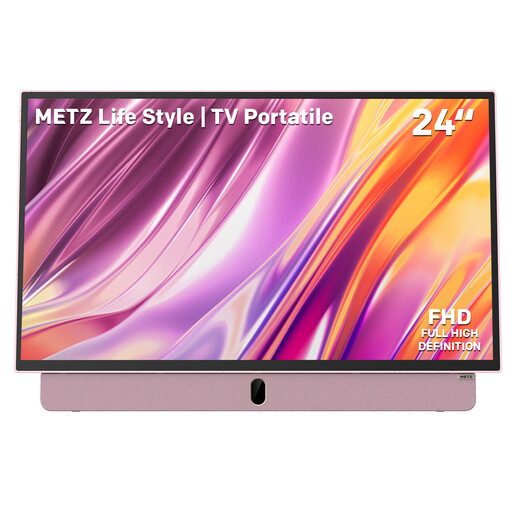
Metz MPE7000Z 24-inch Full HD portable TV, pink
The 24-inch size may be a good option if you need a smaller, portable setup; check in advance that the screen is large enough for all your viewers.
The product name lists a built-in battery, HDMI and USB.
View at Joybuy
 No image available
Hisense 43E7S 43-inch 4K UHD QLED Smart TV
A larger screen may be suitable if viewers are sitting further away and there’s enough space for it.
The product name lists 4K UHD 3840 × 2160, HDR10+, VIDAA and three HDMI 2.1 connections. Test USB playback with the exact file you plan to show.
View at Joybuy
 No image available
CHiQ U43QM10E 43-inch 4K Ultra HD QLED Smart TV
The 43-inch size may work well at a greater viewing distance if you have enough space for the TV.
The product name lists 4K Ultra HD, QLED and Google TV. Check in advance which connection or transmission method you’ll use with your source device.
View at Joybuy
Frequently asked questions
Does your TV need to be 4K to show an animation showreel?
No, your TV doesn’t have to be 4K. Consider your export resolution, screen size and viewing distance; according to the Consumers’ Association, the difference between Full HD and 4K isn’t always easy to see in practice.
Can you connect your laptop directly to a TV?
Yes, a TV can display pictures from a connected laptop or computer via HDMI. Check whether your laptop has a suitable output or needs an adapter, and test the sound before the presentation too.
How can you assess the picture settings for your presentation?
Watch a familiar scene with light and dark areas in the lighting conditions of the presentation space. The Consumers’ Association recommends using a scene you know well. Check that details remain visible, but don’t assume this guarantees colour accuracy.
How can you compare TVs’ energy use?
Compare the EU energy labels and product information for the exact models. The European Commission describes a scale from A to G for electronic displays; when comparing, also check the information about HDR playback.
What happens in the Netherlands if a TV bought online is faulty or you change your mind?
If a TV doesn’t meet the standard you’re entitled to expect with normal use, the retailer is responsible for the statutory guarantee, which is separate from any commercial manufacturer’s warranty. For a new TV bought online, ACM ConsuWijzer also states that you have a statutory 14-day cooling-off period from delivery, subject to applicable exceptions.


