
Viewer looking for a specific online lecture
Wants to check that the lecture and the platform it uses work on their TV before buying a device. The Dutch Consumers’ Association explains that compatible apps can play directly on a smart TV.


First, check where the lecture is available and whether your TV can play it directly through an app or using a supported casting method. You may not need an extra device at all. If you do need a separate player, choose one based on the app or casting method that works, the controls and the connections. Don’t expect a 4K streamer to solve reflections from daylight: for that, assess your TV and its position in the room.
Wants to check that the lecture and the platform it uses work on their TV before buying a device. The Dutch Consumers’ Association explains that compatible apps can play directly on a smart TV.
Wants to be able to read slides and text clearly, and is looking into whether the TV, daylight or its position in the room makes a difference. The Dutch Consumers’ Association recommends considering factors such as viewing angle, reflections and typical room lighting.
Wants to show a lecture from a phone or laptop on the TV, and to check in advance that picture and sound work properly with the chosen casting method. Google explains how to cast from Chrome; Apple describes AirPlay for supported devices.
Choose this if: your TV already supports the service hosting your lecture and you’re happy with the controls.
Bear in mind: check for the specific app; availability varies between TVs.
Choose this if: your TV doesn’t have the app you need and you’d like a player that plugs in behind the TV.
Bear in mind: check the exact version and whether the lecture you want is available through a compatible app.
Choose this if: you want to watch using a remote control or need a specific connection.
Bear in mind: compare the ports and included cables for the exact version; a box also needs space by the TV.
Choose this if: the lecture is mainly available in a browser or on a mobile device, and your TV or receiver supports the right method.
Bear in mind: Google Cast and AirPlay have different requirements. Test the lecture and check where the sound plays.
| What matters | What to look for when buying | Who is this important for? |
|---|---|---|
| Access to the lecture | Find the specific lecture and check the app or casting method on your TV or the device you’re considering. | If I want to be sure this particular lecture works, I’ll check how to play it first; around 36% of consumers put access to the lecture first. |
| Readability in daylight | Assess the TV from your usual seat in normal daylight, and look out for reflections. | In a bright living room, I want to be able to read slides and text clearly; around 29% of consumers prioritise readability in daylight. |
| Sharing and controls | Try the app or browser page you intend to use with your chosen casting method, and check both picture and sound. | If I want to start the lecture from my phone or laptop, I want to know in advance how the sound will play; around 21% of consumers prioritise sharing and controls. |
| Connections | Check HDMI, power, Wi-Fi or Ethernet, and what’s included with the exact version. | If I need cables or a wired connection, I want to know in advance what will work with my TV and what’s in the box; around 14% of consumers prioritise connections and any additional equipment needed. |
A compatible smart TV may play the lecture directly, but the apps available vary between TVs.
First, find the lecture, check how it can be played and try it on your existing TV.
A streamer’s output resolution doesn’t tell you whether text will be easy to read on a reflective TV screen in daylight.
Check the TV in your usual lighting and viewing position before replacing a player for picture quality reasons.
Ports and included cables vary between versions; a plan to use wired internet will only work if the necessary port is available.
Check the ports and box contents for the exact model before deciding how to connect it.
A similar name alone doesn’t confirm that it’s the same generation or version.
Compare the full model name and version on the product page before placing your order.
Google TV Streamer (4K) is a box with Google Cast, a remote control and built-in Ethernet, for anyone considering using their own TV apps or casting.
Apple TV 4K may suit viewers who want to share from a supported device using AirPlay or use TV apps.
The Xiaomi TV Box S (3rd Gen) is a Google TV box with a remote control for watching through compatible apps.
The LEAP-S3PRO is a Google TV box with Google Cast and a full-size remote control.
The products below are METZ TVs with Google TV, for anyone who wants to watch a lecture through a compatible TV app; they are not separate streamers. Also check the CE marking and product information for the exact version.
 Image unavailable
Can play a lecture through a compatible Google TV app; the title also mentions built-in Chromecast, but doesn’t confirm that the specific lecture will work.
43 inches (109 cm), QLED 4K UHD; HDR10+, Dolby Vision and Atmos; HDMI 2.1, VRR and MEMC; Triple Tuner DVB-T/T2/C/S/S2.
Check the CE marking and product information for the exact version.
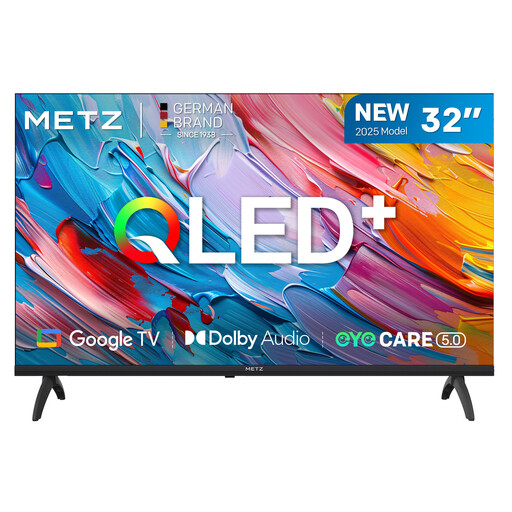 Image unavailable
Can play a lecture through a compatible Google TV app; the product title alone doesn’t confirm that the specific lecture will work.
32 inches, QLED HD; 93% DCI-P3 colour gamut; HDR10/HLG and Dolby Audio.
Check the CE marking and product information for the exact version.
Not necessarily. First, check for reflections and the TV’s picture settings in your usual daylight. The TV and video source must also support that resolution to play content in 4K.
With a compatible Google Cast receiver, you can cast a tab from Chrome. Google warns that when you cast your entire screen, the sound may stay on your computer. Try the tab-casting option and check how the specific website plays.
Check for a free HDMI input, a power supply and a network connection. Xiaomi lists an HDMI cable with the TV Box S (3rd Gen); Google says that a compatible HDMI cable for the TV Streamer is sold separately.
According to the Dutch Radiocommunications Agency, CE marking is mandatory on equipment covered by the applicable European requirements. Check the marking and product information for the version actually supplied; the product title alone doesn’t confirm this.
Not if your TV already plays the lecture through the app you want or a supported casting method, and you’re happy with the controls. Find the specific lecture and test picture and sound on your existing TV before choosing an extra device.