
Viewer with limited space
You want a TV that fits on your existing unit without dominating the seating area. The viewing distance and the TV’s overall dimensions, including the stand, will help you work out what size is practical.


First, measure your viewing distance and the space available for the screen and stand. Then choose based on the lighting you usually watch in. An OLED TV is worth considering if you mainly watch star fields in a dark room, while an LCD, QLED or Mini LED TV is worth comparing if your room gets a lot of daylight. The Dutch Consumers’ Association generally describes OLED as a technology that can produce deeper blacks. Also check whether the programme you want to watch is actually available in 4K or HDR: a TV with those specifications does not, by itself, guarantee a visible improvement.
You want a TV that fits on your existing unit without dominating the seating area. The viewing distance and the TV’s overall dimensions, including the stand, will help you work out what size is practical.
You mainly watch in low light and want to make out stars against a dark background. For you, black levels may matter more than peak brightness.
You often watch during the day and take reflections and brightness into account, as well as how the TV displays dark scenes.
Start with your viewing distance and the space available. Then assess the screen in your usual lighting and, finally, check the source and running costs. The Dutch Consumers’ Association suggests around 2.4 times the screen’s diagonal as a starting point for viewing distance, not a fixed rule.
| What to consider | What to look for | Who should pay particular attention? |
|---|---|---|
| Size and placement | Measure the viewing distance and the width and depth of your TV unit, allowing for the stand. | If I have limited space, I want the TV to fit without encroaching on the seating area. Around 28% of consumers give the highest priority to finding a suitable size and position. |
| Dark scenes | Compare the black levels and HDR of the specific model with the programmes you actually watch. | If I mainly watch star fields in the evening, I want to be able to follow bright details against a dark background. Around 28% of consumers prioritise how dark scenes are displayed. |
| Daylight and reflections | Assess reflections and brightness from your usual seat and in your usual lighting. | If I often watch during the day, I want incoming light not to make the picture uncomfortable to watch. Around 17% of consumers prioritise visibility in daylight. |
| Programme and picture format | Check that the provider offers the required app or connection, and that the programme is available in 4K or HDR. | If I want to watch my programmes without an extra playback device, I first check the source and the app I need. Around 16% of consumers prioritise access to programmes and the available picture format. |
| Energy use and service | Compare the EU energy label for SDR and HDR, and read the terms of any additional service. | If I want to factor in running costs, I want to compare energy use once I know the size and placement are right. Around 11% of consumers say energy use and service are the deciding factors. |
The TV’s overall dimensions, including the stand, also determine whether it will fit on your unit.
Measure the viewing distance and the available width and depth before choosing a size.
For 4K or HDR playback, both the TV and the broadcast or stream you’re watching must support the format.
Check the specific programme and provider, then see which picture formats the TV supports.
Whether you need permission depends on the alteration. Safe installation also depends on the wall and the TV.
Consider using the stand first. If you’re mounting the TV on the wall, check the wall, whether the alteration can be repaired, and the TV’s manual.
ACM ConsuWijzer distinguishes between a manufacturer’s or retailer’s warranty and your statutory rights.
Compare any additional cover with your existing rights, and read the terms and exclusions.
The OLED42C55LA is a 42-inch model to compare if an OLED TV suits the space you have available.
The QN90F range includes a 43-inch Neo QLED Mini LED model to compare if that size fits your space.
The 32PFS6900/12 and 43PUS9000/12 offer different screen sizes and resolutions to compare side by side.
The 43MQF7500Z is a 43-inch model to compare for placement and panel type.
These models are suited to compact spaces, viewing space footage in a dark room or comparing a QLED TV. Measure first to make sure the screen size will fit.
 No image available
An option to consider if you mainly watch in subdued lighting and have room for a 42-inch screen.
4K OLED smart TV; Dolby Vision, HDR10, Dolby Atmos, HDMI 2.1, webOS and Wi-Fi.
With OLED, image retention can occur if the same still image is shown for a long time; the Dutch Consumers’ Association does not specify an exact time period.
 No image available
Consider this model if a 43-inch screen fits your room and you’re looking for a 4K smart TV.
The product name lists 4K and Nano UHD.
 No image available
Only worth considering if, after measuring, you find that a 48-inch screen will genuinely fit your space and you often watch in low light.
4K OLED smart TV; Dolby Vision, Dolby Atmos, webOS and a native refresh rate of 120 Hz.
With OLED, image retention can occur if the same still image is shown for a long time; the Dutch Consumers’ Association does not specify an exact time period.
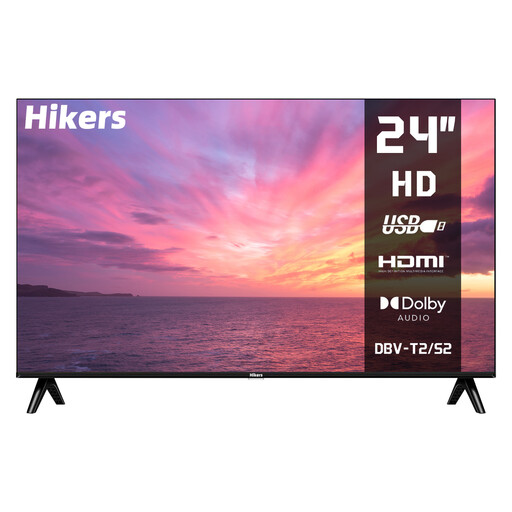 No image available
A compact model to consider if limited space on your TV unit is the deciding factor and you don’t need streaming apps on the TV.
HD; HDMI, USB, DVB-S2/T2/C, HDR and Dolby Audio.
The product name states that this isn’t a smart TV, so you’ll need an external playback device for streaming apps.
 No image available
Consider this QLED model if the size fits and you want to weigh it up against an OLED TV for your viewing conditions.
The product name lists QLED. The Dutch Consumers’ Association describes QLED as a type of LCD; compare the black levels of this specific model with what you need.
Measure from your seat to the intended screen position, and also check the width and depth of your TV unit, including the TV stand. The Dutch Consumers’ Association suggests around 2.4 times the screen’s diagonal as a starting point for viewing distance, not a required distance.
No. The broadcast or stream itself must also be available in 4K. Check with the provider to see whether the specific programme is available, and make sure you have the app or connection you need on your TV.
Start with the home setting rather than the shop mode. Watch a familiar scene with both dark and bright areas in your usual lighting, so you can see whether enough detail remains visible in both.
It depends on the alteration and the wall. According to the Dutch Government, you don’t need permission for a minor alteration that can be reversed without much expense, such as small holes that can be filled; you do need permission for renovation work. Before installation, also check the wall, the suitable fixings and your TV’s manual.
Compare the EU energy label and product information sheet for the specific models, including energy use with SDR and HDR. An energy rating cannot predict exactly what your own electricity bill will be.