
Viewer with limited space
You want a screen that suits your viewing distance and isn’t too wide for your TV unit or wall. The Consumentenbond recommends measuring your viewing distance at home when choosing a screen size.


Start by measuring your viewing distance and the space available: a bigger screen isn’t automatically more comfortable in a narrow living room. A compact OLED TV could suit you if you watch in subdued light or from different seats. If your room gets plenty of daylight, compare it with an LCD or Mini LED model. If music matters most, check the sound quality of the exact model and see whether you have room for a soundbar.
You want a screen that suits your viewing distance and isn’t too wide for your TV unit or wall. The Consumentenbond recommends measuring your viewing distance at home when choosing a screen size.
Vocals and instruments matter, but there’s little room for extra speakers. Compare the sound of each TV model and measure the space available for a potential soundbar too. The Consumentenbond points out that sound quality can vary considerably between TVs.
You watch during the day and in the evening, or from different seats. So consider the light, reflections and viewing angle where you’ll actually use the TV.
First measure the available space and viewing distance, then weigh up the light, seating positions and sound. The Consumentenbond uses viewing distance divided by 2.4 as a starting point for the screen diagonal in centimetres. Also check the actual external dimensions, including the stand or bracket.
| What to consider | What should you check? | Who should pay particular attention? |
|---|---|---|
| Size and placement | Measure the viewing distance and the available width and height; check the dimensions with the stand or bracket. Use the Consumentenbond’s formula as a starting point only. | If I have limited space, I want to know whether the screen will fit on my TV unit and be comfortable to watch from my seat. Around 31% of consumers prioritise size and placement. |
| Vocals and music | Compare reviews of the exact TV model. If you’re considering a soundbar, check the available width, whether it can be positioned freely and HDMI-(e)ARC compatibility on both devices. | If vocals and instruments matter more to me than extra picture features, I want to know whether the built-in sound is enough or whether I need a soundbar. Around 25% of consumers prioritise music sound. |
| Daylight and seating positions | Check for reflections in your room’s lighting and assess the picture from the seats you use. The Consumentenbond explains that OLED can generally offer a wider viewing angle, while LCD TVs can often be bright. | If I watch during the day or don’t sit directly in front of the screen, I want to assess the picture from my usual seat. Around 25% of consumers take daylight or seating positions into account. |
| Contrast in film scenes | Compare dark and bright scenes in the lighting you usually use, then adjust the picture settings at home to suit your preferences. The Consumentenbond describes deeper blacks as a general feature of OLED TVs. | If dark film scenes matter to me, I want to see how blacks and bright details look in my room, without overlooking the space available. Around 19% of consumers prioritise film contrast. |
The screen diagonal doesn’t tell you how wide the TV is with its stand, or how it will work with your viewing distance.
Measure the available space and viewing distance first. Use a viewing-distance formula as a guide, then check the external dimensions of the model you’ve chosen.
LG’s range includes the 48-inch OLED48C56LB from the C5 line. It’s an option to compare if you’re looking for a compact OLED screen.
Samsung’s range includes the 50-inch QE50QN90FATXXN, a Neo QLED model with Mini LED. Compare its size and picture quality if you watch during the day.
According to the manufacturer, the Philips 48OLED911/12 combines OLED and Ambilight with built-in Bowers & Wilkins sound. This could be useful if you have little room for separate audio equipment.
Sony lists an LCD screen with Mini LED and local dimming for the K-55XR5. This 55-inch model is only worth comparing if you have enough space for it.
This selection includes TVs with 48- and 50-inch screen diagonals, including OLED, QNED and Mini LED models. Compare the dimensions and features of your chosen model with your room. Audio claims aren’t an independent assessment of sound quality.
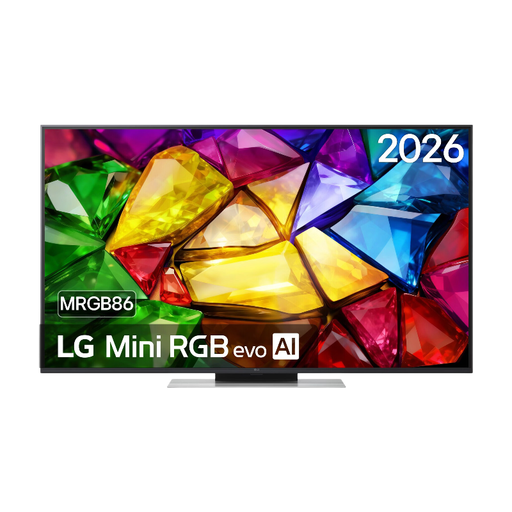 No image available
Compare the 50-inch size with your viewing distance and TV unit width. The product name specifies a 4K Mini RGB LED screen.
 No image available
This 48-inch OLED model is worth comparing if size and picture quality in dark scenes matter to you. The Consumentenbond explains that OLED TVs in general can offer deeper blacks and a wider viewing angle.
 No image available
Check the external dimensions and full specifications of this model, then compare them with your viewing distance and available space.
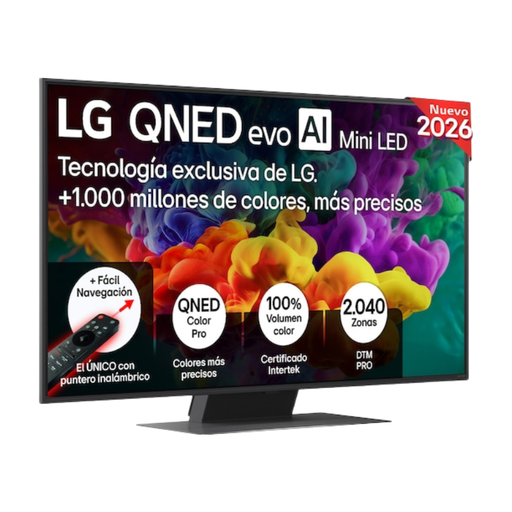 No image available
Compare this 50-inch Mini LED model with the space you have and your viewing distance. Assess reflections and picture quality in your room’s lighting.
 No image available
The product name specifies a 50-inch 4K Mini LED screen with 144Hz. Check that the size will fit, then compare the picture in your living room’s lighting.
Measure the distance from your eyes to where the screen will go, then check the available width and height. The Consumentenbond uses viewing distance divided by 2.4 as a starting point for the diagonal in centimetres; it isn’t a required size.
Check that both the TV and soundbar support HDMI-(e)ARC and that there’s space to position the soundbar freely. If needed, select the external speaker in the TV settings and check that the picture and sound are in sync.
Watch a familiar scene with the lighting you usually have at home. Adjust the picture settings to suit your preferences and check that details remain visible in both dark and bright scenes.
The European energy label for televisions runs from A to G. The European Commission says that energy consumption is shown in kWh per 1000 hours. This figure is useful for comparison, but it doesn’t predict your exact electricity costs at home.
According to the Dutch government, online distance purchases from a business generally come with a 14-day cooling-off period. You also have rights if a product is faulty or doesn’t meet requirements. The Netherlands has no fixed statutory guarantee period, and the retailer is your point of contact if something goes wrong.