
Viewers with limited space
You want to put a TV in an existing space and choose one based on viewing distance and its dimensions, including the stand. The Consumentenbond recommends using viewing distance as a starting point.


First, measure your viewing distance and the space available for the screen and stand. At around 2 metres, the Consumentenbond suggests 32–43 inches as a guide, not a hard-and-fast rule. Then choose a playback option that works with your film file and devices: the Consumentenbond covers USB playback, while Apple Support and Google Streaming Help say that AirPlay and Google Cast require compatible devices on the same Wi-Fi network. Check the picture, subtitles and spoken dialogue from the seats as well.
You want to put a TV in an existing space and choose one based on viewing distance and its dimensions, including the stand. The Consumentenbond recommends using viewing distance as a starting point.
Your holiday film is on a laptop, phone or USB storage device. The right playback option depends on the file, the TV and the source device. The Consumentenbond, Apple Support and Google Streaming Help outline different connection and sharing options.
You want everyone to be able to follow the picture, subtitles and spoken dialogue. Check from the seats people will actually use; the Consumentenbond includes picture and sound quality in its TV tests.
Start with the space and playback options, then factor in group viewing and running costs.
| What to consider | What to look for | Who should pay extra attention? |
|---|---|---|
| Screen size and placement | Measure the viewing distance and check the width, depth and stand dimensions of the exact model. | I want the TV to fit in the space I already have, including the stand and depth; around 34% of consumers prioritise placement. |
| Playing your own holiday film | Check the file format and whether HDMI, USB or your preferred wireless method works with your devices. | I want to play my own film from the source I already have and know in advance which option will work; around 33% of consumers prioritise playback method. |
| Picture and sound for a group | Check subtitles, picture and spoken dialogue from the seats you plan to use; compare tests of the exact model where possible. | If we watch from different seats, I want everyone to be able to follow the film and dialogue; around 20% of consumers prioritise watching together. |
| Energy use and help if something goes wrong | Compare the energy label for the correct model variant and read the terms of any optional additional warranty. | I want to be able to compare energy information and know who to contact if the TV does not work as expected; around 13% of consumers prioritise energy use and after-sales support. |
The diagonal measurement does not tell you how wide or deep the TV is. The stand takes up space too, and may determine whether the set fits on your furniture.
Measure the viewing distance and the available width and depth before comparing the dimensions of different models.
USB playback, HDMI and wireless sharing each have different requirements for the file, source and devices. Having a port alone does not guarantee that your film will play.
Check the manual for the exact model to confirm file and device compatibility, and test your chosen option in advance.
In the Netherlands, you have statutory rights against the seller even without a separate warranty plan. The Dutch government says there is no fixed statutory warranty period.
Read exactly what an additional plan covers, and keep it separate from your statutory rights if a product is faulty.
Philips Netherlands’ product information includes compact models such as the 32PFS6000/12, which may be worth considering if you’re looking for a 32-inch set.
Samsung Netherlands lists the 32-inch UE32H5000FKXXN, a compact model with Tizen.
TCL Netherlands lists 32-, 40- and 43-inch versions in its S5K range, offering options for different spaces.
The LG Netherlands catalogue lists the compact 32LR60006LA and 32LQ63006LA models.
This Joybuy selection focuses on 43-inch TVs for watching your own holiday film together, provided the viewing distance and available space are suitable. Before buying, also check that your film source and file format work with your chosen playback option.
 Image unavailable
A 43-inch option for watching together, if the viewing distance and available space are right.
Listed features: 4K UHD, 60 Hz, Dolby Vision, VIDAA and Game Mode Plus. Check that your film source and file format work with this model.
 Image unavailable
A larger screen for watching together, provided your furniture and viewing distance are suitable.
The product name lists Google TV, HDR10+, Dolby Vision & Atmos, HDMI 2.1 and Chromecast Built-in. Check that your source device and network suit your preferred playback method.
 Image unavailable
A 43-inch model to consider if you have room for a larger screen.
The product name lists 4K QLED and 120 Hz. Before playing your own film, check that your devices support the connection or playback method you want to use.
 Image unavailable
A 43-inch option for watching together, if the viewing distance and available space allow.
The product name lists HDR10+, VIDAA, Wi-Fi and 3 HDMI 2.1 ports. Check that your source device and film file support your preferred playback option.
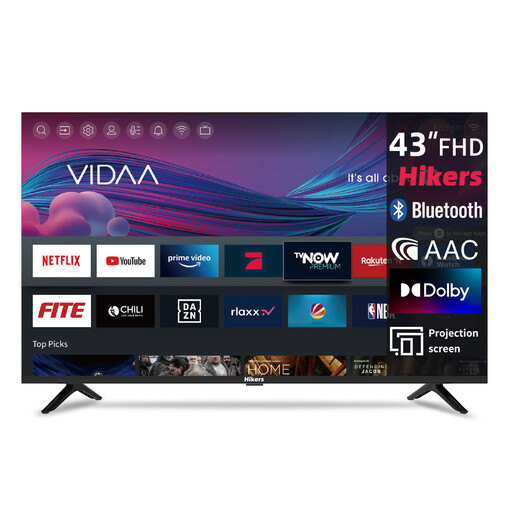 Image unavailable
A larger screen for watching together, if the available space and viewing distance are suitable.
The product name lists Wi-Fi, VIDAA and a triple tuner (DVB-C/S2/T2). Check the model information to see whether your film and playback option are supported.
Measure the distance from your seat to where you plan to put the TV, and measure the furniture too. For a 2-metre viewing distance, the Consumentenbond suggests 32–43 inches as a guide; also check the overall dimensions, including the stand.
Only if the TV supports your video and audio formats and storage device. Check the manual for the exact model and test the file in advance.
Not necessarily. Google says the device you cast from and the receiving device must be on the same Wi-Fi network; Apple says AirPlay needs a compatible receiver on the same network. Check that the devices can find each other, and have a suitable HDMI option ready if needed.
In the Netherlands, the seller must provide a solution if a product is faulty. The Dutch government says there is no fixed statutory warranty period; what you can expect depends on the circumstances and the information provided with the product.
EU rules for electronic displays, including televisions, set out requirements for energy labels and related product information. Compare the label for the exact model variant; it won’t tell you what your own energy use will be.