What should you look for when buying?
For a film night in a small living room, start by using the viewing distance and available space to narrow down the size. Then choose the picture, streaming features, sound and energy use to suit your own needs.
| What to consider |
What should you look for? |
Who is this important for? |
| Size and placement |
Measure the distance from your eyes to the screen, as well as the available width and height, including the stand. The Dutch Consumers’ Association uses viewing distance divided by 2.4 as a starting point for the diagonal in centimetres. |
I want a clear view from both the nearest and furthest seat, and a TV that fits my unit; around 33% of consumers prioritise size and placement. |
| Film picture and viewing angle |
Watch dark scenes and check the viewing angle from the seats you plan to use at the side. The Dutch Consumers’ Association says OLED generally offers deeper blacks and a wider viewing angle, while LCD can be bright in a well-lit room; performance varies by model. |
If I watch with the lights dimmed or guests sit off-centre, I want to know how dark scenes and colours look from those seats; around 27% of consumers prioritise film picture and viewing angle. |
| Playing your chosen film |
Check that your preferred app is available on the exact TV platform. Also count the available HDMI ports if you want to connect an external media player. |
I want to start film night without app or input problems; around 20% of consumers prioritise access to their preferred film. |
| Clear dialogue |
Assess how voices sound at the volume you use at home. If you’re using a soundbar, check that the TV and sound system support the HDMI ARC or eARC connection you need. |
If I want guests to follow the dialogue easily, I’ll look for clear speech and a suitable soundbar connection; around 13% of consumers prioritise dialogue. |
| Energy use |
Compare the EU energy label and the energy consumption per 1000 hours of specific models. Where stated, check the separate figures for SDR and HDR too. |
I want to compare energy use based on the settings and viewing time I expect; around 7% of consumers prioritise energy use. |
TVs on Joybuy
These Joybuy models cover compact OLED and LCD or QLED options. Check how well one will fit by measuring your viewing distance and available space.
 No image available
LG OLED42C68LA 42-inch 4K OLED Smart TV
A good option if you’re considering a compact OLED TV for film night; measure your viewing distance and available space before choosing a screen size.
42 inches, 4K Ultra HD, OLED and Smart TV. The product name also lists Dolby Vision, HDR10, Dolby Atmos, HDMI 2.1, webOS and Wi-Fi.
Joybuy
 No image available
METZ 43MQF7500Z 43-inch QLED 4K UHD Google TV
A good option if you want to compare a compact QLED TV with Google TV; check the viewing angle and how well it fits your living room.
43 inches (109 cm), QLED, 4K UHD and Google TV. The product name also lists HDR10+, Dolby Vision, Dolby Atmos and HDMI 2.1.
Joybuy
 No image available
Hisense 43E7S 43-inch 4K QLED Smart TV
A good option if you want to compare a compact QLED TV for films; measure your viewing distance and available space before choosing a size.
43 inches, 4K, QLED and Smart TV. The product name also lists 120Hz.
Joybuy
 No image available
CHiQ U43QM10E 43-inch 4K UHD QLED Smart TV
A good option if you want to compare a compact QLED TV with Google TV; measure the available space and check whether wall mounting will work in your setup.
43 inches, 4K Ultra HD, QLED and Google TV. The product name also lists HDR10, VRR, ALLM and Dolby Audio.
Joybuy
 No image available
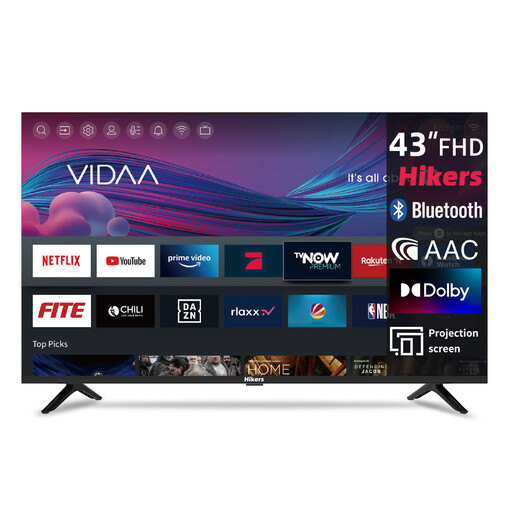
Hikers Smart TV 43-inch FHD
A good option if you’re considering a compact smart TV with the listed film apps; check that the screen resolution suits your viewing needs.
43 inches (108 cm), FHD and VIDAA. The product name lists Netflix, Prime Video, Disney+, YouTube and a triple tuner.
Joybuy
Frequently asked questions
Is 43 inches automatically the right size for a small living room?
No. The right size depends on your viewing distance and the space available. Measure from eye level to where the screen will go, and check the external dimensions, including the stand. The Dutch Consumers’ Association uses viewing distance divided by 2.4 as a starting point for the diagonal in centimetres, not as a required size.
How do I connect an existing soundbar?
Check that both the TV and soundbar have a suitable HDMI ARC or eARC connection. If not, see whether both devices support an optical audio connection; you may need a second remote control for this setup.
How can I keep film night running smoothly if a smart TV app disappears?
Before buying, check that your preferred app is available on the TV platform and, if needed, keep an HDMI port free for a separate media player. The Dutch Consumers’ Association points out that apps can disappear from a smart TV over time.
What should I look for when it comes to a TV’s energy use?
Compare the energy label and consumption in kWh per 1000 hours for the models you’re considering. SDR and HDR consumption can differ, so check both figures when they’re listed.
What are my rights when buying a TV online in the Netherlands?
For a typical online purchase by a consumer, ACM ConsuWijzer says you have a legal cooling-off period of up to 14 days after delivery; a new television is given as an example. Your statutory guarantee is separate from any manufacturer’s or retailer’s guarantee. If a product is faulty, the seller is responsible under the applicable terms.
Does an energy label apply to TVs in the Netherlands?
Yes. The European Commission includes televisions in its rules for electronic displays and specifies an energy label on a scale from A to G, with information for SDR and HDR. Check the label for the specific model; the rules don’t indicate which label class that TV has.


