
Family with a compact living room
Measure your viewing distance and furniture before choosing a screen size. The Consumentenbond uses the distance from your eyes to the screen as a starting point for working out the diagonal measurement.


First, measure the distance from your eyes to the TV and the width of the space available on your furniture. A small living room doesn’t automatically mean you need a smaller screen. Then choose based on where your videos are stored and how you want to play them. If your family sits in different places, compare the picture from the seats furthest to the side, too. The Consumentenbond generally describes OLED TVs as having a wider viewing angle and deeper blacks, while LCD/QLED TVs can often be brighter.
Measure your viewing distance and furniture before choosing a screen size. The Consumentenbond uses the distance from your eyes to the screen as a starting point for working out the diagonal measurement.
If your videos are on a USB drive, phone or another device, check that the TV and your chosen playback method support those files. Sony recommends checking the manual for the specific model to see which file types it supports.
If not everyone sits directly in front of the screen, pay attention to viewing angles and reflections. The Consumentenbond points out that viewing angles can vary between TVs.
Start with your viewing distance and how you plan to play your family videos. Then compare the view from different seats and the running costs.
| What to consider | What should you check? | Who should pay extra attention? |
|---|---|---|
| Size and placement | Measure the distance from your eyes to the screen and the width of your furniture. The Consumentenbond uses viewing distance divided by 2.4 as a starting point for the diagonal in centimetres. Also check the dimensions of the TV and its stand. | If my viewing distance is short or my furniture is narrow, I want to know whether both the screen and stand will fit. This is the top priority for consumers who focus mainly on size and placement: around 36%. |
| Playing videos | For the exact model, check which file systems and video and audio codecs it supports over USB, or whether it supports the phone connection you want to use. Compare this with one of your own files. | I want to watch family videos directly from my USB drive or phone without relying on a connection that might not work. This is the top priority for around 29% of consumers who focus on playback compatibility. |
| Viewing from different seats | Check the picture from the seats furthest to the side, and look for reflections in your usual lighting conditions. The Consumentenbond generally notes that OLED offers a wider viewing angle and deeper blacks, while LCD/QLED can often be brighter. | If we watch together and not everyone sits directly in front of the TV, I want a good view from the side, too. Around 21% of consumers prioritise a clear view from different seats. |
| Running costs and aftercare | Compare the energy label for the exact variant and check the delivery and returns terms. Treat the statutory guarantee separately from any optional commercial warranty service. | As well as the purchase price, I want to consider energy use and what options I have if something goes wrong. This is the main priority for around 14% of consumers. |
Viewing distance and furniture dimensions are two separate things to check. A screen might suit the distance, but its stand could be too wide for your furniture.
Measure both and compare them with the dimensions of the exact TV, including its stand.
An awkwardly sized TV or a stand that doesn’t fit could mean you need to rearrange your furniture.
Supported file systems and codecs vary between models and files. So, having a USB port doesn’t guarantee that your video will play.
Check one of your own representative files against the specifications or manual for the exact model.
If the file isn’t supported, you may need to use a different playback method.
Viewing angle, brightness and reflections all matter differently depending on where you sit and the lighting conditions. The screen technology alone won’t tell you how a specific model will perform in your living room.
Assess the model you’re considering from the seats furthest to the side, in lighting conditions similar to those at home.
ACM ConsuWijzer distinguishes between the statutory guarantee and an additional commercial warranty. A commercial warranty period does not replace your statutory rights against the retailer.
Check your statutory rights first, then consider whether any additional warranty service offers extra value.
An optional warranty service may cost extra, so weigh it up separately from your statutory rights.
The Dutch-market BRAVIA 3 K-43S3 is a 43-inch model worth considering if USB files or wireless sharing are important to you.
The Q7F2 QE43Q7F2AUXXN is a Dutch-market 43-inch 4K QLED variant to compare with other models.
The Dutch-market OLED42C5ELB is a 42-inch OLED variant for anyone who also considers viewing angles and dark scenes.
Philips describes the 43PUS8500/12 as a 43-inch QLED TV with Ambilight and Titan OS.
TCL’s P7K series includes a 43-inch QLED variant, offering another option to compare.
These TVs are worth considering for family videos in a compact living room. The range includes OLED and QLED models, as well as options for USB playback or wireless sharing. Check that the viewing distance and playback method suit each model.
 Image unavailable
A good fit if you’re looking for a 42-inch OLED TV and want to share compatible content from a suitable Apple device.
Features listed in the product name: 42 inches, 4K Ultra HD and OLED. The model-specific description mentions AirPlay 2; check that it works with your device and preferred sharing method.
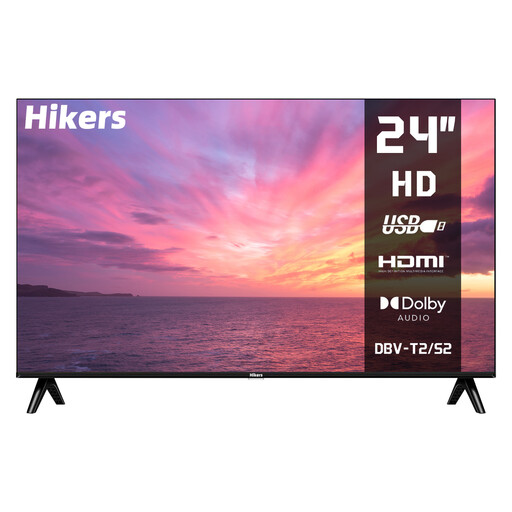 Image unavailable
A good fit if you’re looking for a small screen and want to play videos from USB.
The product name lists 24 inches, HD, HDMI and USB. According to the product name, this isn’t a smart TV, so bear that in mind if you need built-in streaming apps.
 Image unavailable
A good fit if you’re looking for a 43-inch smart TV and want to share videos from a compatible device.
The product name lists 43 inches and 4K UHD. The model-specific description mentions AirPlay 2, screen sharing and a media player. Actual file playback may depend on codec settings, resolution, bitrate and file container.
 Image unavailable
A good fit if you’re looking for a 43-inch QLED TV and want to explore Chromecast built-in as a wireless sharing option.
The product name lists 43 inches, QLED, 4K UHD and Google TV. The model-specific description mentions Chromecast built-in.
 Image unavailable
A good fit if you’re looking for a 43-inch QLED smart TV for family videos.
The product name lists 43 inches, 4K, QLED and 120 Hz.
Measure the distance from your eyes to the screen and use it as a starting point for the diagonal measurement. The Consumentenbond divides the distance in centimetres by 2.4. For a distance of 200 cm, it suggests 32–43 inches as a possible range, not a required size. Measure your furniture too, and check the stand.
No. Check the file systems and codecs supported by the exact model, as well as those used by your own files. Sony publishes model-specific information for the K-43S3. Its general guidance is to check the product manual for supported file types.
Compare the width of the TV and its stand with your furniture, and check the picture from the seats furthest to the side. Look for reflections in your usual lighting conditions, too. Then choose the USB or wireless playback method that suits where your videos are stored.
Compare the EU energy label and, if necessary, the EPREL information for the exact models. The European Commission says the energy label for electronic displays also includes information about HDR playback. Without knowing how many hours you watch and your energy tariff, you can’t use this information to work out a reliable annual cost for your household.
For a standard online purchase of a new TV, ACM ConsuWijzer says you have a statutory cooling-off period of up to 14 days after delivery. You also have statutory rights against the retailer if the product doesn’t meet reasonable expectations under normal use. A commercial warranty period does not replace those rights.