First, measure the width, height and depth of your stand, then compare these with the TV’s dimensions including its stand. Make sure the screen size also suits your viewing distance. If 42–43 inches will fit, consider OLED for films with dark scenes, or compare LCD models if watching in daylight is important. The Consumers’ Association describes these as general differences, not a verdict on every individual model. Also check that your preferred film service, title and subtitles are available on each TV.
Who is this buying guide for?
Viewers with a narrow TV stand
If you first want to check whether the TV, stand and connections will fit in the space available, compare the dimensions including the stand and take viewing distance into account too. The Consumers’ Association highlights height and width as important when fitting a TV into a unit.
Film fans with limited space
If you have room for a screen of around 42–43 inches, you can weigh up contrast, viewing angles and reflections for film nights. The Consumers’ Association describes deeper blacks and generally wider viewing angles as general OLED characteristics.
Viewers who want to hear dialogue clearly
If you want to follow Dutch-language dialogue clearly or use subtitles, it’s worth checking the sound, playback method and availability for each film title. NPO explains the subtitle settings for the NPO Start app.
What should you look for in a TV for film nights?
Start with the space available and your viewing distance. Then compare picture quality for films, access to the films you want to watch, and how clearly you can hear dialogue.
Compact 32-inch LCD TV
Ideal for: a setup where a larger TV won’t fit comfortably on the stand.
Trade-off: a smaller picture may be less enjoyable from further away. Weigh up screen size and viewing distance together, as the Consumers’ Association recommends.
42-inch OLED TV
Ideal for: a stand that can accommodate a 42-inch TV, if you enjoy films with dark scenes or watch from an angle.
Trade-off: general OLED characteristics don’t tell you how a particular model handles reflections or performs in a bright room, so assess these individually.
43-inch LCD TV
Ideal for: a setup with room for a 43-inch TV, where watching in daylight is also a consideration.
Trade-off: QLED doesn’t guarantee a better picture for films. Check the specific model’s contrast, reflections, sound and fit.
| What to consider |
What should you check? |
Who should weigh this up most carefully? |
| Fit and viewing distance |
Measure the stand’s width and depth, and the available height. Compare these with the TV’s dimensions including its stand, and take viewing distance into account. The Consumers’ Association recommends considering screen size and viewing distance together. |
I want to make sure the TV and stand will fit on my narrow unit, and that my seating position suits the screen size; around 36% of consumers put fit first. |
| Picture quality for films and reflections |
Compare specific models for dark scenes, reflections and viewing positions. The Consumers’ Association describes general differences between OLED and QLED LCD, but these alone won’t tell you which model is right for your room. |
For film nights, I mainly care about black levels, viewing angles and distracting reflections once I know the TV will fit; around 29% of consumers prioritise picture quality for films. |
| Films and subtitles |
Search for the title you want on the service, then check that the app is available on the exact TV model or external player you plan to use. Try the subtitles using your intended playback method. |
I want to know in advance where I can watch the Dutch-language films I’m after and how to switch on subtitles; around 21% of consumers prioritise access and subtitles. |
| Clear dialogue |
Listen to spoken dialogue on the specific TV. If you’re considering external audio, check the connection and the space available too. |
If I want to watch films without extra audio equipment, I need to be able to follow the dialogue clearly; around 14% of consumers prioritise clear dialogue. |
Pitfalls when buying a TV for a narrow stand
-
Measuring only the screen diagonal
The diagonal measurement won’t tell you whether the whole TV, including its stand, will fit on the unit. Height, width and the space needed for connections all matter too.
Before you buy, compare the full dimensions for the specific model with your unit, allowing for connections and your chosen setup.
Depending on your setup, you may need a different stand or a bracket.
-
Assuming a smart TV has every Dutch film you want
A smart TV or an available app doesn’t guarantee that a specific title is available to watch. Subtitle settings can also vary depending on how you play the film.
First, search for the film titles you want. Then check the service, access requirements, subtitles and playback options.
You may need to set up another service or playback option, or buy an additional device.
-
Focusing only on picture quality for films
The Consumers’ Association notes that voices can be difficult to hear clearly on TVs, including those in the 40–43-inch class it tested.
Listen to spoken dialogue on the specific TV. If you’re planning to use external audio, check the connection and how much space the setup will take up.
External audio may take up extra space and add to your costs.
Brands to compare when choosing a TV
Philips
Worth comparing a compact 32-inch Full HD TV, such as the 32PFS6900/12, with a 43-inch QLED LCD TV, such as the 43PUS8450/12.
- Philips lists Ambilight for both of these models.
- Ambilight isn’t independent evidence of better picture quality for films. Check that the TV fits and that the apps you use are available on the specific model.
LG
Worth considering if you’re looking at a 42-inch OLED TV. LG describes the OLED42C68LA as a 4K OLED smart TV.
- The Consumers’ Association lists deeper blacks and generally wider viewing angles as general OLED characteristics.
- These general characteristics aren’t an independent assessment of this model. Assess reflections, sound and dimensions separately.
Samsung
Worth comparing a compact 32-inch Full HD TV, such as the UE32F6000FUXXN, with a 43-inch Mini LED model, such as the QE43QN90FATXXN.
- These models give you the chance to compare different screen sizes and technologies.
- The model descriptions don’t prove that a 43-inch TV will fit on a particular unit or deliver a better picture for films. Check the exact dimensions and assess picture and sound quality for each model.
Joybuy TVs for compact film setups
These Joybuy products include 32-inch models and 42- and 43-inch TVs to compare for a compact film setup. Measure the space available and check each model’s full dimensions before choosing.
 Image unavailable
LG OLED42C68LA 42-inch 4K Ultra HD OLED smart TV
A 42-inch OLED option if you have room for this screen size on your unit.
42 inches, 4K Ultra HD, OLED and smart TV.
View on Joybuy
 Image unavailable
KOORUI K32Q1FFQ-T8 32-inch Full HD QLED smart TV
A 32-inch TV to consider if you need a more compact screen size. Check the dimensions including the stand to make sure it will fit on your unit.
Full HD, QLED and smart TV with Tizen OS.
View on Joybuy
 Image unavailable
Hisense 43A6S 43-inch 4K UHD smart TV
A 43-inch option if you’re considering a larger screen and can check that the TV fits on your unit first.
4K UHD, Dolby Vision, VIDAA and Game Mode Plus.
View on Joybuy
 Image unavailable
CHiQ L32QM10E 32-inch QLED smart TV with Google TV
A 32-inch model to compare if you’re looking for a more compact TV. The screen size alone won’t tell you whether the stand will fit on your unit.
QLED and Google TV.
View on Joybuy
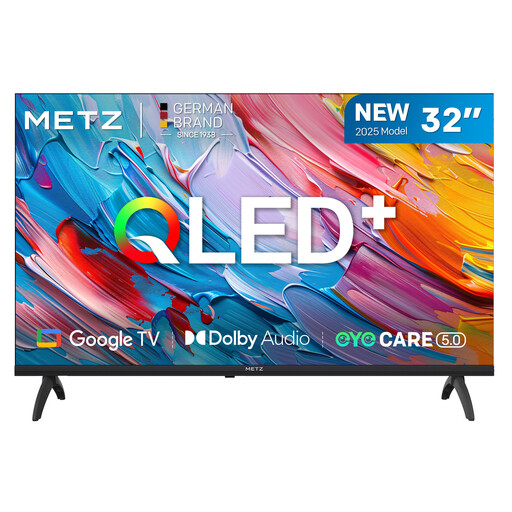 Image unavailable
METZ 32MQF7000Z 32-inch 2025 QLED HD Google TV
A 32-inch option for a compact setup. Measure your unit and check the TV’s full dimensions before deciding.
QLED, HD and Google TV.
View on Joybuy
Frequently asked questions
Do you need 4K for Dutch-language films?
No, not necessarily. The Consumers’ Association notes that the source material also needs to be available in 4K, and that the difference from Full HD isn’t always easy to see. So check the quality in which the films you want to watch are offered.
How do I switch on subtitles in NPO Start?
It depends on how you’re watching. NPO explains how to change the settings using the cog in the player on its website and through the settings in the app. Also check separately whether subtitles are available for the specific film.
Can a wall bracket free up space on the TV stand?
It can, but check that the bracket is suitable for your exact TV model and that the wall and mounting position are suitable too. LG’s mounting guidance highlights possible restrictions depending on the wall type and installation environment. This is manufacturer guidance, not a general legal requirement for mounting.
How much does NPO Start Plus cost?
On 27 October 2026, NPO listed the price of NPO Start Plus as €3,49 per month, following a change that took effect on 2 March 2026. NPO also offers free ways to watch. Check the current price and whether the film you want is available before signing up.


