Start with your film file or playback device: your TV needs to display the original aspect ratio and keep intertitles readable from your seats. Then compare reflections and viewing angles in daylight in your kitchen-diner. According to the Consumentenbond, QLED TVs can often be brighter, while OLED TVs generally offer deeper blacks and wider viewing angles. The performance of the specific model and your set-up are still what matter most.
Who is this guide for?
Viewer with their own silent film files
You want to watch films via a player or USB and check that the intertitles and original framing are displayed properly. The British Film Institute describes 4:3 as a common aspect ratio for films from the celluloid era.
Daytime viewer at the dining table
You often watch during the day and want to be able to follow the picture from different seats. Compare reflections and viewing angles with the windows and lighting in your own kitchen-diner; the Consumentenbond lists these as factors to consider when choosing a TV.
Viewer with limited wall space
You need a safe spot for the TV where intertitles remain readable from your usual viewing distance. So measure more than just the screen size: check the space available for the entire TV set-up too.
What should you look for?
| What to consider |
What to look for |
Who is this important for? |
| Film playback and framing |
Check your source, file format and connection. Test one of your own films and see whether the player and TV can preserve its original aspect ratio. |
I want to watch my existing films without stretched or cropped intertitles, so I check both the player and the TV settings. Around 29% of consumers prioritise accurate film playback. |
| Picture in daylight |
Compare the exact model with light coming from the same direction as it does at home, and look out for dark scenes and reflections at the same time. |
When I watch during the day, I want to be able to follow dark scenes despite windows or lamps. Around 23% of consumers pay most attention to visibility in daylight and reflections. |
| Readable intertitles |
Measure your viewing distance and check that text is easy to read from both the furthest seat and the one at the sharpest angle. |
I want to read the intertitles from my usual seats, even when not everyone is sitting directly in front of the screen. Around 18% of consumers prioritise readability from different positions. |
| Black-and-white detail |
Watch a familiar dark scene and a light one, and adjust the picture with the lighting you usually have at home. |
Visible tonal differences and detail in black-and-white images matter more to me than a picture-quality logo. Around 18% of consumers focus on the subtleties of older films. |
| Placement and energy use |
Check the external dimensions, stand or mounting details, and EU energy label for the exact version. |
I want to know whether the TV will fit safely in the chosen spot and understand how much energy it uses. Around 12% of consumers prioritise placement and running costs. |
Common buying mistakes
-
Assuming a 4K or HDR logo means an old film will look better
A higher screen resolution alone does not guarantee good playback of an older source. HDR information also needs to be present in the footage. The Consumentenbond points out that picture quality can vary between 4K TVs.
Watch one of your own films and focus on detail, reflections and viewing angles rather than logos alone.
-
Automatically making an old aspect ratio fill the screen
Zooming or stretching can alter the original framing and crop parts of the picture. Some combinations of source device and signal do not offer the same aspect-ratio options.
Test the player and TV with a scene where the full frame and intertitles are visible.
-
Measuring only the screen size
The TV also needs to fit in the chosen spot with its stand or wall mount. If the measurements do not work, you may need a different stand, bracket or position.
Measure the available space and viewing positions, and check the details for the exact version. For example, Sony Netherlands lists separate dimensions without the stand and VESA mounting details for the K-43S3.
-
Thinking an extended warranty replaces your statutory rights
A manufacturer's warranty or extended cover is separate from your statutory rights to a product that is fit for purpose. In the Netherlands, there is no fixed statutory warranty period, according to the Dutch government.
Compare the additional terms with your existing rights before deciding whether the cover is right for you.
Brands to compare
Sony
The K-43S3 is a 43-inch model worth comparing if you’re looking for a compact set-up.
- Sony Netherlands lists details for the K-43S3 including dimensions without the stand and VESA mounting information.
- These details do not tell you how your film will look or how much reflection you’ll get in your kitchen-diner.
Philips
The 43PUS8500/12 is a 43-inch QLED TV with Ambilight and Titan OS, according to Philips Netherlands.
- The listed features give you specific details to compare with other compact models.
- These specifications do not, by themselves, confirm the brightness, viewing angle or file playback for your films. Ambilight is no substitute for checking reflections.
Samsung
The QE43Q7F2AUXXN is a 43-inch Q7F2 QLED model to compare with other compact TVs.
- Samsung lists features for this model including a Q4 AI Processor and Quantum Dot.
- Treat picture enhancement as a claim by Samsung, not proof that old films will look better. The model specifications also do not confirm a wide viewing angle or anti-reflection performance.
LG
The OLED42C54LA is a 42-inch OLED model to compare if compact dimensions and black levels matter to you.
- LG highlights deep blacks and AI upscaling for the C5; these are claims made by the manufacturer.
- Check reflections in daylight and watch one of your own older films before deciding whether the model suits your set-up.
TCL
According to TCL, the P7K range also includes a 43-inch QLED version, giving you another LCD model to compare.
- TCL lists features for the range including an AiPQ processor and HVA panel.
- Check the specifications for the exact 43-inch version; information about the range does not show how it will perform with your film or lighting conditions.
Joybuy products
The Joybuy options shown are LCD and QLED TVs for anyone comparing these screen technologies. Before choosing, check that the screen size and complete set-up will fit in your kitchen-diner; the models below are not OLED options.
 Image unavailable
Philips 43PUS8001/12, 43-inch 4K (F)
A 43-inch LCD model to compare if you want to connect an external player.
4K LED screen; three HDMI connections according to the product information.
View at Joybuy
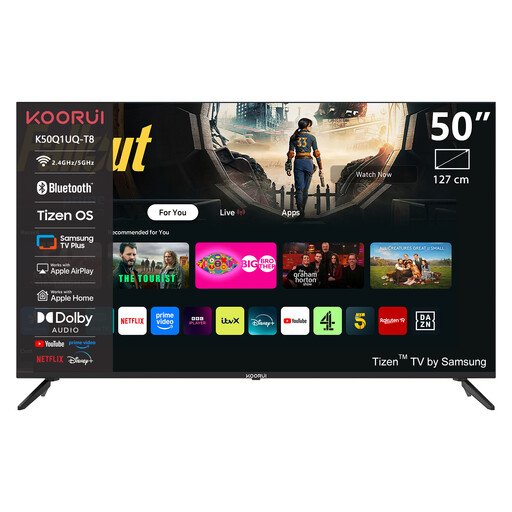 Image unavailable
KOORUI K50Q1UQ-T8, 50-inch 4K UHD QLED, Tizen OS
Compare this 50-inch model with your available wall or furniture space and the distance to the furthest seat.
4K UHD QLED screen; Tizen OS.
View at Joybuy
 Image unavailable
TCL 55T8D, 55-inch QLED, 4K UHD
This 55-inch model is a practical option only if the screen size and viewing distance suit your kitchen-diner.
QD-Mini LED dimming; HDMI 2.1 connections according to the product information.
View at Joybuy
 Image unavailable
Philips 43PUS7061/12, 43-inch 4K
A 43-inch LED model to compare with the available space and your viewing distance.
43 inches; 4K.
View at Joybuy
 Image unavailable
Hisense 43A6S, 43-inch 4K UHD, 60 Hz
A 43-inch model to compare if you’re looking for a smaller screen for your kitchen-diner.
4K UHD; 60 Hz; Dolby Vision; VIDAA; Game Mode Plus.
View at Joybuy
Frequently asked questions
Should an old silent film fill the screen on a widescreen TV?
No. A 4:3 film does not have to fill a 16:9 screen; stretching or zooming can change the framing. Check the player’s output, then the TV’s aspect-ratio settings, as the options can vary depending on the signal.
Is a USB connection enough to play your film collection?
Not necessarily. Check which files the exact TV supports and test one of your own films. An external player connected via HDMI is an alternative if it can play your files.
How do you adjust the picture for a black-and-white film?
Use your usual room lighting and choose a scene with both dark and light areas. Adjust the brightness and contrast so that details remain visible in both. The Consumentenbond recommends matching picture settings to the lighting in the room.
What should you consider when placing and maintaining a TV near the kitchen?
Follow the fitting and safety instructions for the exact model, and keep the TV away from cooking splashes and excessive heat. LG recommends, among other things, unplugging its TV screens before cleaning and not spraying water directly onto the screen. Check the care instructions provided by other brands.
What energy information and consumer rights apply in the Netherlands?
Televisions sold on the Dutch market are subject to the applicable EU ecodesign and energy-labelling rules; compare the label for the exact version. When buying online from a business, you often have 14 days to change your mind. The Dutch government states that there is no fixed statutory warranty period in the Netherlands and that you should contact the seller if a product is faulty.


