
Viewers in a bright room
You’ll also be showing the film during the day and want to see bright coastal scenes clearly, without distracting reflections. Check both the brightness and reflections where you plan to put the TV.


Start by considering the natural light, the seats furthest to the sides and the distance to the back row. Only then decide on the screen technology and size. An LCD or mini-LED TV may be worth considering in a room with lots of ambient light, while OLED generally offers a wider viewing angle and deeper blacks, according to the Dutch Consumers’ Association. Check for reflections and the film source on the specific TV: a 4K screen won’t automatically add detail to footage that wasn’t filmed in 4K.
You’ll also be showing the film during the day and want to see bright coastal scenes clearly, without distracting reflections. Check both the brightness and reflections where you plan to put the TV.
Not everyone will be sitting directly in front of the screen. Check the picture from the seats furthest to the sides, and choose a screen size that works for the back row too.
You may want to connect the film source and, if needed, a sound system. Check which inputs you’ll need, and separately find out whether you need screening rights for the film.
First, measure the viewing distances and assess the light and seating as they’ll be during the screening. Then compare specific TVs.
| What to consider | What to look for | Who is this important for? |
|---|---|---|
| Daylight and reflections | View both bright and dark scenes in the usual ambient light, and look for reflections from the seats. | If the film is shown during the day, I want to follow the coastal scenes without windows or lamps dominating the screen. Around 31% of consumers prioritise visibility in daylight and reflections. |
| Picture from side seats | Compare colour and contrast from the furthest planned seats; don’t rely on screen type alone. | When seats are positioned beside the screen, I want the picture to be easy to follow from there too. For around 25% of consumers, the picture from side seats is their main concern. |
| Screen size at the back | Measure the viewing distance and compare nearby sizes. The Dutch Consumers’ Association suggests around 2.4 times the screen diagonal as a starting point, not a fixed requirement. | From the back row, I want to follow the film comfortably without the screen taking up too much space. Around 25% of consumers prioritise viewing distance and screen size. |
| Film source and sound | Check the connections on the source and screen. For external audio, look for HDMI-ARC/eARC or a suitable optical connection. | If I’m using a separate player, storage device or sound system, I want to know in advance how to connect it to the TV. For around 19% of consumers, playback and sound are their main concern. |
A 4K screen won’t automatically add extra detail to a film source that doesn’t contain 4K detail.
Check the source file, then assess the picture from the planned seats and in the room’s lighting.
Brightness, reflections and picture quality from a viewing angle are separate considerations. A bright screen won’t automatically prevent distracting reflections.
View bright and dark scenes in normal daylight, including from the side seats.
OLED77C5ELB and OLED77C51LA are different model codes; a similar sequence in the name doesn’t prove they’re the same version.
Compare the full model code and relevant variant before applying specifications to another TV.
In the Netherlands, there is no fixed statutory end date for the legal guarantee. If a product is faulty, the retailer is your point of contact.
Check what additional rights an extended contract offers, and keep these separate from your statutory rights.
Samsung describes the QE75QN90FATXXN as a 75-inch Neo QLED 4K TV with mini-LED technology, from 2025. It’s a specific size and version to consider for a bright room.
LG’s Dutch product page describes the OLED77C5ELB as a 77-inch OLED evo AI C5 4K smart TV from 2025.
Philips describes the 65OLED810/12 as a 65-inch 4K OLED TV with Ambilight. It may be worth considering if you’re also thinking about lighting around the screen.
The Sony K-65XR5 is a 65-inch mini-LED/LCD model to consider if you need connections for a film source or external audio.
These TVs offer a range of screen sizes and versions to compare for a shared film screening. Check the viewing distance, reflections and connections on the model you’re considering.
 No image available
An OLED version to include in your comparison for a group with seats spread across the room; check the size and reflections in your chosen spot.
 No image available
A 65-inch version to compare if you’re considering an OLED screen for a shared viewing setup; measure the distance from the front and back rows.
The product name lists 4K, OLED evo AI and C6.
No image available
Compare this 55-inch version with the viewing distance and seating in the room before choosing a size.
The product name lists 4K, OLED evo AI and C6.
 No image available
This 48-inch version is worth comparing if the available space and viewing distance allow for a smaller screen.
The product name lists 4K, OLED evo AI and G6.
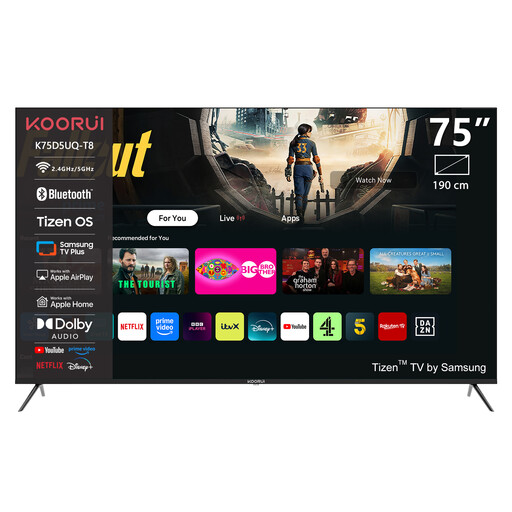 No image available
A 75-inch option to compare if viewers will be sitting further from the screen; also check the picture from the side seats and the space available.
The product name lists 4K UHD, QLED, Tizen OS and Dolby Audio.
First, measure from the seats to the planned screen position. The Dutch Consumers’ Association suggests a viewing distance of around 2.4 times the screen diagonal as a comfortable guide, but this is a starting point, not a fixed requirement for every seat.
Check which output the film source has and which inputs the TV supports. For a soundbar, check whether both devices support HDMI-ARC/eARC. If you’re playing files from USB, also check that the file format is supported.
Watch a familiar scene with the lighting you’d normally use, and adjust the picture so details remain visible in both bright and dark areas. The Dutch Consumers’ Association recommends using the lighting you usually have on while watching.
Compare the EU energy label on screens of a similar size. It shows energy use in kWh per 1000 hours and also includes information about HDR energy use. In the Netherlands, there is no fixed statutory end date for the legal guarantee; if a product is faulty, the retailer is your point of contact. Consider any additional warranty contract separately from your statutory rights.
This depends, among other things, on the film rights and whether the screening is private or public. The Dutch Government says permission is required to make copyright-protected films available to the public; the description “shared space” alone doesn’t tell you whether that applies here.