First, measure the distance from your eyes to the TV and the available width. A bigger screen won’t automatically be a better fit for a narrow living room. Then compare how it handles movement in rugby footage, the viewing angle from other seats and reflections in daylight: OLED TVs generally offer a wider viewing angle, while LCD and QLED TVs can often be brighter, according to the Consumers’ Association.
Who is this choice relevant to?
Watching close to the screen
You want to follow the match clearly without the TV taking over your limited space. Measure the viewing distance and available width before choosing a size; the Consumers’ Association suggests dividing the distance by 2.4 as a starting point for choosing a suitable screen diagonal.
Following the action during a rugby match
Pay particular attention to fast camera movements and on-pitch action. The Consumers’ Association warns that motion interpolation can make movement look smoother, but can also cause artefacts during unpredictable action.
Watching together from seats to the side
You want the picture to remain clear from seats beside the TV, and you’re also considering how much light enters the room. The Consumers’ Association describes OLED as generally offering a wider viewing angle, while LCD and QLED TVs are often brighter.
What should you look for when choosing?
Start with the viewing distance and where the TV will go. Then compare motion handling, viewing angles from side seats and the features you need for your TV source.
| What to consider |
What should you check? |
Who should pay particular attention? |
| Screen size and fit |
Measure the viewing distance and the available width of your TV unit or wall. The Consumers’ Association suggests dividing the viewing distance by 2.4 as a starting estimate for the screen diagonal in centimetres. |
If I sit close to the TV, I want to follow the match clearly without the set dominating the room. Around 33% of consumers put screen size and physical fit first. |
| Motion handling |
Check the panel refresh rate of the exact model and compare sports footage from a similar source; a gaming feature such as VRR doesn’t, by itself, tell you what a broadcast will look like. |
For fast action, I want to judge motion using the footage I watch at home, not just by looking at a high refresh rate. Around 27% of consumers give motion handling top priority. |
| Side seats and lighting |
View the exact model from the seats to the side, and consider the light and reflections at the time you usually watch. OLED generally offers a wider viewing angle, while LCD and QLED can often provide greater brightness, according to the Consumers’ Association. |
If we don’t all sit directly in front of the screen, I want to know how the picture looks from our seats and how daylight affects it. Around 20% of consumers put seating, light and reflections first. |
| Energy use and features |
Compare the energy labels and SDR/HDR information for the exact models. Also check that you can connect your TV source or receiver; 4K won’t automatically add detail to a broadcast that isn’t in 4K. |
I want the right connections and features without losing sight of energy use. Around 20% of consumers start with running costs and the features they need; the European Commission explains the efficiency information shown on energy labels for electronic displays. |
How to avoid common buying mistakes
-
Choosing based on screen diagonal alone
The screen size might seem right, but the TV may not fit on your unit once you include the stand.
Measure both the viewing distance and available width, and check the external dimensions of the exact model.
-
Assuming a high VRR or marketing figure guarantees a sharp rugby picture
Panel refresh rate, picture processing and the broadcast source each play a different role. Motion interpolation can make movement look smoother, but the Consumers’ Association says it can also cause artefacts during unpredictable action.
Check the panel specifications and compare sports footage from a source similar to the one you use at home.
-
Assuming QLED and OLED use the same screen technology
The technologies can differ in viewing angle and brightness. This matters if people sit at an angle to the screen or if the room gets a lot of daylight.
Compare the exact models from your seats and in lighting conditions similar to those when you usually watch.
-
Automatically adding installation or an extended warranty
The wall and installation conditions matter when mounting a TV. LG strongly recommends professional installation for its OLED TVs because walls and installation situations vary.
Check the manual for the exact model, the wall bracket and your wall type. If you’re considering an extended warranty, compare its terms with your existing rights.
Wall mounting may be a separate service. An extended warranty is most relevant if its terms offer something beyond your statutory rights.
Brands to compare
These models illustrate compact OLED, LCD and QLED options. The brand name alone won’t tell you how a TV performs with your seating, lighting or rugby source.
LG
LG’s Dutch product page lists the OLED42C68LA as a 42-inch OLED model for anyone looking for a compact screen.
- LG specifies OLED and 4K for this model.
- The stated maximum refresh rate isn’t an independent assessment of rugby footage. Check the dimensions and reflections from your usual viewing position.
Philips
The 43PUS9000/12 offers a 43-inch QLED option with Ambilight, while the 42OLED811/12 is an OLED model from the brand.
- Philips lists 4K, Ambilight and VRR up to 144 Hz for the 43PUS9000/12.
- The VRR specification doesn’t prove how live rugby will look. Compare the exact models for viewing angle and performance in your lighting conditions.
Samsung
Samsung’s Dutch product specifications for the QE43Q7F2AUXXN show a 43-inch QLED model for anyone considering a compact LCD screen.
- Samsung specifies 4K and an energy rating of G for this model.
- The stated 50 Hz panel refresh rate doesn’t, by itself, describe the visible motion quality of a rugby broadcast.
Sony
Sony’s Dutch product page shows a 43-inch BRAVIA 3 with Google TV as a compact LCD option.
- Sony lists 4K and Google TV for the version reviewed.
- These specifications don’t indicate viewing angle or motion handling; check these features for the exact model.
TVs at Joybuy for watching rugby in a narrow living room
This Joybuy selection includes compact TVs from 40 to 43 inches and a 48-inch OLED model. Measure your viewing distance and available width before choosing a size.
 No image available
LG OLED48G69LS 48-inch OLED evo AI G6 4K Smart TV
An option if your measured viewing distance and available space can accommodate a 48-inch screen.
48 inches; OLED; 4K; Smart TV.
View at Joybuy
 No image available
METZ 43MQF7500Z 43-inch QLED 4K UHD Google TV
A 43-inch option to compare with the available space and viewing distance in your room.
43 inches (109 cm); QLED; 4K UHD; Google TV.
View at Joybuy
 No image available
iFFALCON U65A 43-inch 4K LED Smart TV
A compact 43-inch option; check that the screen size suits your viewing distance and where you plan to put it.
43 inches; 4K; LED; 50 Hz; Smart TV.
View at Joybuy
 No image available
Hisense 43E7S 43-inch 4K QLED Smart TV
A 43-inch QLED option to assess against your available width and seating arrangements.
43 inches; 4K; QLED; 120 Hz; Smart TV.
View at Joybuy
 No image available
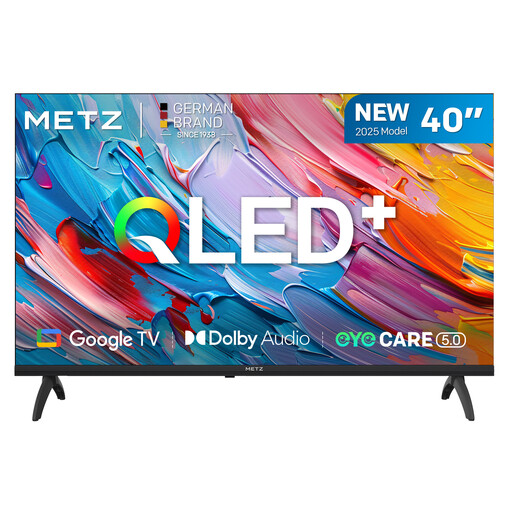
METZ 40MQF7000Z 40-inch QLED Smart TV
A smaller screen to consider if you have limited width available.
40 inches (102 cm); QLED; HD; Google TV.
View at Joybuy
Frequently asked questions
Which TV size should I choose if I sit close to the screen?
Measure the distance from your eyes to where the screen will be. The Consumers’ Association uses the viewing distance divided by 2.4 as a starting estimate for the screen diagonal in centimetres. Also check that the TV, including its stand, will fit on your unit.
Is 144 or 165 Hz automatically better for live rugby?
No. A maximum gaming refresh rate doesn’t automatically tell you how a TV will display a match broadcast. The Consumers’ Association says motion interpolation can make movement look smoother, but can also cause artefacts during fast, unpredictable action.
Can I mount a TV on the wall myself?
Check the manual for the exact model, the wall bracket and your wall type. LG strongly recommends professional installation for its OLED TVs because walls and installation conditions vary. This is the manufacturer’s advice, not a general legal requirement.
How can I compare the energy use of TVs?
Compare the energy labels and energy-use information for the exact models. The European Commission explains that the energy label for electronic displays also includes information about efficiency when displaying HDR content.
In the Netherlands, am I always limited to a two-year warranty?
No. According to the Dutch Government, the Netherlands has no fixed statutory warranty period; what matters is what you can reasonably expect from the product. If a product is faulty, the retailer is your point of contact, even if the manufacturer’s warranty has expired.


