First, measure your viewing distance and available space, then compare OLED and LCD TVs that will physically fit. OLED is generally worth considering for dark scenes and viewing from an angle; LCD may be a better choice in a bright room. Assess voices and music separately, and check that you can watch your theatre recording using your preferred app or connection.
Who should consider this?
Viewers sitting close to the screen
Want to follow the details on stage and read subtitles without the TV dominating your seating area? Measure the distance from your eyes and the available width before choosing a screen size. The Consumentenbond recommends using viewing distance as a starting point when deciding on screen size.
Fans of darker performances
With dark sets or stage lighting, black levels and viewing angles can matter, especially if you don’t sit directly in front of the screen. Also check for reflections in the room where you watch. The Consumentenbond highlights these picture characteristics as points to consider when comparing TVs.
Viewers who value voices and music
If you want to follow dialogue and singing clearly, assess the sound at the volume you plan to use. If you have a separate sound system, check which connection it needs. The Consumentenbond explains HDMI-ARC and HDMI-eARC as connections for devices such as soundbars.
What should you look for when choosing?
Compact OLED TV
Best for: dark stage scenes and viewing from a seat off-centre, provided the measured viewing distance suits the screen size.
Trade-off: according to the Consumentenbond, OLED can generally deliver deeper blacks and wider viewing angles; LCD TVs can often be brighter.
Compact LCD or mini-LED TV
Best for: a room with plenty of daylight, or if you want to compare LCD models with OLED TVs.
Trade-off: brightness alone doesn’t determine how dark scenes look; compare contrast, reflections and viewing angles for each model.
| What to consider |
What to look for when buying |
Who will value this? |
| Screen size and placement |
Measure the viewing distance and the TV’s width, including its stand. The Consumentenbond suggests around 2.4 times the screen diagonal as a starting point for viewing distance, not a hard-and-fast rule. |
I want to follow subtitles and details on stage without the TV being too big for my seating area. Around 31% of consumers give screen size and placement top priority. |
| Dark scenes and viewing angles |
Compare the same dark scene from your usual seats, paying attention to details in the shadows and lit areas. |
If I often watch performances with dark sets or sit at an angle to the screen, I want to compare picture quality in those conditions. Around 25% of consumers prioritise dark scenes and viewing angles. |
| Voices and music |
Listen to speech and music at the volume you use at home. If you use external audio equipment, check that the TV and audio device have a compatible connection. |
I want to follow dialogue, singing and music clearly, and know whether I’ll need extra audio equipment. Around 19% of consumers put speech clarity and music first. |
| Daylight and reflections |
Check for reflections from your own seats and compare TVs in lighting conditions similar to those in your room. |
In a bright room, I want the picture to remain clear at the times I usually watch. Around 13% of consumers give daylight and reflections top priority. |
| Playback options |
Check that the service you want is available on the exact TV model. If you use an external player, make sure there’s a suitable HDMI port free. |
I want to watch my theatre recordings through my preferred app or a separate playback device. Around 12% of consumers put access to their recordings first. |
Common buying pitfalls
-
Choosing a bigger screen without measuring your seating area
Viewing distance is linked to screen diagonal, while the TV’s width, including its stand, determines whether it will fit where you plan to put it.
Measure the distance from your eyes and the available space, then compare screen sizes that will fit.
-
Assuming 4K, an audio format or wattage tells you everything about the viewing experience
The level of detail in 4K also depends on the recording. An audio format or stated sound output alone won’t tell you how clear dialogue will be.
Check your source’s resolution and assess both a dark scene and speech and music on the exact TV model.
-
Assuming every smart TV has your theatre app
Available apps vary between smart TV platforms. If your service isn’t available, you may need an external playback device.
Before buying, check that the specific service is available on the exact model and, if necessary, make sure there’s a suitable HDMI port.
-
Choosing based on OLED or LCD alone
OLED can generally offer advantages for black levels and viewing angles, while LCD can often be bright. Reflections, picture processing and the room also play a part.
Compare models in similar ambient lighting, and try viewing from a seat off-centre too.
Brands worth comparing
LG
LG’s OLED42C67LA is a documented 42-inch OLED model that you can include in a comparison for a compact seating area.
- LG lists OLED and 4K among this model’s features.
- General OLED characteristics aren’t an independent assessment of this specific model. Check reflections, sound and the exact version.
Samsung
The Consumentenbond lists the QE43QN94F as a 43-inch mini-LED TV, making it a model to compare with OLED.
- The Consumentenbond lists 4K, mini-LED, HDMI-ARC/eARC and a stated sound output of 20 W.
- A stated output doesn’t tell you how clear dialogue will be; assess the sound for yourself.
Philips
According to Philips’ product specifications, the Philips 43PUS8001/12 is a 43-inch 4K LCD TV with Ambilight and Titan OS.
- Its screen size, display type and listed features give you useful points of comparison with other compact TVs.
- Brand claims about the viewing experience don’t prove superior picture or sound. Check that the app you need is available.
Hisense
The Consumentenbond lists the Hisense 50U7SE as a 50-inch LCD option to compare if, after measuring, you’re also considering a larger screen.
- The listing specifies the model, screen size and display type.
- Those details don’t tell you how it performs with dark scenes or sound quality; compare these aspects for the exact model.
TVs for different viewing setups
This selection includes TVs with different screen sizes and display technologies to compare for a small seating area. Measure your viewing distance and check the app or connection you need before choosing a model.
 No image available
LG OLED42C68LA 42-inch 4K OLED smart TV
A 42-inch OLED model to compare if dark scenes and a compact setup are important to you; according to the Consumentenbond, OLED can generally deliver deeper blacks and wider viewing angles.
Specifications: 42 inches, 4K Ultra HD, OLED, Dolby Vision, HDR10, Dolby Atmos, HDMI 2.1, AMD FreeSync, webOS and Wi-Fi.
Joybuy
 No image available
Philips 43PUS8001/12 43-inch 4K TV
A 43-inch LCD TV to compare if you’re considering a compact 4K model with Ambilight; check whether Titan OS has the app you need.
Specifications: 43 inches, 4K, LED LCD, Ambilight, Titan OS and 20 W built-in sound output. This output figure isn’t an assessment of speech clarity.
Joybuy
 No image available
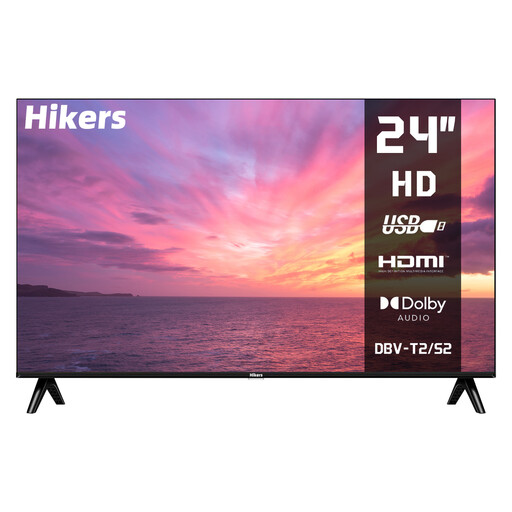
Hikers 24-inch HD TV
A small-screen option to compare if space is limited; check that the viewing distance and resolution suit your theatre recordings.
Specifications: 24 inches (60 cm), HD, non-smart TV, HDMI, USB and DVB-S2/T2/C tuner.
Joybuy
 No image available
Philips 43PUS7061/12 43-inch 4K LED TV
A 43-inch 4K model to compare for a compact viewing setup; check that it supports the app you use and has the connections you need.
Specifications: 43 inches, 4K LED, HDR10+, HLG, Titan OS and HDMI eARC.
Joybuy
 No image available
Philips 43PQS7801 43-inch 4K QLED smart TV
A 43-inch QLED model to compare with other display technologies; check whether its smart TV platform supports your preferred theatre service.
Specifications: 43 inches, 4K, QLED and smart TV. The product information also lists Dolby Atmos, DTS:X and IntelliSound; these labels alone don’t prove sound quality.
Joybuy
Frequently asked questions
What screen size will fit in my seating area?
Measure the distance from your eyes to where you plan to position the screen. The Consumentenbond uses around 2.4 times the screen diagonal as a starting point and recommends comparing nearby sizes; also check the actual width, including the stand.
Can I use my theatre service on any smart TV?
No. Available apps vary between smart TV platforms. Check whether the specific service is available on the exact model and, if you use an external playback source, check the available connections too.
What should I look for in a soundbar?
Check that the TV and soundbar can connect using the intended HDMI-ARC or eARC port. Listen to voices and music first: an audio format or stated wattage isn’t the same as proven sound quality.
How should I set up a TV for dark stage scenes?
At home, watch a familiar scene with both dark and light areas in your usual room lighting. The Consumentenbond recommends assessing picture settings in the lighting conditions you normally use; adjust the picture so that details remain visible in both the shadows and brighter areas.
What are my rights when buying a TV online in the Netherlands?
For many consumer purchases made at a distance, there is a 14-day cooling-off period; applicable exceptions and conditions still matter. In the Netherlands, products are also covered by a legal guarantee that they will be of satisfactory quality, with no fixed statutory guarantee period. If something is faulty, contact the seller.


