What should you look for when choosing?
Start with your viewing distance, then assess the features that matter for your seating positions and when you watch.
| What to consider |
What to check before buying |
Who it matters to |
| Screen size for your viewing distance |
Measure the distance from your eyes to where the screen will be. As a starting point, divide the distance by around 2.4 to estimate the diagonal in centimetres, then compare nearby sizes. For 4 metres, the Consumers’ Association recommends 55–77 inches. |
I want to follow quiz questions and answers from my usual seat, so I start with the distance and a suitable screen size. Around 42% of consumers put screen size at the top of their list when buying. |
| Speech clarity |
Check a speech clarity review for the exact model and try the sound settings with programmes that include speech. |
If I want to understand the presenter and contestants clearly, I look beyond screen size. Around 25% of consumers prioritise speech clarity. |
| Side viewing and reflections |
Check the model’s viewing angle and reflection performance, or assess the picture from the seats you plan to use in similar lighting conditions. |
When we’re sitting in different places, I want to know how the picture looks from the side seats and whether windows or lights cause problems. Around 17% of consumers put side viewing and room lighting at the top of their list. |
| Efficient use |
Compare the SDR consumption shown on the energy label for the exact model and decide in advance whether you’ll need help setting it up. |
I want to choose features I’ll actually use and find out what energy consumption and installation will mean for my situation. Around 16% of consumers prioritise making an efficient choice. |
Joybuy products
This selection focuses on large-screen LCD, QLED and mini-LED TVs. Measure the distance between your seat and the screen before choosing a size.
 Image unavailable
LG 75NU800B6LA 75-inch Nano 4K UHD Smart TV
Use the 75-inch diagonal as a size to compare with the distance from your seat to the screen.
Product title: NANO 4K UHD, Alpha 7 AI Processor 4K Gen9, HDR10, HLG, webOS 26 and AI Sound Pro.
View at Joybuy
 Image unavailable
TCL T8D 85-inch 4K QD-Mini LED Smart TV
The 85-inch size is an option to compare with your measured viewing distance. The right size depends on your setup.
Product title: QD-Mini LED, 4K, Google TV, 144 Hz, FreeSync Premium, VRR and Onkyo 2.1 Sound.
View at Joybuy
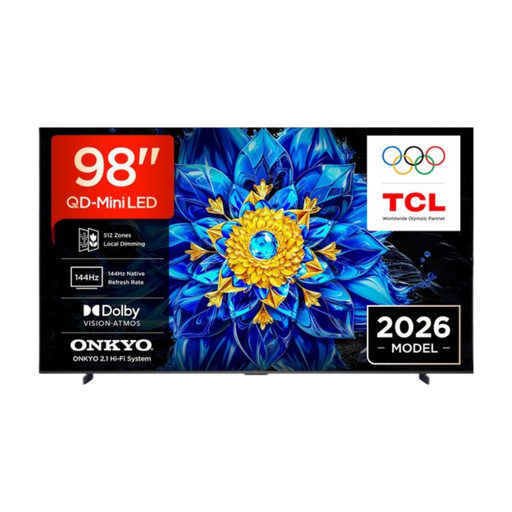 Image unavailable
TCL T8D 98-inch 4K QD-Mini LED Smart TV (2026)
The 98-inch diagonal is an exceptionally large size. Only consider it after measuring your viewing distance and the space available.
Product title: 4K, QD-Mini LED and Smart TV.
View at Joybuy
 Image unavailable
TCL 75T8D 75-inch QLED QD-Mini LED TV
Compare the 75-inch size with your measured viewing distance and the space where the TV will go.
Product title: QD-Mini LED, 4K HDR, Google TV, 144 Hz VRR and Onkyo 2.1 Sound.
View at Joybuy
 Image unavailable
METZ 86MQE8000Z 86-inch QLED Google TV
The 86-inch diagonal offers a large screen size to compare with your actual viewing distance and the space available.
Product title: 4K HDR10+, Dolby Vision Atmos, 144 Hz and a 2.1.2 sound system with integrated subwoofer.
View at Joybuy
Frequently asked questions
What screen size is right for my viewing distance?
Measure from your eyes to where the screen will be, then use the Consumers’ Association guideline as a starting point: divide the distance by around 2.4 to get a diagonal measurement in centimetres. The Consumers’ Association recommends 48–65 inches at 3.5 metres and 55–77 inches at 4 metres. You can also consider sizes close to the guideline.
Does 4K automatically make quiz questions easier to read from a distance?
No. A 4K label doesn’t guarantee that quiz questions will be easy to read from your viewing distance. The Consumers’ Association reports that it can often be difficult to distinguish the extra detail in 4K, and that not every 4K TV offers good picture quality. Start with your viewing distance, then assess the picture quality of the specific model.
What can I do if the picture isn’t good after installation?
Use a still image or a photo on a USB drive to assess the picture settings. This is the approach described by the Consumers’ Association. Also check the picture from the seats you normally use.
How can I compare TVs’ electricity consumption?
Compare the kWh per 1,000 hours figure on the energy label for the exact model. The European Commission explains this unit, and the European EPREL database includes electronic displays such as televisions.
Can I always return a TV bought online in the Netherlands within 14 days?
Not always. According to the Dutch government, distance purchases are often covered by a 14-day cooling-off period, and the seller must provide information about this. Check the terms and any applicable exceptions for your specific purchase.


