Who is this guide for?

Renter with limited space for a TV

You want a TV that fits on your existing stand and can come with you if you move. The Consumers’ Association (Consumentenbond) highlights the importance of viewing distance, while the Dutch Government explains that small changes to a rented home that can easily be reversed are permitted.

Evening viewer of period dramas

You want to make out faces, costumes and dark scenes clearly, so you’re looking at contrast, viewing angle and picture settings that suit the lighting in your room. The Consumers’ Association explains the differences between OLED and LCD TVs and recommends adjusting the picture at home to suit your usual lighting.

Streamer who wants to follow the dialogue

You want clear voices and access to the streaming services you use, without immediately needing extra audio equipment. The Consumers’ Association points out that sound quality should be assessed for each TV model.

What should you look for when choosing?

Compact LCD or LED TV, around 32 inches

Best for: a short viewing distance or a narrow stand, as long as the TV’s overall dimensions, including the stand, fit the available space.

Consider: you’ll have less screen space for costumes and subtitles; also check that the resolution and apps suit the way you use your TV.

LCD or QLED TV, around 43 inches

Best for: anyone looking for a bigger screen who also watches in daylight, provided there’s enough room for the TV stand and viewing distance.

Consider: brightness, reflections, black levels and viewing angle vary by model. The Consumers’ Association often describes LCD TVs as bright, but that alone doesn’t tell you how a particular model performs.

OLED TV, around 42 inches

Best for: anyone who usually watches in dim lighting and values deep blacks and a wide viewing angle.

Consider: compare reflections and the energy label for the specific model. According to the Consumers’ Association, OLED isn’t automatically better than QLED in every respect.

What to consider What should you check? Who is this important for?
Size and placement Measure the viewing distance and the width of your stand; check the TV’s overall dimensions, including the stand. In May 2026, the Consumers’ Association reported that people in its own research found a viewing distance of around 2.4 times the screen diagonal most comfortable. Use this as a starting point, not a fixed rule. If there’s limited space in my rented home, I want to know whether the TV will fit on the stand with its feet attached and whether it’ll be easy to move later. Around 33% of consumers put size and placement first.
Dark scenes and viewing angle Compare dark and light images in similar room lighting, and look out for reflections. Adjust the picture at home to suit the lighting you usually watch in. When I watch period dramas in the evening, I want to make out faces and details in dark settings. Around 27% of consumers prioritise contrast and viewing angle.
Clear dialogue Listen to dialogue at a normal volume. If you’re planning to use external audio, check that it’s compatible with the connections on your chosen model. If I want to follow the dialogue without immediately adding a speaker, I want to assess the TV’s own sound. Around 20% of consumers put clear dialogue first.
Streaming and energy use Check that your preferred apps are available on the exact model, and compare the energy information for standard picture settings and HDR on the EU energy label. If I mainly watch streaming services, I want to be able to use them and compare energy consumption. Around 20% of consumers prioritise streaming and energy use.

How to avoid common buying mistakes

  • Measuring only the screen diagonal

    The diagonal measurement won’t tell you whether the TV, including its stand, will fit on your existing unit.

    Measure the available width and compare it with the TV’s full external dimensions, including the stand.

  • Assuming QLED, OLED or HDR guarantees a great picture for period dramas

    Picture technology, room lighting and the source material all play a part. The name of a technology alone doesn’t tell you how dark scenes will look on a particular model.

    Compare dark and light scenes, reflections and viewing angles on the models you’re considering.

  • Choosing a soundbar or extra warranty cover straight away

    Sound quality varies by TV model, and extra audio equipment takes up space.

    Listen to dialogue through the TV first. If you’re considering extra warranty cover, check what rights and terms already apply.

  • Using the shop’s picture settings as a guide for home

    A setting that stands out in a shop may not be comfortable to watch in the lighting in your own room.

    Assess and adjust the picture at home in the lighting you usually watch in, as the Consumers’ Association recommends.

Brands to consider

LG

LG offers, among other options, a compact 32-inch model and a 42-inch OLED model to compare if space for your TV stand and evening viewing are different priorities.

  • LG says the 32LQ63006LA has Full HD and webOS; the manufacturer describes the OLED42C55LA as a 42-inch OLED TV.
  • These model specifications aren’t an independent assessment of picture or sound quality. Check the dimensions, apps and connections for the exact version.

TCL

According to the manufacturer, TCL’s P7K range also includes a 43-inch model for anyone comparing QLED screens with built-in streaming.

  • TCL lists Dolby Vision, HDR10+ and Dolby Atmos as features of the range.
  • Those range-wide features don’t determine on their own how dark scenes or dialogue will sound on the model you choose; check the exact version.

Philips

According to Philips, the Philips 43PUS8000/12 combines a 43-inch 4K screen with Titan OS and Ambilight.

  • Ambilight is an extra feature to consider if you’d like lighting behind the screen.
  • Check that your preferred apps are available and that there’s room for lighting behind the TV. Ambilight alone doesn’t prove that details in period dramas will be easier to see.

Samsung

The Samsung QE43Q7F2AUXXN is a 43-inch QLED model to compare if you’re considering a mid-sized screen with smart TV controls.

  • Samsung lists QLED and 4K specifications for this model.
  • A brand’s picture-quality claim isn’t an independent test of this model. Assess reflections and dialogue clarity separately.

TVs at Joybuy

This selection includes compact 32-inch LCD or QLED TVs and 42–43-inch models, including OLED and LCD or QLED versions to compare with your viewing distance and available space.

LG OLED42C68LA 42-inch 4K OLED Smart TV

LG OLED42C68LA 42-inch 4K OLED Smart TV

A 42-inch OLED option to compare if you mainly watch dark scenes in the evening; viewing distance and room lighting still matter.

Specifications: 4K Ultra HD, Dolby Vision, HDR10, Dolby Atmos, HDMI 2.1, AMD FreeSync, webOS and Wi-Fi.

View at Joybuy

Philips 43PUS8001/12 43-inch 4K LED TV

Philips 43PUS8001/12 43-inch 4K LED TV

A 43-inch option to compare with the width of your TV stand and your viewing distance.

Specifications: 4K, LED, Titan OS and Ambilight.

View at Joybuy

Hisense 43E7S 43-inch 4K QLED TV

Hisense 43E7S 43-inch 4K QLED TV

A 43-inch model to consider if the bigger screen suits your viewing distance and available space.

Specifications: 4K UHD (3840 × 2160), HDR10+, VIDAA, Wi-Fi and 3 HDMI 2.1 connections.

View at Joybuy

METZ 32MQF7030Z 32-inch QLED Smart TV

METZ 32MQF7030Z 32-inch QLED Smart TV

A 32-inch model to compare if space for your TV stand and a short viewing distance matter more than having a large screen.

Specifications: HD Ready, HDR10, Google TV and Chromecast.

View at Joybuy
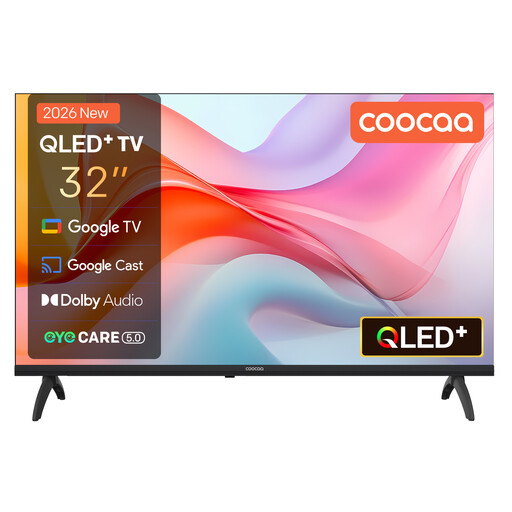
Coocaa 32CGQG41Z (2026) 32-inch QLED Smart TV

Coocaa 32CGQG41Z (2026) 32-inch QLED Smart TV

A 32-inch option to compare with the available space and viewing distance in a compact rented home.

Specifications: HDR10, Google TV, Google Cast, Bluetooth 5.1 and triple tuner DVB-T2/C/S2.

View at Joybuy

Frequently asked questions

Is 43 inches too big for your living room?

It depends on more than the name of the room: measure the distance from your eyes to the screen and check the TV’s overall dimensions, including the stand. According to the Consumers’ Association, people in its own research found a viewing distance of around 2.4 times the screen diagonal most comfortable. Treat this as a starting point, not a rule you have to follow.

Can you hang a TV on the wall in a rented home?

For small changes that are easy to reverse, such as holes you can fill in, the Dutch Government says permission isn’t required. Whether a particular wall bracket and the repairs it involves fall into this category depends on the work; ask your landlord if you’re unsure. A TV stand avoids the need to drill holes.

Which picture settings should you use for dark scenes?

Assess the picture at home in the lighting you normally use, as the Consumers’ Association recommends. Watch a scene with both light and dark areas, then adjust the picture so you can see the details clearly.

How do you compare TVs’ energy use?

Compare the EU energy labels for the exact models, and check the HDR information too. The European Commission states that HDR viewing can use up to twice as much energy as other settings; actual consumption depends on how you use the TV.

What are your rights when you buy a TV online?

For online purchases in the Netherlands, the Dutch Government says you generally have a 14-day cooling-off period. The product must also be fit for purpose: Dutch statutory warranty law doesn’t set a fixed time limit, and the retailer is your point of contact if the product doesn’t meet expectations.
