Which play style suits you?

Spectators who want to join in

You want people outside the main group of players to answer or vote on their phones, whether they’re at home or joining remotely. Check whether the specific game has an audience feature: Jackbox Games says that features vary between games.

Players on the sofa

You want to play controller-based mini-games together on one visible screen. Nintendo says the number of players in Super Mario Party Jamboree varies by game mode. You’ll also need a Switch model with TV output to play on a TV.

Hosts bringing a mixed group together

You’re looking for a game that suits the ages and language skills of your group, and you want to be able to manage who takes part. Check the language, PEGI rating and, for an open or streamed game, the settings for that specific game. PEGI ratings are about content suitability, not difficulty.

What should you consider when choosing?

Nintendo Switch 2

A good fit if: you want to use the extra Jamboree TV modes or play Jackbox on a shared screen.

Bear in mind: Jamboree TV is exclusive to the Switch 2 Edition. Some camera features require a compatible camera, sold separately.

Nintendo Switch or Switch – OLED Model

A good fit if: you want to play the standard Switch version of Super Mario Party Jamboree on a TV.

Bear in mind: the Jamboree TV-exclusive features are part of the Switch 2 Edition, not the standard Switch version.

PlayStation 5

A good fit if: you also want to play PlayStation games and let Jackbox guests join in on their phones.

Bear in mind: the PS5 Digital Edition has no disc drive. PlayStation says a separate paid Plus subscription is required for online multiplayer.

Xbox Series S

A good fit if: you want an Xbox library alongside a digitally available Jackbox game.

Bear in mind: the Series S is fully digital. Check whether audience participation and your preferred language are available in each Jackbox game.

Nintendo Switch Lite

A good fit if: playing on the built-in screen works for your group and you don’t need a shared TV.

Bear in mind: Nintendo says the Switch Lite cannot connect to a TV.

What to consider What should you check? Who is this important for?
Getting spectators involved For your chosen game, check the number of active players, whether it supports an audience role and how participants can see the host screen. Jackbox Games says that player numbers and features vary between games. If you want spectators to vote or answer on their phones rather than just watch, around 36% of consumers give audience participation top priority.
Playing together on one screen Check TV output, the exact game version, the number of players per game mode and how many controllers you’ll need. Nintendo says Super Mario Party Jamboree supports up to four players offline on one system. If you want to play on a TV with guests on the sofa, around 29% of consumers give multiplayer on one shared screen top priority.
Suitability for your group Check the language and PEGI rating for the exact game. For an open or streamed game, the available room management settings may also matter; Jackbox Games describes these settings for specific games. If participants have different ages or language skills, you’ll want to choose a suitable game and manage who can join in; around 21% of consumers put suitability first.
Equipment you’ll need for your play style Check whether you’ll need a game, extra controllers, a camera or an online membership. If you’re considering a digital console, also check that the games you want are available digitally. If you want to know in advance what you’ll need besides the console, around 14% of consumers give getting everything they need for their play style top priority.

Pitfalls to avoid

  • Assuming a large audience means just as many active players

    In Jackbox, main players and the audience have different roles, and features vary between games. Super Mario Party Jamboree also has different player limits for each game mode.

    Decide in advance who will play and who might vote as part of the audience. Check the roles and player limits for the exact mini-game.

  • Choosing a Switch Lite for mini-games on your TV

    Nintendo says the Switch Lite cannot connect to a TV. Playing on its built-in screen doesn’t mean the group will be able to see the game on the TV too.

    If everyone needs to watch the same TV screen, choose a model that supports TV output.

  • Not checking the game version and equipment you’ll need

    The Jamboree TV features are part of the Switch 2 Edition. Nintendo says some camera features require a compatible camera, sold separately; what you need depends on how you plan to play.

    First decide which game mode you want to use, then check the exact game version and what’s included in the bundle.

  • Choosing a digital console when you want to use discs

    According to the manufacturers, the Xbox Series S and PS5 Digital Edition do not support game discs.

    Check your existing games and preferred way to buy games before choosing a digital model.

Brands to consider

Nintendo

A relevant choice for Switch and Switch 2 games on a shared screen, including Super Mario Party Jamboree.

  • Nintendo specifies TV play for the OLED model and exclusive Jamboree TV features for the Switch 2 Edition.
  • The Switch Lite cannot connect to a TV. The number of players varies by Jamboree mode.

PlayStation

A console option if you also want to play PlayStation games and use phones with Jackbox.

  • The Dutch PlayStation page for The Jackbox Party Pack 9 describes phone controls and audience participation.
  • The PS5 Digital Edition has no disc drive. PlayStation says a separate paid Plus subscription is required for online multiplayer.

Xbox

The Xbox Series S is a digital console option if you also want to play Xbox games and choose a Jackbox game available on the platform.

  • Microsoft describes the Series S as fully digital.
  • Disc games are not compatible. Check audience participation and language options for each Jackbox game.

Jackbox Games

A game publisher, not a console brand. The specific Party Pack game determines which play roles are available.

  • Jackbox Games describes phones as controllers and says many games support audience participation.
  • Player numbers and audience features vary between games; stream management settings are specific to each game.

Joybuy products

These Joybuy product picks are related to consoles for group and party games. Check each product and game to make sure it supports the way you want to play.
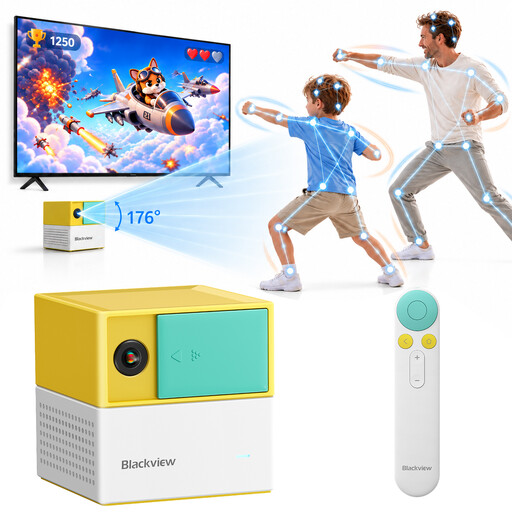
Blackview PlayPop 8 AI Motion Game Console

Blackview PlayPop 8 AI Motion Game Console

The product title focuses on controller-free group play; check that the controls work for the mini-games you want to play.

The title mentions 17-point AI tracking, up to 4 players, 6 game categories and 8 GB + 128 GB. The product description lists 22 built-in family and educational games.

View at Joybuy

Nintendo Switch console bundle, 32GB, with Mario Kart 8 Deluxe game card

Nintendo Switch console bundle, 32GB, with Mario Kart 8 Deluxe game card

An option to consider for TV or tabletop mode and multiplayer on a shared screen. Check that your chosen party game and the controllers you need suit your group.

The bundle lists a dock, HDMI cable, Joy-Con controllers and TV mode. The product description mentions split-screen for up to four players in TV or tabletop mode, and a physical Mario Kart 8 Deluxe game card.

View at Joybuy
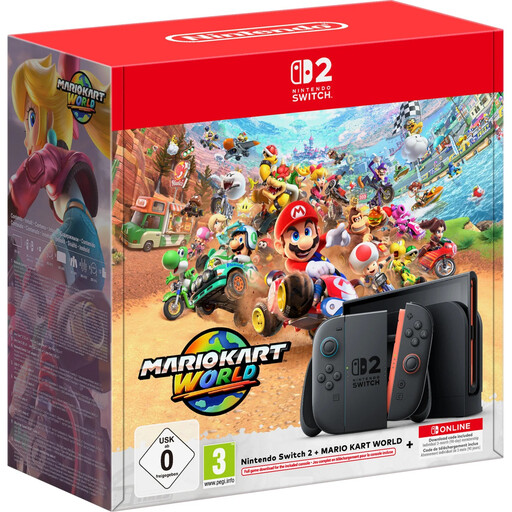
Nintendo Switch 2 console bundle, 256GB, with Mario Kart World download

Nintendo Switch 2 console bundle, 256GB, with Mario Kart World download

The bundle includes a dock for TV play. If you want to play Jamboree TV, check the game version separately: the game included in this bundle is Mario Kart World.

The product information lists 256 GB, Mario Kart World as a digital download and 3 months of Nintendo Switch Online. Nintendo says the Jamboree TV Edition can only be played on Switch 2.

View at Joybuy
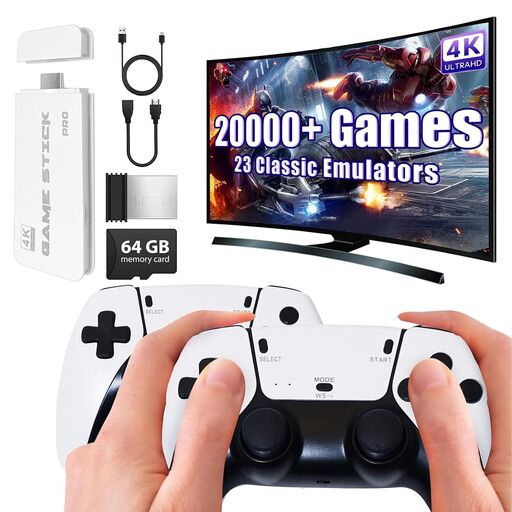
Wireless retro game console with two gamepads

Wireless retro game console with two gamepads

The title describes a console that connects to a TV and comes with two wireless gamepads. Check which games are included and whether they’re right for your group.

The product title lists 4K HDMI output and two 2.4GHz gamepads.

View at Joybuy

Nintendo Switch 2 console (EU)

Nintendo Switch 2 console (EU)

A console option for TV and tabletop mode. Check which game version and equipment suit the way your group wants to play.

The product information lists a dock, HDMI cable and two Joy-Con 2 controllers. The description mentions TV and tabletop modes, and detachable Joy-Con 2 controllers.

View at Joybuy

Frequently asked questions

Can all spectators join in as players in Mario Party?

No. Don’t assume there’s one player limit for the whole game. Nintendo lists different maximums for each Super Mario Party Jamboree mode, with up to four players offline on one system. Check the mode you want before choosing your controllers.

How can guests join Jackbox remotely?

In supported Jackbox games, guests can join on their phones using the room code. Make sure they can see the host screen, for example through screen sharing, and check whether the mini-game you’ve chosen has an audience role; the number of active players varies by game.

Can you connect a Switch Lite to a TV for a group?

No. Nintendo says the Switch Lite cannot connect to a TV. Choose a model with TV output if your group needs to watch together on a television screen.

Do you need to buy anything else besides the console?

It depends on the game and how you plan to play. For online Jamboree, Nintendo lists a Nintendo Switch Online membership as a requirement; some Jamboree TV camera features require a compatible camera, sold separately. PlayStation says a paid Plus subscription is required for online multiplayer. In supported Jackbox games, phones can be used as controllers.

What does the age rating mean for a gaming night with children?

The PEGI rating indicates the age for which the content is suitable, not how difficult a game is. Check the rating for the exact title. NICAM/Kijkwijzer says that shops and libraries must not supply games to anyone younger than the PEGI age recommendation; this doesn’t automatically mean that private play or watching is prohibited.
