
Opera viewer sitting a long way from the screen
You sit a long way from your TV and want to follow the stage action and any subtitles. Measure your viewing distance and check that the screen will physically fit in your room.


First, measure the distance from your eyes to where the screen will be, then choose a suitable size. Brand preference tells you less about how easy the screen will be to view from your seat. The Consumentenbond suggests roughly 2.4 times the screen diagonal as a starting point for a comfortable viewing distance, rather than a fixed rule. Then compare OLED and Mini LED LCD in the light conditions in your room, and assess vocals, orchestra, playback source and subtitles in your intended setup.
You sit a long way from your TV and want to follow the stage action and any subtitles. Measure your viewing distance and check that the screen will physically fit in your room.
You want more than a large stage view; vocals and music matter to you too. Compare the sound from the exact model and check the connections you’ll need for your intended audio setup.
You sometimes watch during the day and sometimes in a darkened room, or you’re not always sitting directly in front of the screen. Reflections, viewing angle and picture quality in dark scenes may all be factors.
Choose this if: you usually watch in subdued lighting and value deep blacks or a wide viewing angle, as long as the size suits your viewing distance.
The trade-off: a smaller OLED isn’t automatically easier to see from a distant seat. You’ll also need to take care with prolonged, almost completely static images.
Choose this if: you also watch during the day or want a large screen. Compare models in similar lighting and from your own seat.
The trade-off: viewing angle and black levels vary by model. A Mini LED label doesn’t guarantee that bright subtitles won’t show a halo in dark scenes.
Choose this if: vocals and orchestra are a priority and you want to use an existing or separate audio system.
The trade-off: an external system needs space and a suitable connection. HDMI-ARC/eARC only works if both the TV and the audio system support it.
First, measure the distance and check the space available. Then compare the picture in your lighting conditions and check your entire playback and audio setup.
| What to consider | What to look for when buying | Who should prioritise this? |
|---|---|---|
| Screen size and viewing distance | Compare the diagonal measurement with your measured distance; also check the dimensions with the stand or for wall mounting. | If I want to follow the stage action and text clearly from my usual seat, I’ll start with the distance and the space available. Around 31% of consumers put screen size first. |
| Vocals and orchestra | Assess the sound from the exact model; check HDMI-ARC/eARC on both the TV and the audio system. | If vocals and orchestra matter more to me than picture alone, I’ll compare the TV speakers or the audio system I plan to use. Around 25% of consumers prioritise sound quality. |
| Picture in your room’s lighting | Compare reflections, viewing angle and dark scenes in similar lighting conditions. | If I watch in changing light or from a seat to the side, I’ll want to know how the picture looks in my room. For around 19% of consumers, visibility in their own room lighting is the top priority. |
| Recording and subtitles | Check the app, player or file format you use, and test the subtitles on the specific recording. | If I want to watch a particular opera recording with subtitles, I’ll check my playback setup and subtitle track in advance. Around 13% of consumers prioritise playback and subtitles. |
| Running costs and installation | Compare the EU energy labels for the exact models and check their dimensions and mounting details. | If I want to consider energy use and installation as well as screen size and features, I’ll compare the labels and placement details. Ongoing running costs are the top priority for around 12% of consumers. |
A 4K screen won’t automatically make a recording 4K. What’s more, from a distant seat, screen size can determine how easily you can follow the stage action and text.
First, measure your viewing distance, then check the quality of the recording source.
OLED and LCD differ in areas such as black levels and brightness. Reflections and viewing angles also vary between models.
Compare specific models in similar room lighting and from your own viewing position.
Support can depend on the app, recording and file. A listed USB format doesn’t automatically mean that every file or subtitle track will play.
Check the app or player you’ll use, the file and the subtitle track you need in advance.
In an older test, the Consumentenbond reported temporary image retention after an unusually long period displaying a static image. That test doesn’t predict the risk for any specific current model.
Break up long periods of displaying a static image and follow the care instructions for your chosen model.
The 75C7K is a 75-inch QD Mini LED LCD model to consider if a large screen and daytime viewing are important to you.
The 77OLED810/12 combines a 77-inch OLED screen with Ambilight, for those considering this combination for their room.
The QE75QN90FATXXN is a 75-inch Mini LED LCD model to compare with other large screens in changing room lighting.
The K-75XR70 is a 75-inch Mini LED LCD model to consider if you also want to connect your own player or audio system.
The OLED65C56LB is a 65-inch OLED alternative if this size suits your measured viewing distance.
This selection includes large OLED and Mini LED TVs, plus a TV and soundbar bundle. Compare the screen size with your viewing distance and check the sound and playback setup you want to use.
 Image unavailable
A 77-inch OLED option to compare if you’re looking for a large screen for a distant seat.
The description lists 4K OLED, Dolby Vision and a 60 W, 4.2-channel audio system.
Also listed: Dolby Atmos, Clear Voice Pro and HDMI eARC.
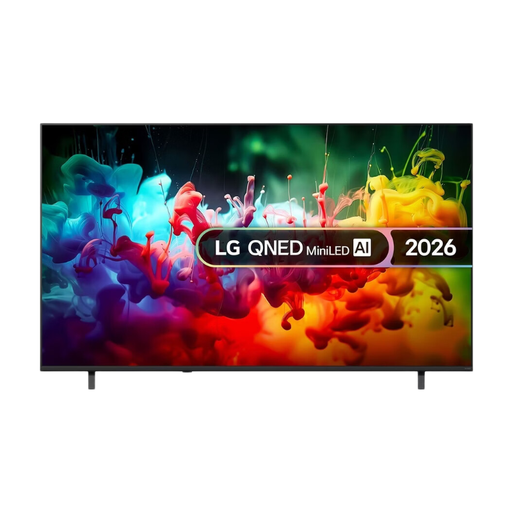 Image unavailable
A 75-inch 4K model to include in your comparison if both screen size and picture technology matter.
The product information lists Mini LED, 4K Super Upscaling and Dynamic Tone Mapping.
Also listed: virtual 9.1.2-channel sound and webOS.
 Image unavailable
A 75-inch model to compare if you’re looking for a large screen and want to consider the TV’s own sound too.
The product name lists QLED, QD Mini LED, Dolby Vision, HDR10+ and 144 Hz VRR.
Also listed: an Onkyo 2.1 audio system and Google TV.
 Image unavailable
An 86-inch option to assess if your viewing distance and available space can accommodate such a large screen.
The product name lists 4K, HDR10+, Dolby Vision and 144 Hz.
Also listed: Dolby Atmos and a 2.1.2 audio system with an integrated subwoofer.
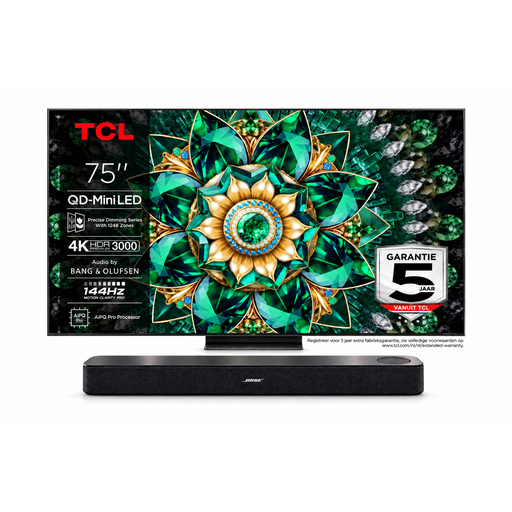 Image unavailable
A TV and soundbar bundle to consider if you want separate audio as well as a large screen.
The bundle description lists a TCL 75Q7C with a 75-inch 4K screen and a Bose soundbar.
According to the description, the soundbar connects via HDMI ARC/eARC; check that this connection suits your setup.
No. The right size depends on your viewing distance and the space available. The Consumentenbond suggests roughly 2.4 times the screen diagonal as a starting point for a comfortable viewing distance; also check that the TV will fit where you plan to put it.
No, it depends on the recording, app or broadcast. Some apps handle subtitles within the app itself, so test the recording and playback setup you intend to use.
Check the connections on both the TV and the audio system. A compatible HDMI-ARC/eARC connection can link them. If that connection isn’t available on both, optical audio may be an alternative, though you might need an extra remote control.
Start with the home setting rather than the usually brighter shop setting. Watch a familiar scene with light and dark areas in your usual room lighting, then adjust the brightness and contrast to suit your preference.
The EU label for electronic displays uses classes A to G and also provides information about HDR viewing. Compare the labels for the exact models; the class alone won’t determine your personal electricity costs.