Who is this TV guide for?

Watching opera without disturbing others

You watch when other people at home need some peace and quiet, so you want to check in advance that your headphones will work with the TV. The Consumers’ Association and LG explain which Bluetooth and wired connections to check on each model.

Streaming opera or playing your own recordings

Your choice may depend on a particular service, player or recording, so check the app, inputs and subtitles. The Consumers’ Association compares TV platforms, while the Metropolitan Opera describes the different types of content in its streaming catalogue.

Watching together from different seats

You share the screen and want to weigh up the size and viewing angle from the places where you actually sit. The Consumers’ Association offers advice on viewing distance and highlights viewing angle as a factor when choosing a TV.

What should you look for?

What to consider What to check before buying Who is this most important for?
Listening without disturbing others Check whether the exact model has Bluetooth audio or a wired audio output, and make sure your headphones will work with it. If I want to listen while others at home need some peace and quiet, I check the headphone connection first. Around 28% of consumers put listening without disturbing others first.
Playing recordings and subtitles Check that the app and subtitles you need are available on the TV or external player. If you have your own recordings, check which input you’ll need too. If I want to use a particular service or my own recording, the playback method and subtitles need to work for me. Around 22% of consumers put access to recordings first.
Picture quality and viewing angle Compare the specific model using suitable content, from different seats and in your room’s lighting conditions. If dark scenes or seats to the side of the TV matter to me, I consider black levels and viewing angle. Around 22% of consumers put picture quality and viewing angle first.
Screen size and viewing distance Measure your viewing distance and available space. The Consumers’ Association suggests around 2.4 times the screen diagonal as a starting point for viewing distance. I want a screen that’s easy to watch from my seat and fits in our shared space. Around 17% of consumers put room size and viewing distance first.
Energy consumption Compare the EU energy label and product information sheet for the exact model; check HDR information separately. If I want to factor in running costs, I compare the energy information for the models I’m considering. Around 11% of consumers put running costs first.

Common buying mistakes

  • Assuming built-in speakers are a solution for quiet listening

    Speaker specifications don’t confirm whether you can connect headphones. LG says that a wired headphone socket is available on selected TV models only.

    Check the audio outputs and Bluetooth audio support on the exact model. You may need separate headphones or an additional audio device.

  • Assuming every smart TV has the opera app you want

    The range of apps varies between TV platforms, and apps can be withdrawn, according to the Consumers’ Association.

    Check that the service you want is available on the specific platform. If you use an external player, make sure it supports the service and subtitles you need.

  • Assuming a 4K screen guarantees 4K opera footage

    The quality available also depends on the recording. The Metropolitan Opera offers HD videos, older broadcasts in standard definition and audio-only radio performances.

    Check the quality of the recordings you actually want to watch before factoring in extra picture features.

  • Assuming there’s a fixed statutory guarantee period

    According to the Dutch government, there’s no fixed statutory guarantee period in the Netherlands. What you can expect from a TV depends on the product and the circumstances.

    If something goes wrong, contact the retailer. Check what extra rights an extended guarantee actually gives you; it doesn’t replace your statutory rights.

Brands and models to consider

Philips

According to Philips’ product description, the 43PUS8001/12 is a compact 43-inch 4K LED TV with Ambilight and Titan OS.

  • Its screen size and listed features make it worth considering if you have less space to work with.
  • Check that the opera app and audio output you need are available on this model. Descriptions of picture and sound quality aren’t an independent assessment of how it performs with opera.

LG

The OLED42C68LA is a 42-inch OLED model. LG describes the contrast of this model itself.

  • Its 42-inch screen makes it an option to consider for a smaller viewing area.
  • LG’s contrast claim doesn’t guarantee an advantage with every recording or in every lighting condition. According to LG, only selected TV models have a wired headphone socket.

Samsung

The QE43QN90FATXXN is a documented 43-inch Neo QLED mini-LED model.

  • This model gives you a specific point of comparison with OLED and other LCD models.
  • The fact that an app is available on some Samsung TVs doesn’t automatically mean it’s available on this model. Check the audio connection on the exact model too.

Sony

According to Sony, the BRAVIA 3 II, model code K43XR35M2PB.CEI, is a 43-inch model with Google TV.

  • The listed TV platform may be useful when comparing the playback apps available.
  • The platform description doesn’t confirm that every opera app or specific pair of headphones will work. Check both on the exact model.

Panasonic

According to Panasonic’s product description, the TV-48Z80BEZ is a 48-inch OLED TV with Fire TV and support for several HDR formats.

  • Its 48-inch screen is a point of reference if you have a larger viewing area.
  • The picture quality descriptions come from Panasonic. Check that the app and audio connection you need are available on this specific model.

Joybuy TVs for opera recordings

These TVs are aimed at anyone who wants to watch opera using a TV app or, if necessary, a separate player. For each model, check that the app, HDMI connection and headphone set-up you need will work for your purposes.

LG OLED42C68LA 42-inch 4K OLED TV

LG OLED42C68LA 42-inch 4K OLED TV

The 42-inch screen is an option to consider for a shared viewing space.

Specifications: 4K OLED, Dolby Vision, HDR10, webOS and four HDMI connections. Bluetooth is listed; check separately whether your chosen headphones work with Bluetooth audio.

View at Joybuy

Hisense 43A6S 43-inch 4K UHD smart TV

Hisense 43A6S 43-inch 4K UHD smart TV

Consider the 43-inch screen size in relation to your viewing distance and available space.

Specifications: 4K UHD, 60 Hz, Dolby Vision and VIDAA. Bluetooth and HDMI connections are listed in the model description; check that your headphones and external player are compatible.

View at Joybuy

METZ Lifestyle Portable TV 32MQE7100Z 32-inch HD smart TV

METZ Lifestyle Portable TV 32MQE7100Z 32-inch HD smart TV

This 32-inch model is a smaller-screen option to weigh up against your viewing distance and the space available in your shared home.

Specifications: HD, QLED+, HDR10 and Google TV. The product name mentions Power-C, compatible with a Power Bank.

View at Joybuy

METZ 43MQF7500Z 43-inch QLED 4K UHD TV

METZ 43MQF7500Z 43-inch QLED 4K UHD TV

The 43-inch screen is an option to compare with your available viewing distance.

Specifications: QLED, 4K UHD, Google TV and HDMI 2.1. The product name also lists HDR10+, Dolby Vision and built-in Chromecast.

View at Joybuy
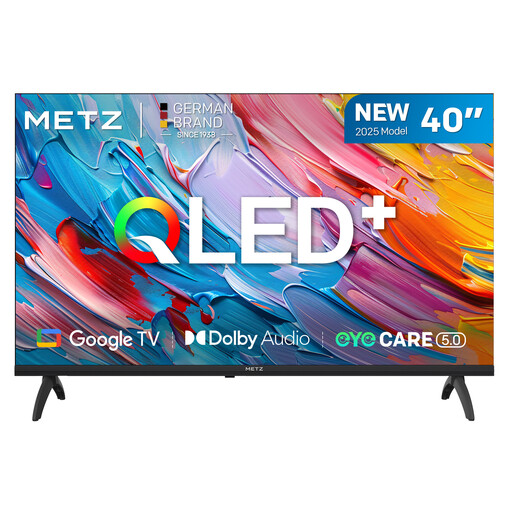
METZ 40MQF7000Z 40-inch QLED HD smart TV

METZ 40MQF7000Z 40-inch QLED HD smart TV

The 40-inch screen may be a good fit if you want to match the screen size to the space available.

Specifications: QLED, HD, Google TV, HDR10 and HLG.

View at Joybuy

Frequently asked questions

Can I connect any Bluetooth headphones to a TV?

No, don’t assume they’ll work. Check whether the exact TV model supports Bluetooth audio and whether your headphones are compatible. For wired listening, also check that the model has a suitable socket.

How can I play an opera recording if the app isn’t on my TV?

A compatible external player connected via HDMI may be an alternative. Check that your service, recording and subtitles work with the player. The range of apps on smart TVs can vary, and apps may change.

How do I choose the right screen size for my seat?

Measure the distance from your usual seat to the screen, and check that the TV will physically fit in the available space. Based on its own research, the Consumers’ Association suggests around 2.4 times the screen diagonal as a comfortable starting point for viewing distance.

What if the TV breaks down after the manufacturer’s guarantee expires?

If you bought the TV in the Netherlands, your statutory guarantee still applies. According to the Dutch government, there’s no fixed statutory time limit; what you can expect from the TV depends on the product and the circumstances. Report any fault to the retailer.

How do I compare the energy consumption of two TVs?

Compare the EU energy labels and product information sheets for the exact models. The European Commission says that labels also include separate information about energy efficiency when displaying HDR content. Factor this in if you often watch HDR recordings.
