Who is this choice relevant to?

Viewers between the sofa and kitchen

You sometimes watch from the sofa and sometimes from an angle in the kitchen. Compare the picture from both spots before choosing a screen technology. The Dutch Consumers' Association points out that viewing angles vary between TVs.

Film fans in a bright living room

You watch animated films in daylight or with the kitchen lights on, and want to see how colour, contrast and reflections look in your room. The Dutch Consumers' Association highlights viewing angle, black levels and brightness as factors to consider when comparing TVs.

Families with an open-plan kitchen

You share the screen, have a set viewing distance and want to follow dialogue while there’s noise in the kitchen. So consider both the screen size and how easy the dialogue is to hear from your usual viewing spots.

What should you look for when buying?

OLED

A good fit if: you often watch from an angle and deep blacks matter when you’re watching films.

Bear in mind: OLED doesn’t automatically prevent reflections; check the screen under your lighting.

Bright LCD, QLED or mini-LED

A good fit if: you often watch in daylight or with the kitchen lights on, and want to compare brightness.

Bear in mind: brightness alone won’t tell you how the screen handles reflections or looks from an angle.

What to consider What should you check? Who is this important for?
Side-on viewing Watch the same film scene from the sofa and the kitchen; if possible, check the viewing-angle information for the specific model. If I want to watch from an angle while cooking, I need to know whether the picture is still clear and comfortable to watch. Around 26% of consumers prioritise being able to see the screen from the kitchen.
Light and reflections Check the screen with your usual lights on, and see whether the specific model has an anti-reflection feature. In daylight or with the kitchen lights on, I want to see whether reflections interfere with my viewing spots. Around 21% of consumers prioritise visibility in bright conditions and handling reflections.
Film contrast Compare the same scenes in a suitable picture mode and check the resolution supported by your film source. If I mainly watch animated films, I pay attention to how dark scenes and bright details are shown. Around 21% of consumers prioritise film contrast and picture quality.
Hearing dialogue Listen from both spots with the extractor fan on its usual setting; check the audio connections if you want to use your own equipment. When kitchen activity drowns out conversation, I want to be able to follow dialogue from my viewing spot. Around 16% of consumers prioritise clear dialogue.
Screen size and placement Measure the distance from the sofa and check the TV’s dimensions, including its stand. The Dutch Consumers' Association suggests around 2.4 times the screen diagonal as a starting point for viewing distance. If I’m looking for a size that works from both the sofa and the kitchen, the screen also needs to fit the planned spot. Around 16% of consumers prioritise a suitable size and placement.

Common buying mistakes

  • Judging the picture only from directly in front

    Viewing angles vary between TVs, so the picture may look different from the kitchen than it does from the sofa.

    Where possible, watch the same scene from both planned viewing spots and compare the viewing-angle information for the specific model.

  • Assuming QLED uses the same screen technology as OLED

    QLED is an LCD technology. The Dutch Consumers' Association describes different strengths for OLED and QLED, but the technology name alone doesn’t determine how an individual model will perform in your room.

    Compare the picture under your lighting and from your viewing angles rather than relying on the name of the screen technology alone.

  • Choosing a large screen without measuring

    Your viewing distance and the space available both affect which screen size will suit you. The TV’s overall dimensions, including the stand, are important too.

    Measure the distance from the sofa and the space where the TV will go. Use the Dutch Consumers' Association’s distance guideline as a starting point, not a fixed rule.

  • Confusing the manufacturer’s warranty with your statutory rights

    A manufacturer’s warranty is separate from your statutory rights against the seller. ACM ConsuWijzer explains that the statutory warranty is not limited to a fixed standard period of two years.

    Consider any extended warranty package separately, and remember your statutory rights against the seller if something goes wrong.

Brands to compare

LG

The OLED evo C6 range is an example of an OLED TV to compare if film contrast and viewing from different positions matter to you.

  • LG lists OLED technology and Brightness Booster for the OLED55C68LA.
  • These are LG’s specifications and claims, not an independent assessment of how the screen handles reflections in your room. Check the exact version.

TCL

The 55C6K is a QD mini-LED model to compare with OLED if visibility in ambient light is a factor.

  • TCL lists mini-LED, an HVA panel and an ONKYO 2.1 system among this model’s features.
  • Claims about contrast and brightness come from TCL. Check the viewing angle, reflections and sound on the exact version; the 55C6K is not the same model as the 55Q6C.

Philips

According to Philips, the 55OLED761/12 combines an OLED screen with Ambilight. Consider this extra ambient lighting only if you plan to use the feature.

  • Philips lists a 55-inch 4K OLED screen and Ambilight for the 55OLED761/12.
  • Descriptions of the film-watching experience and sound quality are Philips claims, not measurements of how easy dialogue is to hear in a busy kitchen.

Samsung

Samsung’s Glare Free coating is a model-specific feature to consider if kitchen lights cause distracting reflections.

  • Samsung lists the ranges that feature the Glare Free coating.
  • The reflection claim doesn’t automatically apply to other Samsung TVs. Check how the exact model performs under your lighting.

Sony

The BRAVIA 6 is an OLED example to compare for picture quality, viewing angle and available screen sizes.

  • Sony lists OLED, 4K HDR and several screen sizes for this range.
  • Claims about the picture from every angle and automatic adjustment to light come from Sony. Check the specific version and screen size.

TVs at Joybuy

This selection includes OLED and LCD TVs, including QLED and mini-LED models, to help you compare options for watching films in a living room with kitchen lighting.

LG OLED55C68LA 55-inch OLED evo AI C6 4K Smart TV

LG OLED55C68LA 55-inch OLED evo AI C6 4K Smart TV

An OLED option to compare if film picture quality and viewing from an angle matter to you; the technology doesn’t guarantee a reflection-free picture.

The product title lists 4K, 120 Hz native, VRR up to 165 Hz, Dolby Vision and Dolby Atmos.

View at Joybuy

Philips 55PUS8001 55-inch F 4K TV

Philips 55PUS8001 55-inch F 4K TV

An LCD TV to compare if you’re looking for a 55-inch screen and features to help with changing ambient light.

The product information lists an LED LCD screen, 4K, Ambilight, an ambient light sensor, HDR10+ and HLG.

View at Joybuy
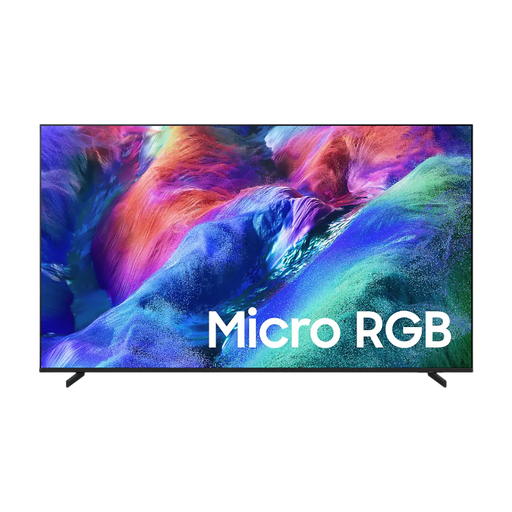
Samsung 55-inch Micro RGB R85H 4K Vision AI Smart TV

Samsung 55-inch Micro RGB R85H 4K Vision AI Smart TV

An option to consider if you’re looking for a 55-inch screen and want to compare features relating to viewing angles and dialogue.

The product information lists 4K, Dolby Atmos, 30 W 2-channel audio, a wide viewing angle and Active Voice Amplifier Pro. These are stated product features, not independent measurements of dialogue clarity.

View at Joybuy
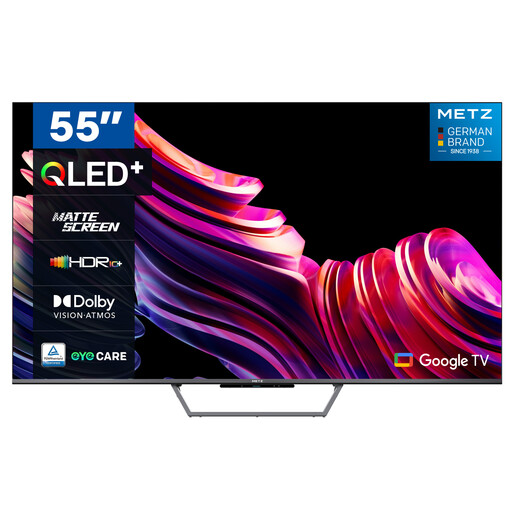
Metz 55MQE7600Y 55-inch QLED+ 4K UHD Smart TV

Metz 55MQE7600Y 55-inch QLED+ 4K UHD Smart TV

A QLED option to compare in a kitchen-lit room; check how the matte screen looks in your space.

The product information lists a matte screen, QLED+, 4K UHD and an automatic ambient light sensor.

View at Joybuy
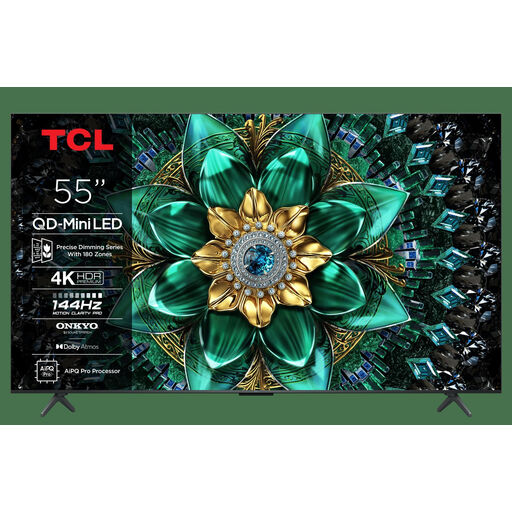
TCL 55Q6C 55-inch QLED Mini LED TV

TCL 55Q6C 55-inch QLED Mini LED TV

A mini-LED option to compare in daylight or with the kitchen lights on. The stated brightness alone won’t tell you how the screen handles reflections or looks from an angle.

The product information lists 4K, Full Array Mini-LED, Dolby Vision IQ, HDR10+ and an Onkyo 2.1 audio system. The product title lists 1000 nits.

View at Joybuy

Frequently asked questions

What size works well if I watch from the sofa and sometimes stand in the kitchen?

First, measure the distance from your eyes on the sofa to where you plan to put the screen. The Dutch Consumers' Association suggests around 2.4 times the screen diagonal as a comfortable starting point. Compare nearby sizes too, then check that the picture remains visible from the kitchen.

Can I put the TV close to the cooking area, and how should I clean it?

Choose a spot out of the direct reach of moisture and splashes, keep the ventilation openings clear and follow the placement instructions for the exact model. Sony advises unplugging the TV before cleaning the screen and not spraying cleaner directly onto it; LG warns that moisture getting inside can damage components.

What should I compare when it comes to running costs?

Compare the European energy label and product information sheet for the exact version. According to the European Commission, TV labels include information for standard dynamic range (SDR) and HDR; compare consumption for similar screen sizes and usage conditions.

If I buy a TV online in the Netherlands, do I have statutory rights and a cooling-off period?

If you use a product normally and it doesn’t meet what you could reasonably expect, the seller is responsible under the statutory guarantee; according to ACM ConsuWijzer, there is no fixed standard term of two years. For a standard online purchase, you will usually also have up to 14 days after delivery to change your mind. ACM ConsuWijzer specifically gives a TV ordered online as an example; check the terms that apply to your purchase.

Are energy labels compulsory for TVs in Europe?

Yes. The European Commission states that TVs are covered by the energy labelling rules for electronic displays. The label provides information about the energy class; it doesn’t tell you which class to choose.
