What should you look for?
First, choose a screen size that suits the furthest seats and the space available. Then compare picture quality in the expected lighting and check whether your archive can be played directly via USB or from an external source.
In its own research, the Consumentenbond gives a viewing distance of around 2.4 times the screen diagonal as a comfortable starting point. Use this as a guide, not a hard-and-fast rule: also check the picture from the furthest seats and those at the sharpest angle.
| Consideration |
What to look for |
For which consumers |
| Visibility from every seat |
Measure the viewing distances and available space; also assess the screen from the seats furthest away. |
If you want visitors to follow the photos from different places, focus on screen size and viewing angle; for around 40% of consumers, visibility from every seat is the top priority. |
| Playing your own archive |
Check the manual for the exact model to see which files and storage devices are supported. Test your files and an HDMI alternative in advance. |
If your archive contains a range of photo and video files, you’ll want to know which playback option works before the event; around 30% of consumers give reliable playback of their own archive top priority. |
| Picture quality in the event lighting |
Compare the screen in the lighting that will be left on, and look at both light and dark areas of a familiar photo. |
If you want to keep the lights on while people chat, compare screens in those lighting conditions; for around 20% of consumers, visibility with the lights on matters most. |
| Overall cost and positioning |
Check the dimensions, what’s included and any terms and conditions for an extended warranty. |
If you’re buying a TV for this event, you’ll want to know in advance whether it will fit and what extras you’ll need; around 10% of consumers put overall cost first. |
OLED generally offers wider viewing angles and deeper blacks; LCD and QLED models can often be brighter. These are general differences, not a guarantee for every model. Compare the TVs you’re considering in the room and from the seats where they’ll be used.
TVs at Joybuy
These TVs offer a range of screen sizes and types to compare for an archive presentation. Before choosing, check the viewing distance, available space and whether the files and connections in your setup will work.
 No image available
Philips 55PUS8001 55-inch 4K TV
The 55-inch screen and 4K resolution give you useful points of comparison with your viewing distance and archive material.
Joybuy
 No image available
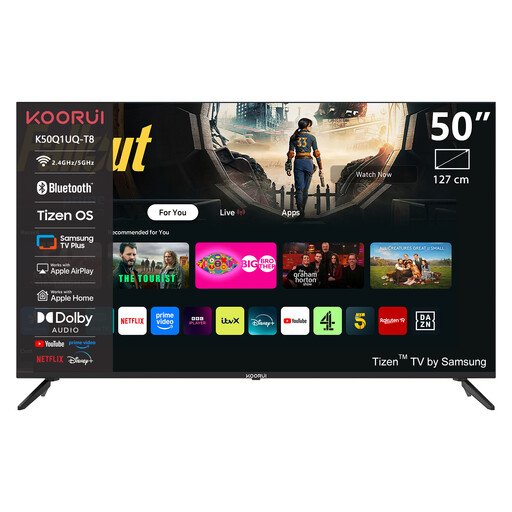
KOORUI K50Q1UQ-T8 50-inch 4K UHD QLED Smart TV
The 50-inch screen gives you a practical starting point for comparing it with your seating distance.
50 inch; 4K UHD; QLED; Tizen OS.
Joybuy
 No image available
TCL T8D 85-inch 4K QD-Mini LED Smart TV (2026)
Compare the 85-inch screen with the furthest viewing distance and the space where the TV will be placed.
4K QD-Mini LED; Google TV; 144 Hz; HDMI 2.1.
Joybuy
 No image available
METZ 86MQE8000Z 86-inch QLED Google TV
With an 86-inch screen, it’s important to check the available space and viewing distance before buying.
86 inch; QLED; Google TV.
Joybuy
 No image available
Samsung S85F GQ55S85FAU 55-inch OLED 4K TV
The 55-inch screen and OLED display give you specifications to compare with your viewing distance and seating arrangement.
55 inch; OLED; 4K.
Joybuy
Frequently asked questions
How do I choose a screen size when visitors will be sitting at different distances?
Measure from the seats to where you plan to place the screen. Based on its own research, the Consumentenbond gives around 2.4 times the screen diagonal as a comfortable starting point. Also take into account the furthest seats and those at an angle, as well as the space available.
Can I show all my old photos and videos directly from a USB stick?
Not without checking the exact TV model and your files. Sony refers to the manual for the relevant product for details of supported file types. Test your own archive in advance; a suitable external source connected via HDMI may be an alternative.
How do I assess picture quality at an evening event?
View a familiar photo with the event lighting switched on. Look for detail in both light and dark areas, and assess the screen from seats beside the TV too.
Can I show any neighbourhood archive at an event?
That depends on the rights to the material and the type of event. The Rijksoverheid distinguishes between private use and making copyright-protected work available to the public. Business.gov.nl explains licensing for businesses that show images to employees or visitors; this information doesn’t automatically apply to every private neighbourhood gathering. Where people are identifiable, privacy rules also depend on who processes the material and how widely it is shared, as explained by the Autoriteit Persoonsgegevens.
Do I need an extended warranty for a TV?
No, you don’t need a paid extension to receive the statutory guarantee when buying in the Netherlands. The Rijksoverheid states that there’s no fixed statutory time limit. Compare the extra cover offered by an extended warranty; your statutory rights and a voluntary extension aren’t the same thing.


