What should you look for?
First, measure the space and viewing distance. Then compare picture quality in your lighting conditions and, finally, check which features you really need.
| What to consider |
What to look for |
Who is this most important for? |
| Screen size and placement |
Measure the distance from your eyes to the screen and the available width of your stand or wall. The Consumentenbond uses viewing distance in centimetres divided by 2.4 as a starting point for screen diagonal, not as a required size. |
I want the TV to be comfortable to watch from the sofa and to fit in the space available. Around 33% of consumers put screen size and placement first. |
| Dark scenes and contrast |
Compare independent picture quality ratings for the exact models and consider the viewing angle if you watch from more than one seat. The Consumentenbond generally notes deeper blacks and a wider viewing angle for OLED TVs. |
If dark details in nature footage matter a lot to me, I compare the picture quality of the models I’m considering. Around 27% of consumers prioritise contrast and detail in dark scenes. |
| Daylight and reflections |
Look for model-specific tests of brightness and reflections, and consider the position of windows and lamps. Greater brightness doesn’t automatically mean less interference from direct reflections. |
I often watch during the day and don’t want reflections to hide details on screen. Around 20% of consumers say daylight and reflections are their main concern. |
| Cost and ease of use |
Compare the energy label for the exact model and check the apps, connections and sound ratings you need. The EU energy label for televisions distinguishes, among other things, between SDR and HDR. |
I want to use the features I need without paying for extras that won’t improve the way I watch. Around 20% of consumers prioritise overall cost and ease of use. |
TVs at Joybuy
These TV options range from compact screens to 4K models with different panel technologies and features. Measure your viewing distance and available space, then compare the features that suit your lighting conditions and viewing habits.
 No image available
LG OLED42C68LA 42-inch 4K OLED Smart TV
A 42-inch OLED option for anyone looking for a compact screen and who values dark nature scenes; measure your viewing distance and available space first.
The product name lists 4K, Dolby Vision, HDR10 and Dolby Atmos. The Consumentenbond generally notes OLED TVs as an option for deeper blacks and a wider viewing angle; this isn’t a model test.
View at Joybuy
 No image available
Philips 43PUS8001/12 43-inch 4K Ambilight TV
A 43-inch 4K LCD LED option with Ambilight; check that the size suits your viewing distance and the space available.
Philips lists Ambilight and Titan OS for this model. Check that the apps and connections you need are available.
View at Joybuy
 No image available
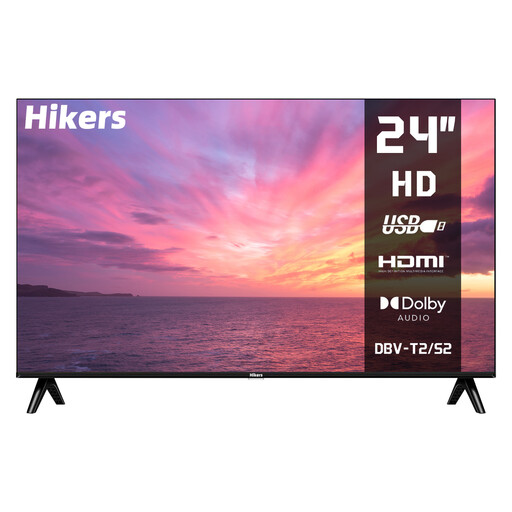
Hikers HD 24-inch LED TV, non-smart
The 24-inch size is a compact screen option; compare it with your viewing distance before deciding whether it will be comfortable for watching nature programmes.
The product name lists HD, HDMI, USB and support for DVB-S2/T2/C. The TV is described as non-smart.
View at Joybuy
 No image available
Philips LED 4K TV 43PUS7061/12
A Philips TV whose product name lists 4K and model 43PUS7061/12. Check its actual dimensions, viewing distance and the connections you need for your setup.
Compare the picture and sound ratings for this exact model before weighing up its features or picture quality.
View at Joybuy
 No image available
Philips 43-inch PQS7801 4K QLED Smart TV (2026)
A 43-inch 4K QLED smart TV to compare if you’re considering this size and panel technology. Measure your viewing distance and check model-specific tests for picture quality and reflections.
The product name lists 2026 as the year and mentions QLED and smart TV.
View at Joybuy
Frequently asked questions
How do I choose a size if I don’t know my viewing distance yet?
Measure from your eyes when seated on the sofa to where the screen will go. The Consumentenbond uses the distance in centimetres divided by 2.4 as a starting point for screen diagonal in centimetres; also consider nearby sizes and check the TV’s actual width.
What should I check before placing or connecting the TV?
Check the dimensions, including the stand, the space where you plan to put it and the connections your devices need. For wall mounting, follow the installation and safety information for the exact model, and don’t assume it has the same VESA size as another TV.
Does an OLED TV need any special maintenance?
Follow the instructions from the manufacturer of your model. For repeated interruptions to pixel cleaning on its OLED TVs, LG advises leaving the TV plugged in while it’s in standby; this advice applies to the LG situation described and isn’t a general rule for all TVs.
Do I need an additional warranty plan, and should a TV have a good energy rating?
According to ACM ConsuWijzer, you don’t need an additional warranty plan to claim your statutory rights in the Netherlands for a faulty product. EU energy labelling rules apply to televisions, but there’s no general requirement to buy a TV with a particular energy rating; compare the label for the exact model.
Can I return a TV bought online if the size isn’t right?
Online purchases in the Netherlands generally come with a 14-day cooling-off period from delivery. Check which exceptions and return conditions apply to your purchase; this is separate from your statutory rights if the product is faulty.


