What should you look for when choosing?
First, measure your viewing distance and the space available. Then consider your viewing positions, lighting conditions and connections for film nights. The Dutch Consumers’ Association suggests a comfortable viewing distance of around 2.4 times the screen diagonal. Use this as a starting point and check the TV’s actual width too.
| What to consider |
What should you check? |
Who should pay extra attention? |
| Size and placement |
Measure the distance from your eyes to the screen, the available width and the space taken up by the stand. Compare these measurements with the exact model. |
I want the screen to fit without overwhelming my narrow room. Around 36% of consumers prioritise size and placement. |
| Viewing angle for guests |
Check the picture from the seats furthest from the screen, and look out for reflections from windows and lamps. |
If guests are sitting at an angle, I want them to be able to follow the film easily from those seats. Around 29% of consumers prioritise viewing angle. |
| Film contrast and ambient light |
Decide whether you’ll darken the room during films. Compare contrast, brightness and reflections for each model in lighting conditions similar to your own. |
I want the TV to work well for both dark scenes and daytime viewing in my room. Around 21% of consumers prioritise picture quality in their own lighting conditions. |
| Sound and connections |
Check that your playback devices are compatible with the available connections, and that the TV and sound system support the HDMI ARC or eARC connection you want to use. |
I want to connect my film source and any soundbar without any surprises. Around 14% of consumers prioritise sound and connections. |
Joybuy TVs for limited space
This selection includes 32-, 40- and 43-inch TVs with QLED or LED technology. Measure the available width and viewing distance; the Dutch Consumers’ Association notes that LCD generally has a narrower viewing angle than OLED.
 Image unavailable
CHiQ L32QM10E 32-inch QLED Smart Google TV
The 32-inch size makes this model worth comparing if space is limited. Remember to measure the space for the stand too.
The product information lists Full HD, HDR10, Google TV and Dolby Audio.
View at Joybuy
 Image unavailable
METZ 43MQF7500Z 43-inch QLED 4K UHD Google TV
The 43-inch size is worth comparing if you have room for a larger screen. Check the TV’s width and your viewing distance.
The product name lists 4K UHD, HDR10+, Dolby Vision, Dolby Atmos, HDMI 2.1, VRR, MEMC and Chromecast Built-in.
View at Joybuy
 Image unavailable
iFFALCON U65A 43-inch 4K LED Smart TV
This 43-inch model is worth comparing with smaller TVs if your available wall or furniture width allows for it.
The product name lists 4K, LED and 50 Hz; the product information mentions Google TV, HDR10 and HLG.
View at Joybuy
 Image unavailable
Hisense 43E7S 43-inch 4K QLED Smart TV
The 43-inch size is worth comparing if the viewing distance and available space work for you.
The product name lists 4K, QLED and 120 Hz; the product information mentions eARC.
View at Joybuy
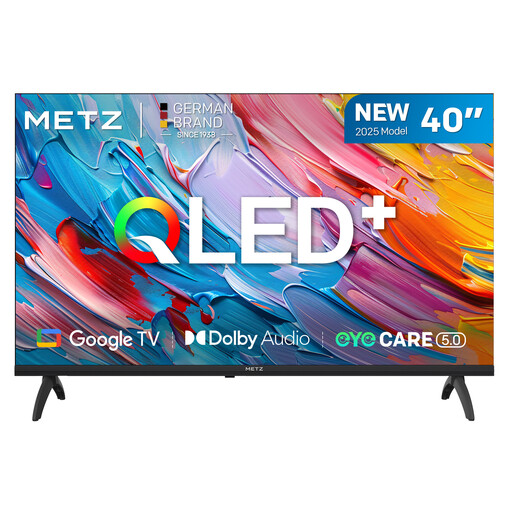 Image unavailable
METZ 40MQF7000Z 40-inch QLED Smart TV HD
The 40-inch size may work if a 43-inch TV is too wide. Check the dimensions of the exact model.
The product name lists HD, not 4K. The product information mentions Google TV, HDR10, HLG and Dolby Audio. Check that the stated resolution meets your needs.
View at Joybuy
Frequently asked questions
How do I choose a size if the sofa is close to the TV?
Measure the distance from your eyes to where you plan to put the screen. The Dutch Consumers’ Association suggests a comfortable viewing distance of around 2.4 times the screen diagonal. Use this as a starting point, and also check the width of the TV and its stand.
Can I use my existing soundbar for film night?
It depends on the connections on both devices. The Dutch Consumers’ Association highlights the HDMI connection marked ARC or eARC. Check that your soundbar supports the connection you’ve chosen too.
How should I assess the picture after setting up the TV?
From the seats where your guests will sit, watch a familiar scene with both light and dark areas, then adjust the picture if needed. The Dutch Consumers’ Association recommends using a scene like this when setting up the picture.
What does a TV’s energy label tell me?
The European Commission states that electronic displays, including televisions, carry an energy label on a scale from A to G. When comparing specific models, check their stated energy consumption too; the Dutch Consumers’ Association notes that larger screens generally use more energy.
What are my rights if a TV bought online doesn’t fit or is faulty?
For online consumer purchases in the Netherlands, you generally have a 14-day cooling-off period from delivery. Check the applicable exceptions and returns policy with ACM ConsuWijzer. Faults are covered by different rules: the Netherlands Authority for Consumers and Markets states that the retailer is responsible for the legal guarantee, including repair or replacement.


