Measure your viewing distance and the available space before choosing a TV, then check the picture from the seat furthest to the side. If guests will be watching at an angle, the exact model’s viewing angle matters; if you watch in daylight, consider brightness and reflections. The Consumentenbond generally describes OLED as offering better viewing angles and QLED as often being brighter, but assess dialogue and picture quality separately in the lighting conditions you’ll be watching in.
Who is this choice for?
Host with side seats
You sometimes add chairs beside the sofa for documentary nights. Check how the picture looks from the seat furthest to the side; the Consumentenbond and RTINGS both highlight viewing angle as a factor when you’re not sitting directly in front of the TV.
Viewer with limited space
You want everyone to be able to see the screen, but your viewing distance and available width limit your options. The Consumentenbond recommends measuring the distance from your viewing position.
Viewer in a bright room
You watch with the lights on or in daylight. Compare reflections and how easy dark scenes are to see in similar conditions; screen technology alone won’t tell you what the experience will be like in your room.
What should you look for?
Start by measuring the room and viewing distance. Then consider how often guests will sit at an angle and take the lighting during your screening into account.
| What to consider |
What should you check? |
Who is this most important for? |
| Picture from side seats |
Check an independent viewing-angle test for the exact model and assess the picture from the furthest seat to the side in your own room. |
When guests sit beside the sofa, I want the picture to be easy to watch from there too. Around 36% of consumers in this buying scenario give side seating the highest priority. |
| Size and placement |
Measure the distance from your eye position to the screen, as well as the available width. The Consumentenbond suggests dividing the viewing distance in centimetres by around 2.4 as a guide to screen diagonal in centimetres; use this as a starting point. |
I want the TV to fit without losing sight of the viewing distance or available space. Around 29% of consumers focus mainly on size and placement. |
| Picture in bright conditions and reflections |
Compare reflection and brightness tests for the exact model, and view the screen with the lighting you’ll use for your documentary night. |
When I watch with the lights on or in daylight, I want to be able to make out dark scenes clearly. Around 21% of consumers prioritise viewing in bright conditions and reflections. |
| Clear dialogue |
Look for a speech intelligibility test or listen to spoken dialogue at the volume you plan to use. If you’re considering a separate audio system, check that the connections on both devices are compatible. |
When watching a documentary, I want to follow the narration clearly without immediately having to buy extra audio equipment. Around 14% of consumers give clear dialogue the highest priority. |
Common buying mistakes
-
Choosing based on screen diagonal alone
Screen diagonal alone won’t tell you whether the TV will fit on your stand or be comfortable to watch from your seats.
Measure the available space and viewing distance first, then compare nearby screen sizes too.
-
Assuming a bright screen will also look good from the side
Brightness and viewing angle answer different questions; a brightness claim won’t tell you how the picture will look to guests sitting to the side.
Check both features for the exact model, whether it’s OLED or mini-LED.
-
Choosing sound based on picture specifications
The Consumentenbond assesses speech intelligibility separately; resolution and screen technology alone don’t tell you how clear voices will sound.
First, assess the TV using spoken dialogue at the volume you plan to use. A separate audio system may mean an extra purchase.
Brands to compare
LG
LG’s Dutch OLED C5 range includes the 48-inch OLED48C55LA, an option to consider if your measurements point to a smaller screen.
- LG lists an OLED screen and 4K for this model.
- These specifications don’t tell you how the TV handles reflections in your room; compare tests of the exact model.
Samsung
The Dutch QN90F is a 55-inch Neo QLED mini-LED TV worth comparing if the amount of light in the room is an important consideration.
- The range includes a mini-LED option alongside OLED models.
- Check the viewing angle and reflections for the exact model; the Dutch model code should match the one you’re looking at.
Philips
The 55OLED810/12 is a 55-inch OLED model with Ambilight; the 55MLED810/12 is a separate 55-inch mini-LED range.
- The two ranges give you different screen technologies to compare side by side.
- Philips’ picture and sound descriptions are manufacturer claims, not comparative measurements for your seating positions.
TCL
The Dutch 55C7K is a QD mini-LED model to compare with LCD and OLED options.
- TCL describes the C7K range as featuring an HVA panel.
- Check the viewing angle of the exact 55-inch model if guests will be sitting at an angle; range-wide maximum brightness claims aren’t necessarily measurements of that variant.
Sony
The BRAVIA 8 II K-55XR8M2 is a 55-inch OLED model to include in your comparison if that size fits your room.
- Sony lists OLED, 4K and four HDMI inputs for this model.
- These specifications don’t tell you how the picture will look from your seats or how clearly voices will come through.
Joybuy products
This selection includes 40- to 55-inch OLED and QLED TVs. Measure your viewing distance and available width before choosing a size, then check the viewing angle, reflections and dialogue for the exact model.
 Image unavailable
LG OLED42C68LA 42-inch 4K OLED Smart TV
The 42-inch size is a specific option to compare with the viewing distance and available width in a narrow living room.
The product name lists 4K OLED, Dolby Vision, HDR10 and Dolby Atmos.
View product at Joybuy
 Image unavailable
LG OLED48G69LS 48-inch OLED Evo AI G6 4K Smart TV
This 48-inch size is worth comparing if your measurements show that your viewing distance and available width can accommodate a larger screen than 42 inches.
The product name lists 4K OLED, Dolby Vision, Dolby Atmos and a native refresh rate of 120 Hz.
View product at Joybuy
 Image unavailable
Philips 55PUS8001 55-inch 4K TV
Consider this 55-inch TV only if your measurements show that the available width and viewing distance suit that size.
The product description lists 4K, three-sided Ambilight and features such as Vocal Boost and a Hearing Profile; assess dialogue at the volume you plan to use.
View product at Joybuy
 Image unavailable
Samsung QE55S99HATXXN 55-inch QD-OLED TV
This 55-inch model is an option to check against your available space if you want to compare OLED TVs.
The product description lists 4K QD-OLED, HDR10+, an anti-glare screen surface and four HDMI 2.1 ports. The anti-glare label isn’t an independent reflection measurement.
View product at Joybuy
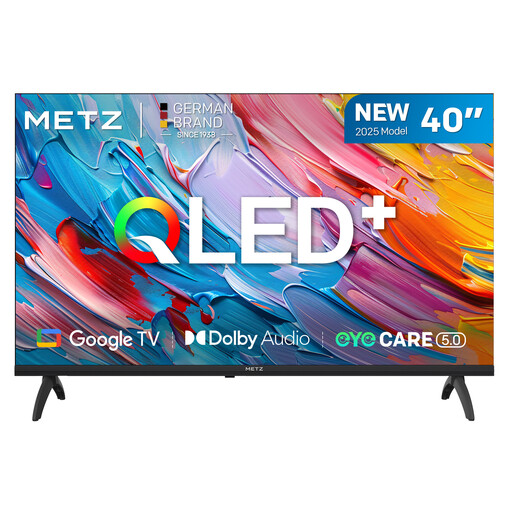 Image unavailable
METZ 40MQF7000Z 40-inch QLED Smart TV
The 40-inch size is worth comparing if space is limited; make sure it also suits your viewing distance.
The product name lists QLED, HD, Google TV and Dolby Audio.
View product at Joybuy
Frequently asked questions
How do I choose a size for a narrow living room?
Measure from the eye position of your seats to where you plan to put the screen, and measure the available width too. The Consumentenbond suggests dividing the viewing distance in centimetres by around 2.4 as a starting point for the screen diagonal in centimetres; compare nearby sizes as well.
What should I set up before my guests arrive?
Watch a familiar scene with the lighting you’ll use. Then choose a picture mode you like and adjust the brightness and contrast so that both dark and light details remain visible.
Do I need to buy a soundbar straight away to hear dialogue clearly?
No. First, assess the dialogue on the TV you’ve chosen. The Consumentenbond treats speech intelligibility as a separate test point. If you decide you want a separate audio system, check that the connections on both devices are compatible.
Do TVs in the Netherlands need an energy label?
Televisions covered by the relevant EU product rules are subject to energy labelling requirements, according to the European Commission. Check the energy label information for the exact model.
Who should I contact if there’s a problem with the TV?
According to the Dutch government, the retailer—not the manufacturer—is responsible for providing a solution if there’s a problem with a product. An additional warranty is extra cover; check its terms separately.


