First, decide how you’ll play your coastal walk video. For USB playback, check the file extension, video and audio codecs, and storage format in the manual for the exact TV model, or use a compatible computer connected via HDMI. Then choose a screen size and technology to suit your viewing distance, seating and room lighting. According to the Dutch Consumers’ Association, OLED generally offers deeper blacks and a wider viewing angle, while QLED can often be brighter. Neither of these features guarantees that your video will play via USB.
Who is this choice relevant to?
Viewer with locally stored film files
Wants to play a coastal walk video from their own storage, so checks whether USB playback supports the files, or uses a computer connected via HDMI. LG Netherlands and Sony Netherlands refer customers to the support information for the exact model for details of file formats.
Viewer in a bright room
Wants to see landscape footage clearly during the day, so compares the brightness, reflections and screen technology of specific TVs. The Dutch Consumers’ Association outlines the general differences between OLED and QLED.
Viewer with several seating positions
Is looking for a screen size and viewing angle to suit the distances and seating positions in the room. The Dutch Consumers’ Association highlights viewing distance and viewing angle as factors to consider when choosing a TV.
What should you consider when choosing?
Play the film directly from USB
Choose this if: you want to watch without a computer connected, and the manual for the exact model confirms support for your file and storage format.
Bear in mind: having a USB port or a compatible file extension alone does not guarantee that both the picture and sound will play.
Play the film from a computer via HDMI
Choose this if: you can play the film on a compatible computer and connect it to a spare HDMI input on the TV.
Bear in mind: you’ll need a computer, a suitable connection and a cable. Also check that you’ve selected the right HDMI input and picture and sound settings.
The table organises your options around the main buying priorities: reliable playback, visibility in the room, the right size or running costs.
| What to consider |
What should you check? |
Who is this most relevant to? |
| Film playback |
For USB playback, compare the storage format, file extension, and video and audio codecs with the manual for the exact model. For HDMI, check the connections on your computer and TV. |
I want to start the film without a computer and know in advance whether both the picture and sound are supported. Around 36% of consumers put file compatibility at the top of their buying priorities. |
| Picture in daylight |
Compare specific models in the room where you’ll watch, paying attention to reflections and viewing angle. The Dutch Consumers’ Association notes that OLED generally offers a wider viewing angle and deeper blacks, while QLED can often be brighter. |
If I’m showing the film during the day, I want to see how the screen handles the light in my room. For around 29% of consumers, visibility in their own lighting conditions comes first. |
| Screen size and viewing distance |
Measure the distance from the seating to the TV position, then check the screen diagonal and overall dimensions. The Dutch Consumers’ Association gives around 2.4 times the screen diagonal as a viewing-distance guide, not a fixed rule. |
With several seating positions, I want a screen that suits both the viewing distance and the room. Screen size and viewing distance are the top priority for around 21% of consumers. |
| Running costs and terms |
Compare energy labels on the same basis and read the terms for any additional services. According to the Dutch Government, an extended warranty does not replace your right to a product that meets reasonable expectations. |
I want to know what running costs and paid extras come with my choice. Around 14% of consumers put running and additional costs ahead of other buying concerns. |
Common buying mistakes
-
Assuming every TV will play a video file from USB
The codec and other requirements for the specific model also determine whether a file will play. A TV recognising a USB device does not, on its own, prove that the file is compatible.
Before relying on direct USB playback, compare your film’s specifications with the manual for the exact model. Otherwise, use a compatible computer via HDMI.
-
Choosing a nature film TV based only on 4K or QLED
Resolution alone doesn’t tell you how well a film will show in your room. Brightness, black levels, viewing angle and reflections all matter too, as does the film’s source resolution.
Check your film’s resolution and compare specific TVs based on viewing distance, room lighting and reflections.
-
Assuming an extended paid warranty covers all your legal rights
There is no fixed statutory warranty period in the Netherlands. An additional warranty does not replace your right to a product that meets what you can reasonably expect from it, according to the Dutch Government.
Read what extra cover a service offers. If there’s a fault, contact the retailer.
Brands to consider
These brands and models are useful reference points for different screen sizes and viewing conditions. A brand mention does not confirm that a film will play via USB.
LG
The OLED evo C6 range available in the Netherlands is worth comparing if contrast and viewing angle are important to you.
- For the OLED55C68LA, LG lists an OLED screen and an alpha 11 AI Processor Gen3.
- LG states that the extension, codec and other requirements must be compatible. Check support for the exact model and file.
Philips
The 43PUS8001/12 is a compact 43-inch 4K LED TV with Ambilight, for anyone looking for a smaller screen.
- Philips lists a 43-inch screen, 4K and Ambilight for this model.
- The model specifications don’t confirm that a particular locally stored film will play via USB. Check the media player for the exact model.
Samsung
The UE65U7090FUXXN is an example of a 65-inch Crystal UHD model to compare if you’ll be watching from further away.
- Samsung lists a 65-inch screen diagonal and 4K for this model.
- Manufacturers’ claims about colour and upscaling are not independent measurements. The 4K specification does not confirm compatibility with your USB file.
Sony
Worth considering if you want to check which USB files are supported by each model or connect a computer via HDMI.
- Sony explains how to connect a computer to a TV via HDMI.
- Sony directs customers to the manual for the relevant device for supported file formats. This information does not guarantee codec support across all models.
TCL
The 55C805 available in the Netherlands is a 55-inch Mini LED/QLED model to compare when weighing up light and contrast.
- For the 55C805, TCL lists Mini LED, QLED and HDR formats.
- These specifications don’t confirm how the screen will perform in your room or whether your film will play via USB.
TVs at Joybuy
This selection includes TVs with a range of screen sizes and technologies. Some model descriptions mention USB playback; connecting a computer via HDMI is another way to play your film. Always check the file requirements for the exact model.
 Image unavailable
LG OLED55C68LA 55-inch OLED evo AI C6 4K Smart TV
An option to compare if OLED and playback from a computer via HDMI suit your viewing space.
55 inches, 4K and OLED; the product information lists four HDMI ports. You’ll need to check separately whether your file can be played directly via USB.
View at Joybuy
 Image unavailable
Hisense 65A6S 65-inch 4K UHD TV
A 65-inch option to compare with your viewing distance; the product description also mentions a built-in media player.
The description lists USB 2.0 and USB 3.0 ports, supported video formats and codecs, and a 178° viewing angle. Playback may depend on codec settings, resolution, bitrate and file container, so check your file before buying.
View at Joybuy
 Image unavailable
Hisense 43A6S 43-inch 4K UHD Smart TV
A smaller screen to weigh up against your viewing distance; the product description mentions USB playback via a built-in media player.
The description lists USB connections and supported video and audio formats and codecs. Playback may depend on codec settings, resolution, bitrate and file container, so check the manual for your file.
View at Joybuy
Image unavailable
Hisense 50A6S 50-inch 4K UHD Smart TV
A 50-inch option to compare with the distances and seating in your room; the description mentions USB playback.
The product description lists a built-in media player and supported video formats, codecs and audio formats. Playback may depend on codec settings, resolution, bitrate and file container, so check support for the exact model.
View at Joybuy
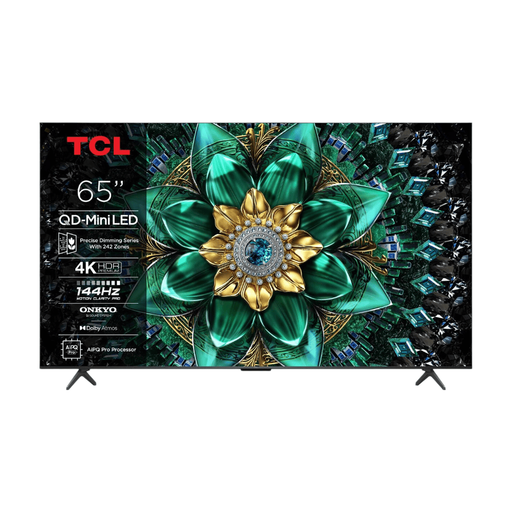 Image unavailable
TCL 65Q6C 65-inch QD-Mini LED 4K HDR TV
A 65-inch QD-Mini LED option to compare with your viewing distance and the light in your room.
The product information lists four HDMI inputs. This does not confirm direct playback of locally stored files via USB.
View at Joybuy
Frequently asked questions
Is a USB port enough to play your coastal walk video?
No. A USB port alone doesn’t confirm that the film will play. For the exact model, check the storage format, file extension, and video and audio codecs in the manual. LG Netherlands warns that an unsupported codec can prevent playback; Sony Netherlands also refers customers to model-specific file formats.
How can you show the film from a laptop?
If your laptop has a compatible HDMI output, connect it to a spare HDMI input on the TV using an HDMI cable. Sony Netherlands describes this HDMI connection method. Then select the right input and, if needed, check the laptop’s picture and sound settings.
What can you do if a USB stick doesn’t work properly?
First, check which storage format and files are supported by the exact TV model. LG Netherlands mentions FAT32 or NTFS in its general USB help and recommends ejecting the device through the TV; this is not a specification for every model.
Are you always entitled to only two years of legal cover in the Netherlands?
No. The Dutch Government says there is no fixed statutory warranty period in the Netherlands: you’re entitled to a product that meets what you can reasonably expect from it. A manufacturer’s warranty or an extended warranty you’ve purchased comes on top of this. If there’s a fault, contact the retailer.
Can you show a locally stored film to the public?
That depends on the rights to the film and how you use it. The Dutch Government distinguishes between making a private copy for personal use and distributing or showing a film publicly. You need permission from the creator to show copyrighted films publicly. Having a file on your own storage does not, in itself, give you the right to show it.


